
Quick answer: An attendance sheet with salary calculation in Excel records each employee’s daily attendance (Present, Absent, Half Day, Leave). It then works out paid days and loss-of-pay (LOP) days, and turns them into earned salary after PF, ESI, professional tax and other deductions. The free Xplorexcel template below does all of this and prints a salary slip for every employee. It needs no macros and handles up to 50 employees.
Key takeaways
- One workbook covers attendance, salary sheet and salary slip, so you type nothing twice.
- Change the month in one cell. Dates, day names, weekly offs and holidays update themselves.
- Salary is calculated as Monthly Gross − (LOP days × Per-day rate), and you choose whether the per-day rate uses calendar days, 26 days or 30 days.
- PF (12%, optional ₹15,000 ceiling), ESI (0.75% / 3.25%, ₹21,000 limit), professional tax, TDS and advances are built in.
- The salary slip is A4-ready and shows net pay in words in Indian format (lakh/crore).
Table of Contents
What is an attendance sheet with salary calculation?
It is a monthly register in which each row is an employee and each column is a date. You mark every working day with a short code. The sheet counts the codes and works out how many days each person should be paid for, and the salary part turns those days into rupees.
Most free attendance sheets online stop at counting presents and absents, and most salary sheets expect you to type paid days by hand. In practice, that hand-copying step is where payroll mistakes happen. This attendance sheet with salary calculation links the two, so that a change in attendance flows straight through to the salary and the payslip.
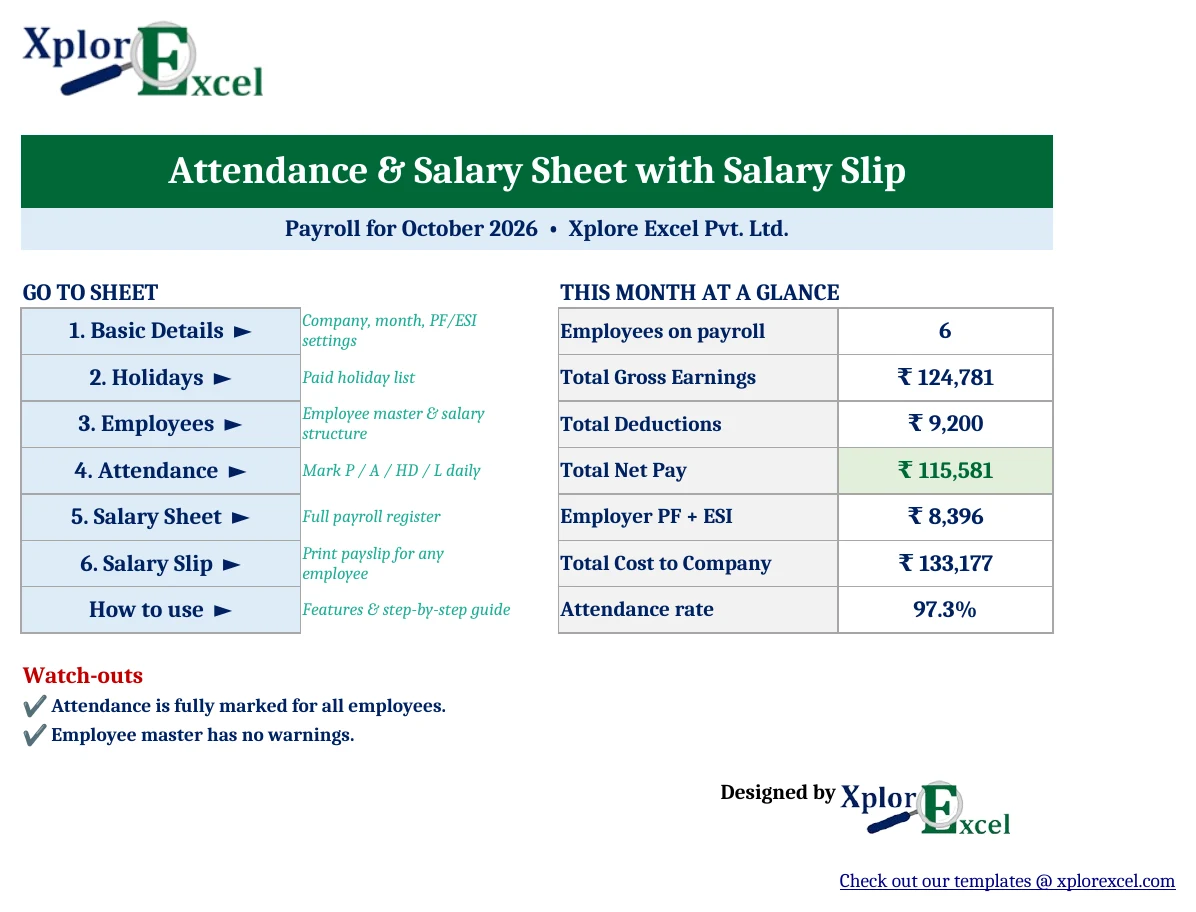
What’s inside the template (8 sheets)
| Sheet | What you do there | What it does for you |
|---|---|---|
| Dashboard | Nothing, it’s read-only | Total gross, deductions, net pay, employer PF + ESI, cost to company, attendance rate and data-entry warnings |
| Basic Details | Company name, month, year, weekly off, PF/ESI settings | Controls every other sheet |
| Holidays | List your paid holidays | Shades and pays those dates automatically |
| Employees | Enter each employee once, with monthly gross | Splits gross into Basic, HRA and Special Allowance, and flags duplicate IDs, wrong ESI flags and Basic below 50% |
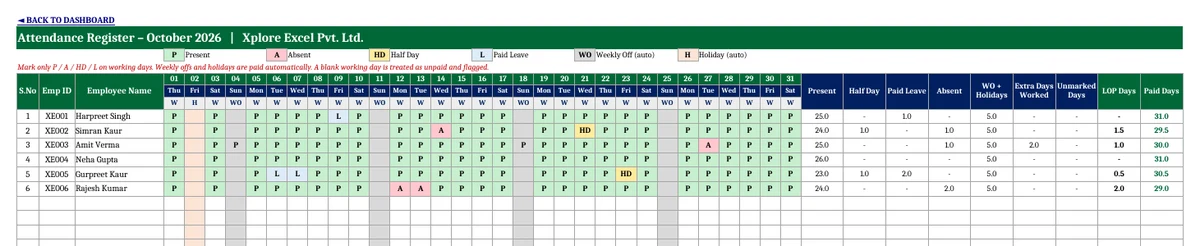
| Attendance | Mark P / A / HD / L | Counts presents, half days, leave, absents, extra days worked, unmarked days, LOP and paid days |
| Salary Sheet | Add OT hours, bonus, TDS, advance (optional) | Full payroll register with earnings, deductions, net pay and employer cost |
| Salary Slip | Pick an Emp ID | Prints an A4 payslip, with net pay in words |
| About Workbook | Read once | Feature list and a 5-step guide |
How to use the attendance and salary sheet (5 steps)
- Set up Basic Details. Type your company name and address. Select the payroll month and year, and choose your weekly off (Sunday; Saturday & Sunday; or 2nd & 4th Saturday + Sunday). Then pick a salary basis. Yellow cells are the only cells you need to fill.
- Add holidays. Enter your paid holidays for the year on the Holidays sheet. National holidays (26 January, 15 August, 2 October) are already included. Festival dates change every year, so add them from your state’s official list.
- Enter employees once. For each person, add their Emp ID, name, designation, department, date of joining and monthly gross salary, whether PF and ESI apply, and their professional tax. The Basic, HRA and Special Allowance columns fill themselves.
- Mark attendance daily. Use the dropdown on each working day: P Present, A Absent, HD Half Day, L Paid Leave. Weekly offs (grey) and holidays (peach) are paid automatically, so leave them blank. If someone works on a weekly off, mark P there and it counts as an extra paid day.
- Run payroll and print slips. On the Salary Sheet, add any overtime hours, bonus, TDS or advance. Open the Salary Slip, choose an Emp ID and press Ctrl + P.
How the salary is calculated (with a worked example)
These are the formulas the template uses, so you can check any figure yourself:
- LOP days = Absent days + (Half days × 0.5) + Unmarked working days
- Paid days = Days in month − LOP days
- Per-day rate = Monthly gross ÷ Salary divisor (days in month, 26 or 30)
- Earned salary = Monthly gross − (LOP days × Per-day rate), applied to Basic, HRA and Special Allowance
- Overtime = OT hours × (Per-day rate ÷ Working hours per day) × 2
- Net pay = Gross earnings − (PF + ESI + Professional Tax + TDS + Advance + Other deductions)
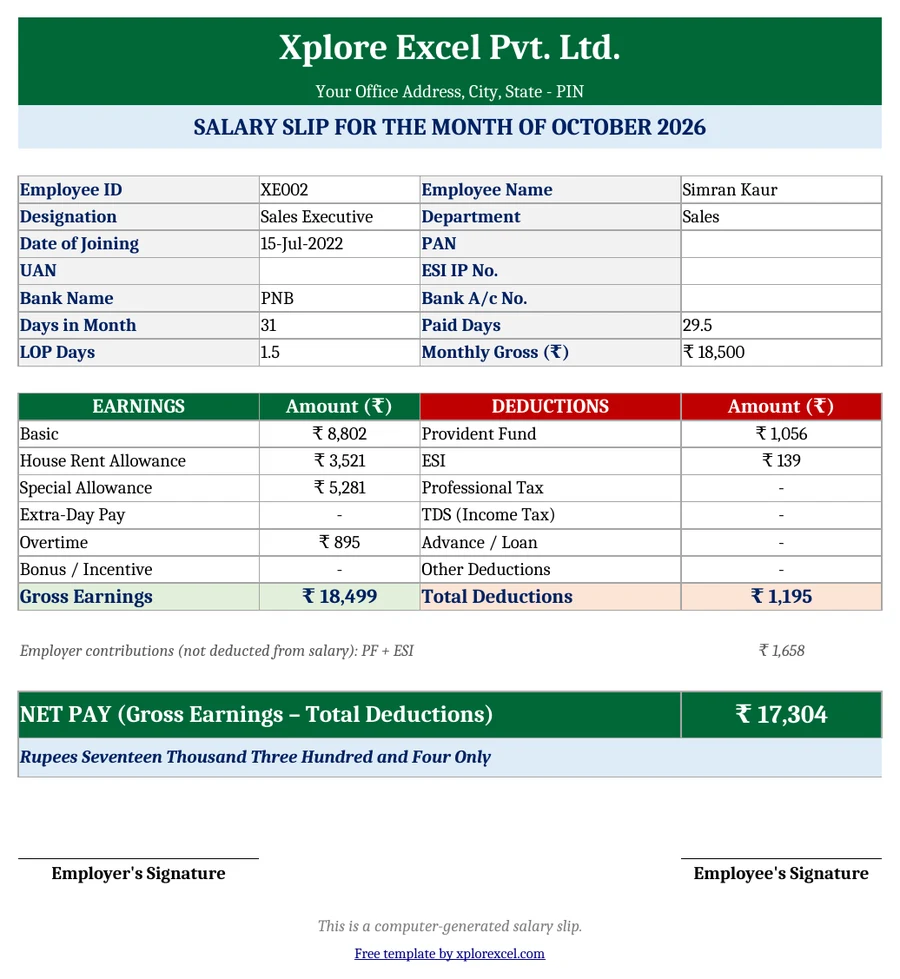
Example. Simran earns a monthly gross of ₹18,500. In October 2026 (31 days) she was absent 1 day, took 1 half day and worked 6 hours of overtime.
| Step | Calculation | Result |
|---|---|---|
| LOP days | 1 + (1 × 0.5) | 1.5 days |
| Per-day rate | ₹18,500 ÷ 31 | ₹596.77 |
| Earned salary | ₹18,500 − (1.5 × ₹596.77) | ₹17,604 |
| Overtime | 6 × (₹596.77 ÷ 8) × 2 | ₹895 |
| Gross earnings | ₹17,604 + ₹895 | ₹18,499 |
| PF (employee) | 12% of earned Basic ₹8,802 | ₹1,056 |
| ESI (employee) | 0.75% of ₹18,499, rounded up | ₹139 |
| Net pay | ₹18,499 − ₹1,195 | ₹17,304 |

PF, ESI and professional tax rules built into the template
| Item | Default in template | Can you change it? |
|---|---|---|
| PF – employee | 12% of Basic | Yes (Basic Details) |
| PF – employer | 12% of Basic (3.67% EPF + 8.33% EPS) | Yes |
| PF wage ceiling | ₹15,000, with an option to calculate on full Basic | Yes |
| ESI – employee / employer | 0.75% / 3.25% of gross earnings | Yes |
| ESI eligibility | Monthly gross up to ₹21,000 | Yes |
| Professional tax | Fixed amount per employee | Yes (Employees sheet), because PT differs by state |
| Overtime rate | 2× ordinary rate | Yes |
New labour codes note: The four labour codes took effect on 21 November 2025. Under the wage definition in the Code on Wages, if allowances exceed 50% of total pay, the excess counts as wages for PF and other contributions. The template therefore sets Basic to 50% of gross by default, and the Employees sheet warns you if any employee’s Basic falls below 50%. Always confirm current rates with EPFO, ESIC and your state’s PT department before running payroll.
Features that make this template more useful than a basic attendance sheet
- Three weekly-off patterns, including 2nd & 4th Saturday + Sunday, which is common in offices, banks and schools.
- Unmarked-day alert. Any working day left blank is highlighted in red and shown on the Dashboard, so no one is paid, or cut, by mistake.
- Pay for work on weekly offs and holidays. Switch it on or off in one cell.
- Three salary bases. Calendar days, fixed 26 days or fixed 30 days, whichever your company follows.
- Employer cost view. Employer PF, employer ESI and cost to company for each employee.
- Error checks. Duplicate Emp IDs, ESI marked “Yes” when gross is above ₹21,000, and Basic below 50%.
- No macros. Works in Excel 2010 and later, Excel for Mac and LibreOffice, and opens in Google Sheets.
Common payroll mistakes this template prevents
- Paying weekly offs twice or not at all. Weekly offs are paid automatically, and extra pay applies only when someone actually works that day.
- Deducting ESI for staff above the wage limit. ESI is skipped automatically when monthly gross is above ₹21,000.
- Calculating PF on full salary instead of Basic. PF is calculated on earned Basic, with the optional ₹15,000 ceiling.
- Wrong day count in February and 30-day months. The number of days comes from the month you select.
- Typing net pay in words by hand. It’s generated for you, in lakh/crore format.
Download the Attendance and Salary Sheet with Salary Slip (Free)
File: Attendance and Salary Sheet with Salary Slip 1.0 · Format: .xlsx · Size: about 90 KB · Macros: none · Price: free for personal and business use.

The sample data (six employees for October 2026) is there to show how it works. Overwrite it with your own staff before your first payroll run.
Frequently asked questions
How do I calculate salary from attendance in Excel?
Count loss-of-pay days (absents + half of the half days), multiply by the per-day rate (monthly gross ÷ days in month), and subtract the result from monthly gross. In this template the Attendance sheet counts the LOP days and the Salary Sheet does the rest automatically.
Should salary be calculated on 26 days or 30 days?
It depends on company policy. Many businesses divide by the actual number of days in the month, while others use a fixed 26 days (excluding Sundays) or 30 days. The template supports all three from a single dropdown on Basic Details.
Is PF calculated on gross salary or basic salary?
PF is calculated on wages, meaning Basic plus DA, not on gross. The employee and employer each contribute 12%. Many employers restrict it to a ₹15,000 wage ceiling, and the template lets you switch that ceiling on or off.
Who is eligible for ESI deduction?
Employees whose monthly gross is up to ₹21,000 at establishments covered by ESI. The employee pays 0.75% and the employer 3.25% of gross wages. The template checks eligibility for each employee automatically.
How are half days and paid leave treated?
A half day (HD) is counted as 0.5 LOP day, so half a day’s salary is deducted. Paid leave (L) is fully paid and nothing is deducted.
Can I use this attendance and salary sheet in Google Sheets?
Yes. Upload the .xlsx file to Google Drive and open it with Google Sheets. It uses no macros, so all the formulas keep working.
How many employees can it handle?
It handles up to 50 employees per workbook. For more staff, save a copy of the file for each department or location.
Does the salary slip show net pay in words?
Yes. Net pay is converted to words in the Indian numbering format, for example “Rupees Seventeen Thousand Three Hundred and Four Only”.
More free Excel templates from Xplorexcel
- Cash Book Template – Free Dynamic Excel Workbook
- Income and Expenses Tracker Template
- 5 Free GST Invoice Templates in Excel and Google Sheets
- Inventory Management Template in Excel
- All Excel templates
Disclaimer: This template is a calculation aid. Statutory rates and limits (PF, ESI, PT, minimum wages) change from time to time and vary by state. Verify them before processing salaries. Last reviewed: September 2026.