
For shops, offices, clinics & workshops with 2–100 staff
Salary, PF, ESI and payslips for your staff — in one Excel file.
Mark attendance once. XplorePay works out salary, PF, ESI, professional tax, LWF and TDS, prints payslips and the bank list, and gets your PF ECR and ESI return ready — updated for the new Labour Codes.
- Instant Download
- Lifetime Access
- No per-employee fee
- Only email + mobile needed
Payday without the calculator
Register & calculator
- Salary worked out by hand for every employee
- PF and ESI challans figured separately
- Payslips typed one by one
- ECR file and ESI sheet made again every month
- A rule changes and every formula needs fixing
With XplorePay
- Attendance turns into salary by itself
- PF, EPS, EDLI, ESI, PT, LWF and TDS worked out
- Payslip for any employee and month, with net pay in words
- PF ECR text and ESI upload sheet ready to use
- Rule changes? Update one Setup sheet
What you get
One Excel file for a whole financial year. Each page does one job and passes the numbers on by itself.
01
Employee details
Up to 100 staff with UAN, ESI no., PAN, bank details and salary structure.
02
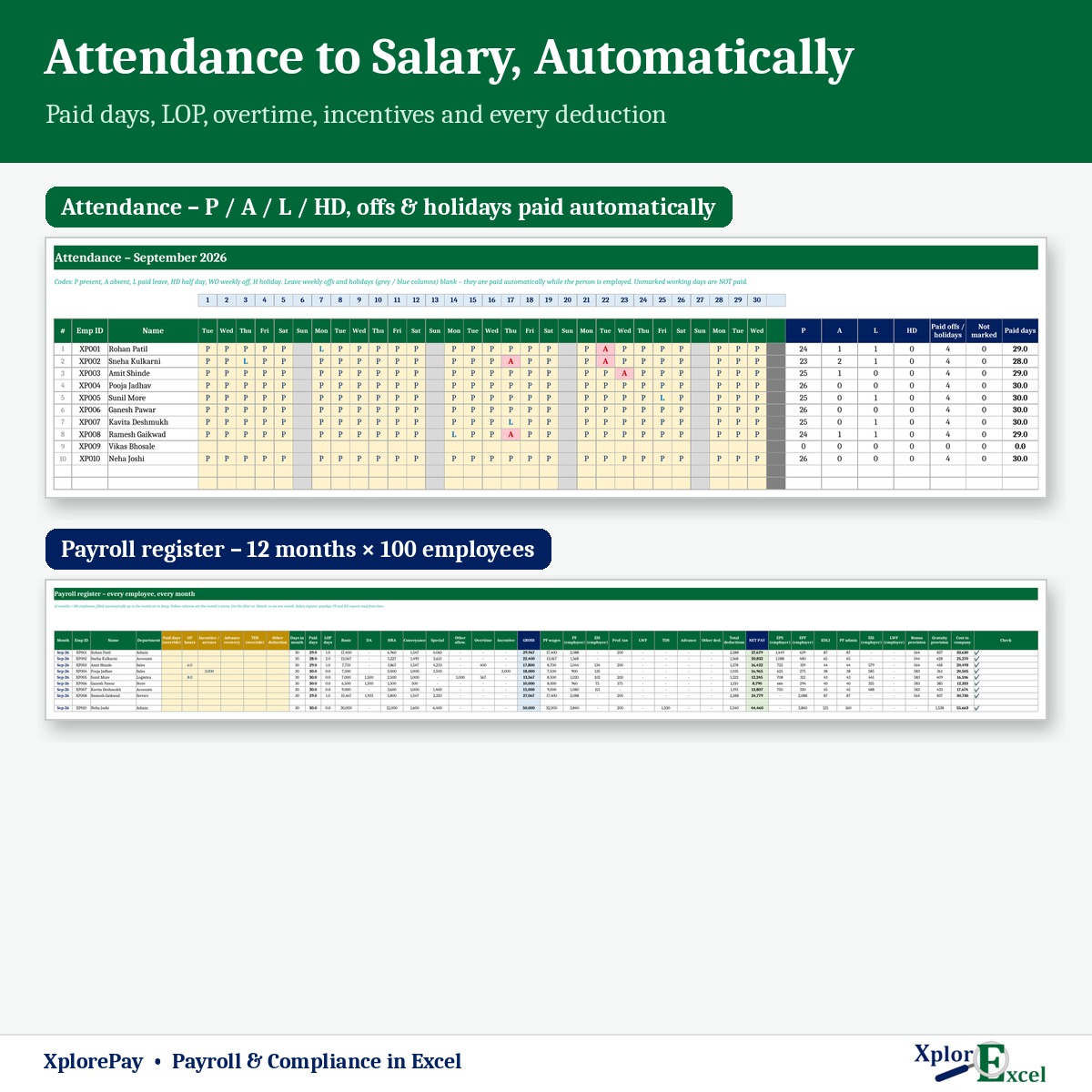
Attendance for 12 months
Mark P, A, L or half day. Weekly offs and holidays are paid by themselves.
03
Salary for every month
Paid days, overtime, incentives, advances and TDS — worked out for you.
04
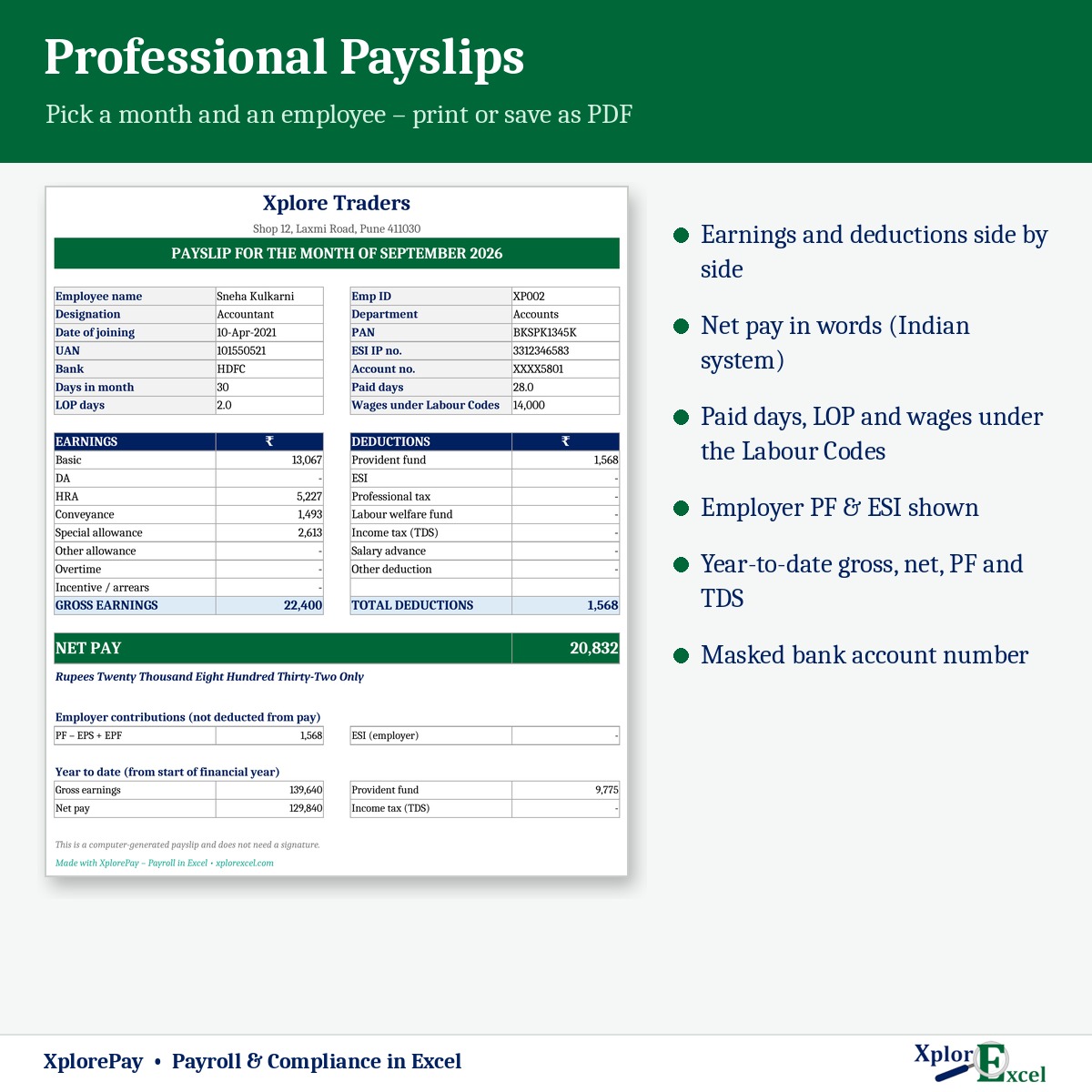
Payslips
For any employee and month, with net pay in words and year-to-date totals.
05
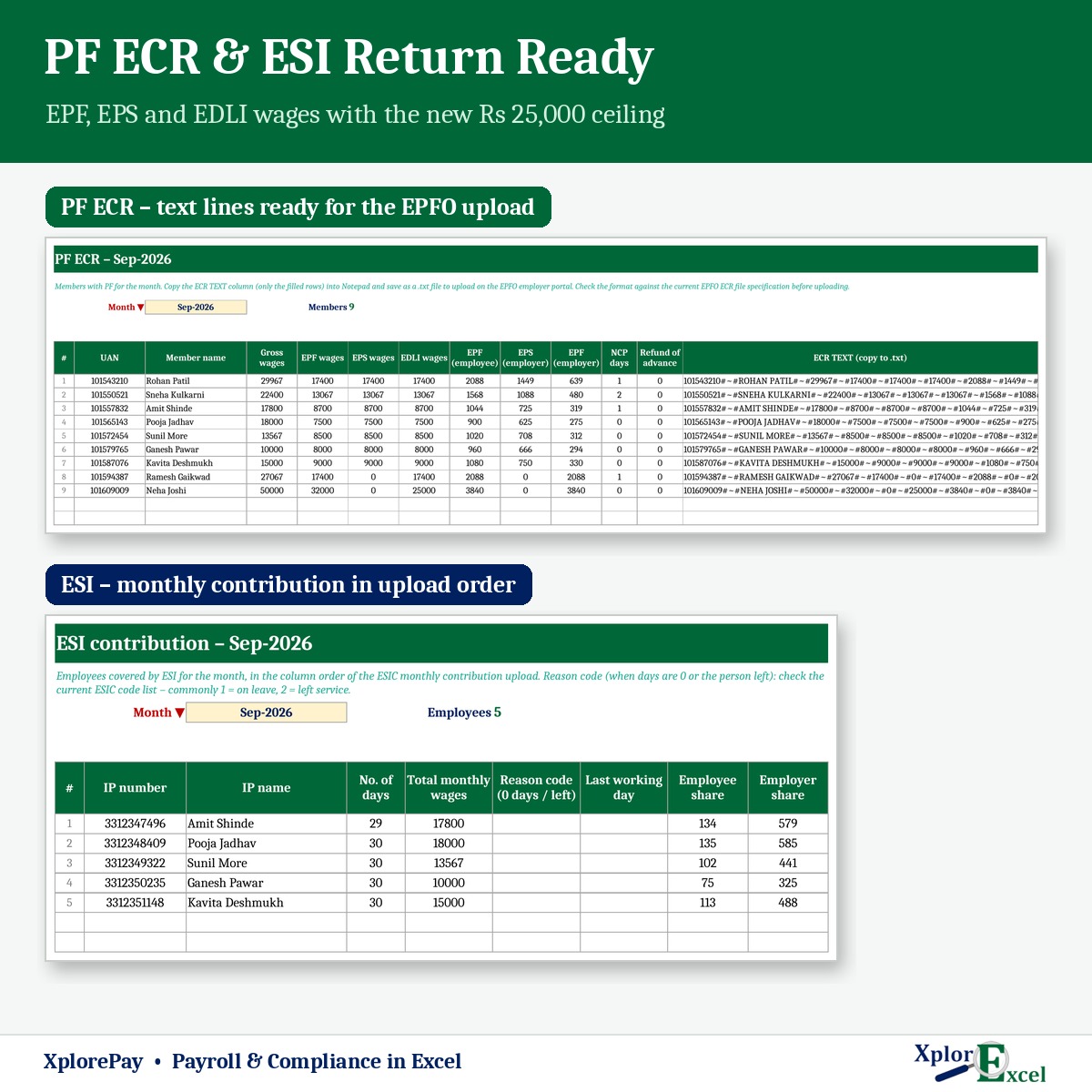
PF ECR & ESI return
ECR text for the EPFO portal and the ESI sheet in ESIC’s column order.
06
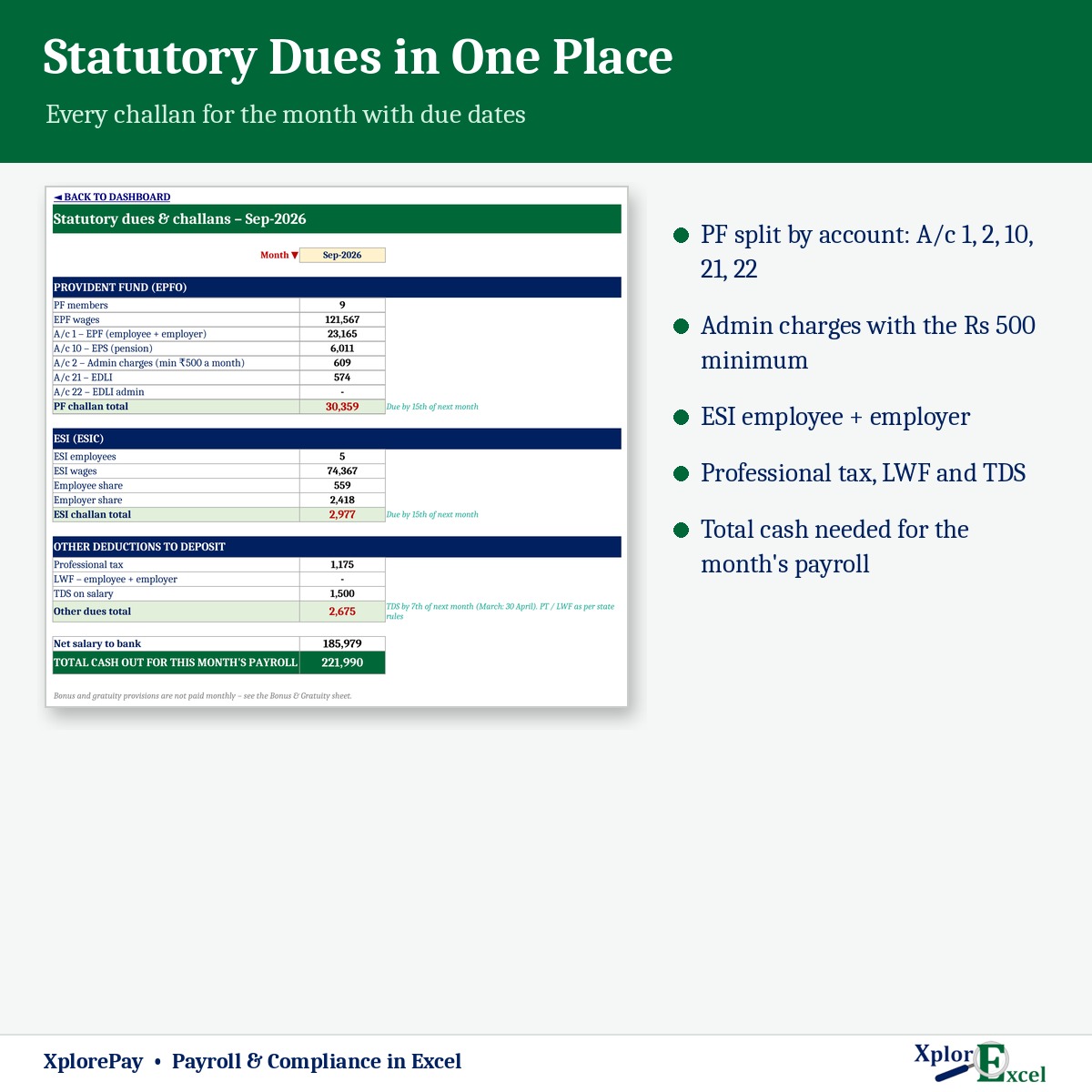
Dues & due dates
PF, ESI, PT, LWF and TDS to pay this month, on one page.
07
Bank transfer list
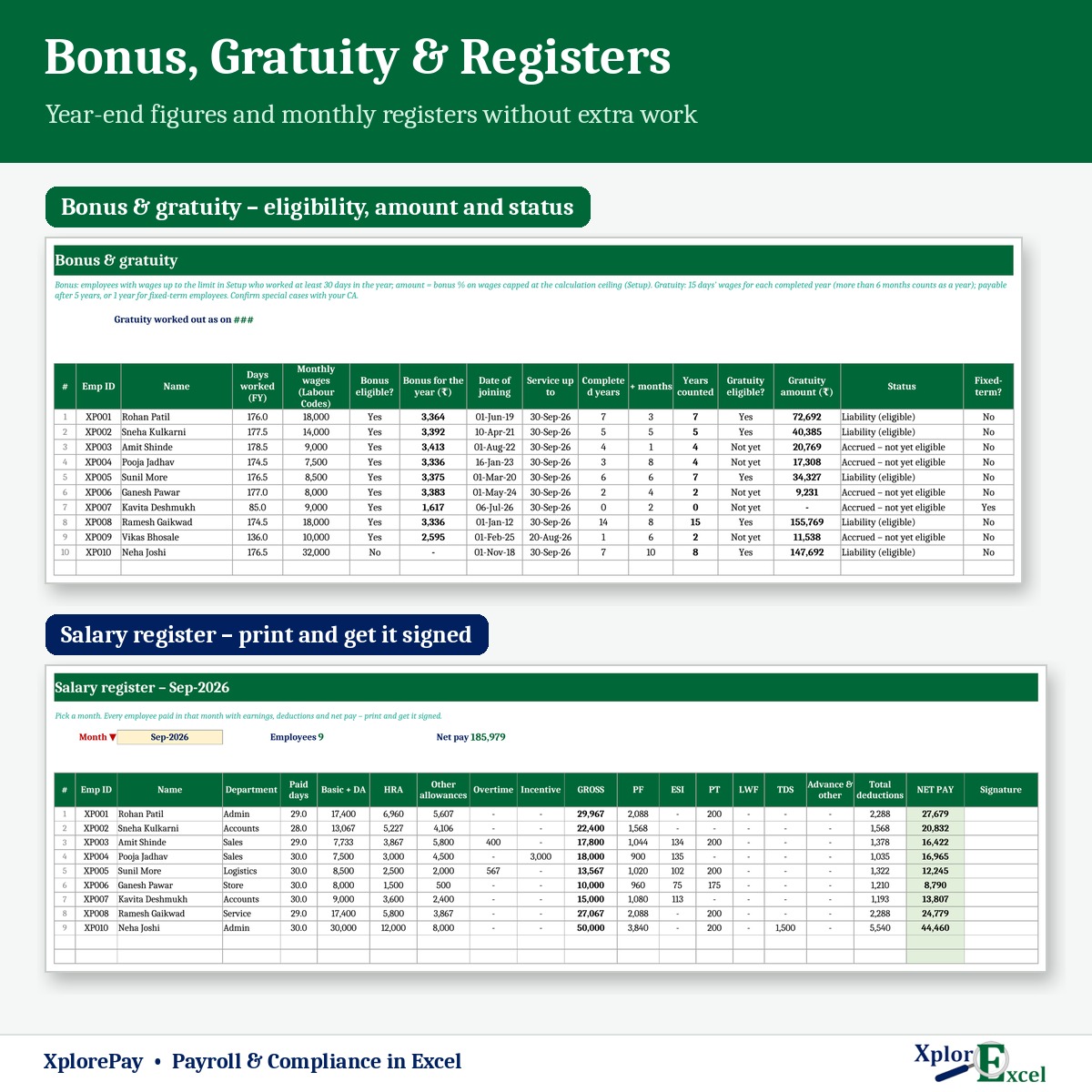
Net pay with account number and IFSC, plus a salary register to sign.
08
Bonus, gratuity & Form 16 summary
Year-end bonus, gratuity up to ₹20 lakh, and a yearly summary per employee.
09Macro edition
A whole month’s attendance in one go
Pick the month, all employees, day 1 to 31 — Save. Weekly offs and holidays are skipped for you.
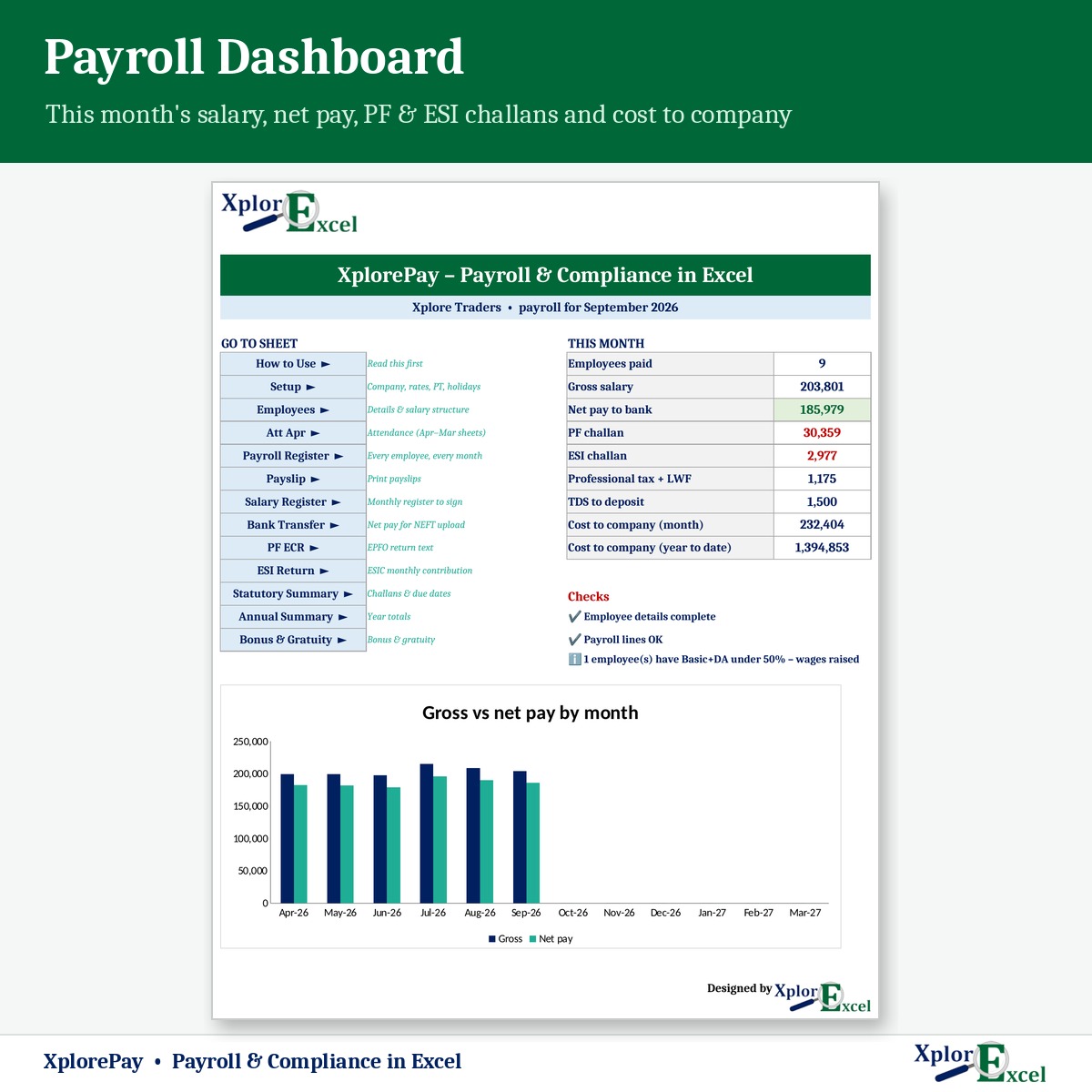
See the real sheets
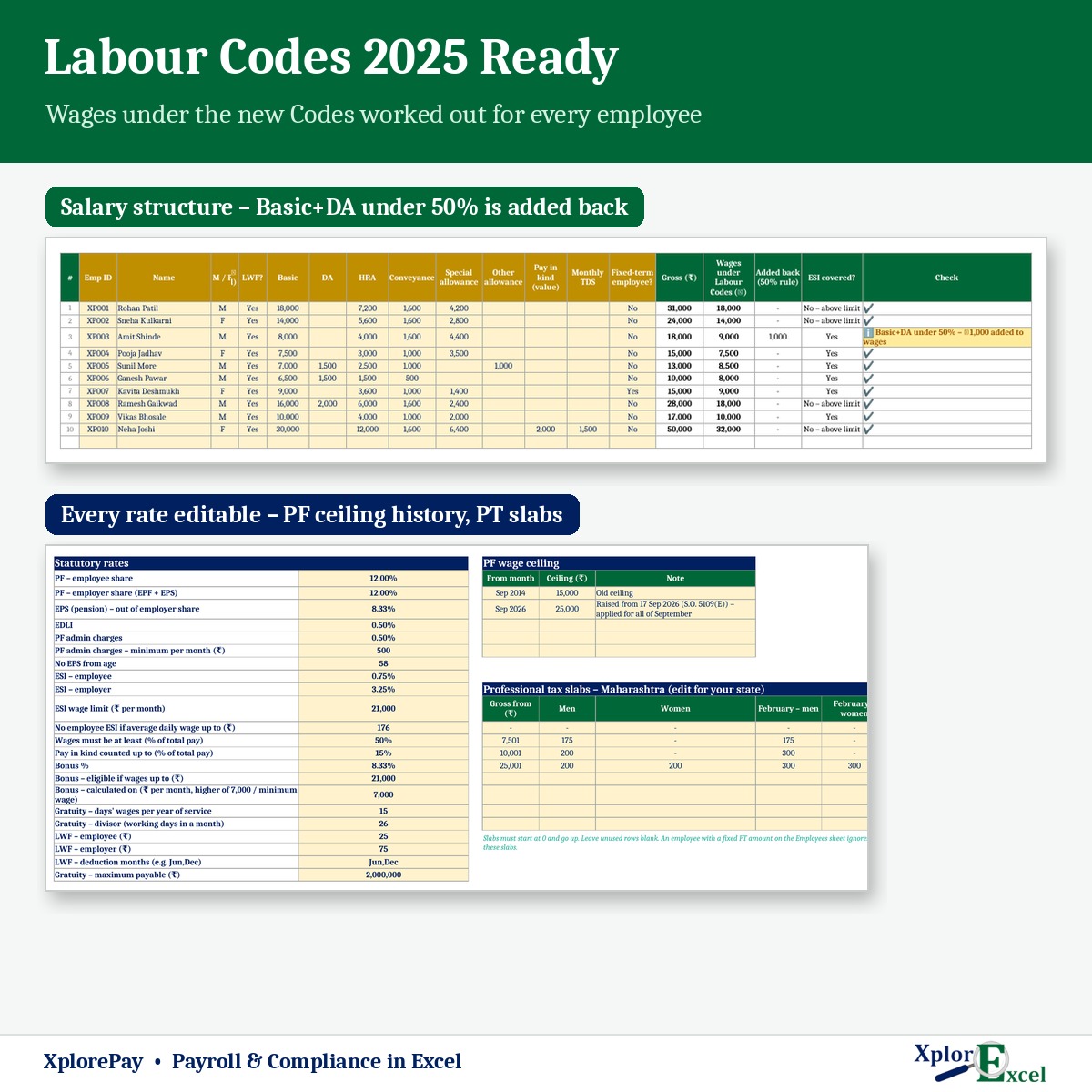
These are pages from the sample file in your download: a shop with 10 employees.
Macro edition: fill-in forms on your PC
Click a button, fill a short form, press Save. These are real screens from the macro edition.


Made for
- Shops and showrooms with staff
- Offices, clinics and schools
- Workshops and small factories
- Accountants who run payroll for a client
Not the right fit if
- You have more than 100 employees
- You need attendance pulled in from a biometric machine by itself
- You want returns filed for you — it prepares the ECR and ESI files; you upload them on the portals
Pick your plan
Same payroll, same reports in both. Choose how you want to enter data.
Formula edition
₹700
- Works on phone and PC
- Type straight into the yellow boxes
- All payslips, returns and reports
Best for most businesses
Macro edition
₹1,000
- Everything in the formula edition
- Easy fill-in forms with buttons on a Windows computer
- Mark a whole month’s attendance for all staff in one go
- Payslips, salary register, bank list and dues summary — print or PDF in one click
- Includes a phone copy for the Excel mobile app
Pay with UPI, cards or net banking. Digital file, so no refunds — but if the file doesn’t work for you, we’ll fix it.
Not sure yet? Use our free payroll templates first
Same builder, same yellow-box style. If these work for you, XplorePay will too.
Hi, I’m Amanpreet
I run XplorExcel from Punjab. I build these files for the way small Indian businesses actually work. If something in the file doesn’t make sense, message me.
Questions
Is it updated for the new Labour Codes?
Yes. If Basic + DA is less than 50% of total pay, XplorePay adds the shortfall back for PF and gratuity and shows you how much was added. The ₹25,000 PF ceiling is applied from September 2026 and ₹15,000 for earlier months, automatically.
My state’s professional tax is different. Can I change it?
Yes. PT slabs sit in the Setup sheet, including separate slabs for women and February where your state has them. Maharashtra is filled in as an example.
Will it work on my phone?
Yes. The formula edition opens in the Excel app on Android and iPhone, and the macro edition includes a phone copy too. The fill-in forms and one-click printing work on a Windows computer.
Which Excel do I need?
Excel 2016 or later on Windows or Mac for the formula edition. The macro edition’s forms need Excel on Windows.
The buttons don’t work — what do I do?
Windows blocks macros in downloaded files. Right-click the .xlsm file → Properties → tick “Unblock” → OK. Then open it and click “Enable Content” on the yellow bar.
Will it file my PF and ESI returns?
No. It prepares the PF ECR text and the ESI upload sheet; you upload them on the EPFO and ESIC portals. Check the ECR against EPFO’s current format before uploading.
Is this legal advice?
No — it’s a calculation tool. Some states are still notifying Labour Code rules, so check your settings with your CA or payroll consultant.
How do I get the file?
The download link appears as soon as payment goes through and is also sent to your email. You can download it again anytime — there is no expiry.
Run this month’s payroll tonight.
Pay once · Instant Download · Lifetime Access