
For manufacturers, traders & distributors who ship through transporters
Every consignment from dispatch to POD — in one Excel file.
Enter each dispatch once. XploreShip shows when the goods should arrive, when the e-way bill runs out, which shipments are late, which PODs are still missing, how much freight you owe each transporter — and which transporter is actually on time.
- Instant Download
- Lifetime Access
- No subscription
- Works offline
Dispatch desk without the phone calls
Dispatch register & calls
- “Where is my material?” — you call the transporter
- E-way bills expire on the road
- PODs missing months later at audit time
- Freight bills checked against nothing
- Every transporter says they’re on time
With XploreShip
- Expected delivery and days late worked out
- E-way bill valid-till date on every shipment
- POD pending list, oldest first, with WhatsApp
- Freight payable, paid (with TDS) and balance per transporter
- On-time % for every transporter and every customer
What you get
One Excel file for a financial year. Each page does one job and passes the numbers on by itself.
01
Shipment register
Up to 3,000 a year. Dispatch no., expected date, e-way bill valid-till and days late filled in.
02
In-transit board
Everything on the way, late in red, with WhatsApp to transporter or customer.
03
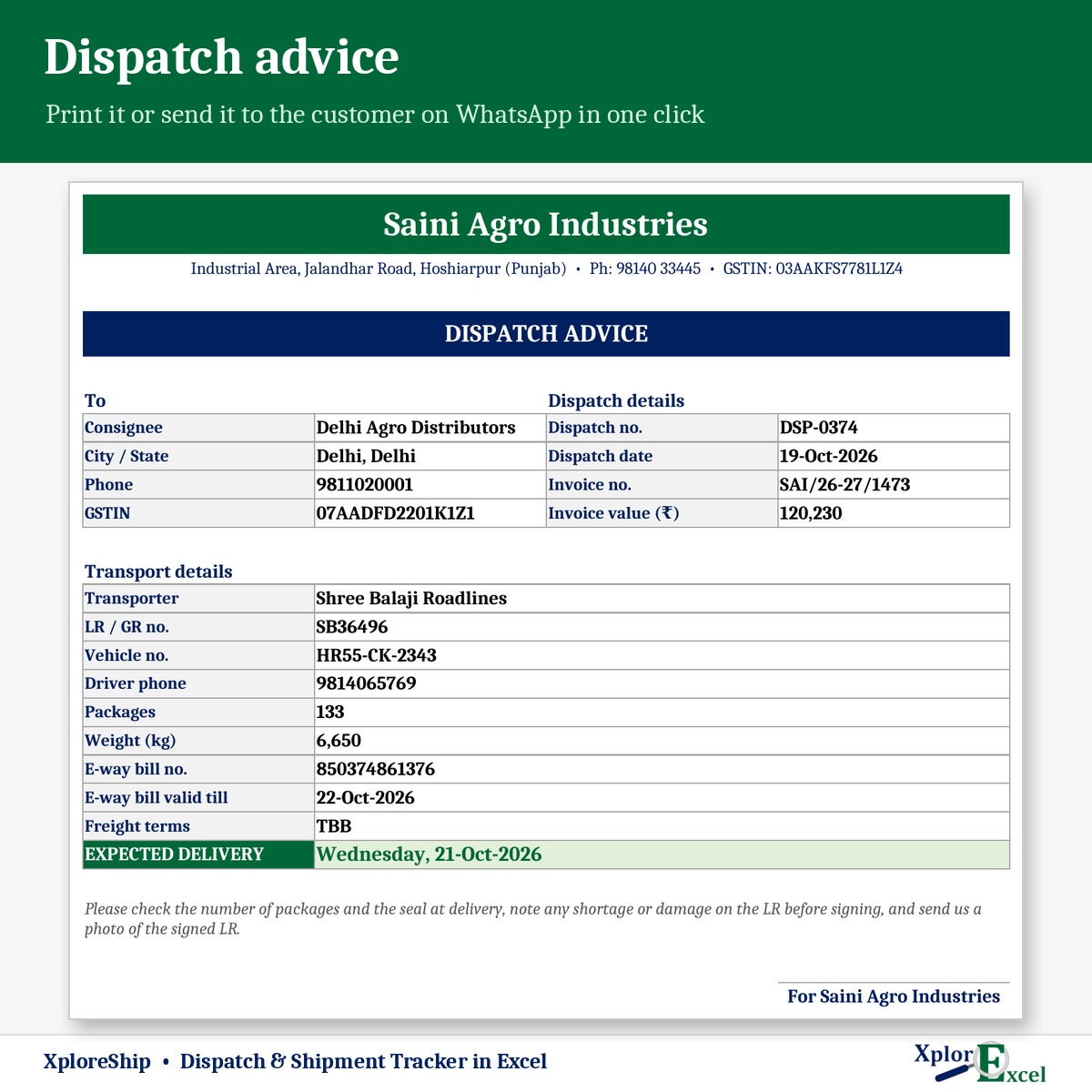
Dispatch advice
LR, vehicle, e-way bill and expected delivery — print or send on WhatsApp.
04
POD pending
Delivered but no POD, oldest first, with a reminder to the transporter.
05
Transporter report
On-time %, average days, freight % of invoice, claims, payable, paid and balance.
06
Consignees
Up to 500 with city, GSTIN, distance and transit days — each with its own on-time %.
07
Claims
Shortage, damage, delay or lost — status, settled amount and days open.
08
Dashboard & checks
Late now, e-way alerts, PODs pending, freight due — and mistakes flagged.
09Macro edition
Update status in seconds
Pick the dispatch, mark it delivered and POD received — the board and reports update.
See the real sheets
These are pages from the sample file in your download: 6 transporters, 20 consignees and 377 shipments.




Macro edition: fill-in forms on your PC
Click a button, fill a short form, press Save. These are real screens from the macro edition.


Made for
- Manufacturers dispatching to dealers
- Traders and distributors
- Dispatch and logistics desks
- Anyone chasing PODs at month end
Not the right fit if
- You run your own trucks — see XploreFleet instead
- You need live GPS tracking
- You need e-way bills generated from the file
Pick your plan
Same register, board and reports in both. Choose how you want to enter data.
Formula edition
₹699
- Works on phone and PC
- Type straight into the yellow boxes
- All boards and reports
Best for the dispatch desk
Macro edition
₹999
- Everything in the formula edition
- Easy fill-in forms for dispatches, status, consignees, freight paid and claims on a Windows computer
- Update status form: mark delivered and POD received in seconds
- Dispatch advice, in-transit board, POD pending and transporter report — print or PDF in one click
- Includes a phone copy for the Excel mobile app
Pay with UPI, cards or net banking. Digital file, so no refunds — but if the file doesn’t work for you, we’ll fix it.
Not sure yet? Try a free template first
Same builder, same yellow-box style. If our free templates work for you, XploreShip will too.
Hi, I’m Amanpreet
I run XplorExcel from Punjab. I build these files for the way Indian manufacturers and small businesses actually work. If something in the file doesn’t make sense, message me.
Questions
How is the e-way bill valid-till date worked out?
From the distance — 200 km a day for normal cargo, counted from the dispatch date. It’s a reminder only; the GST e-way bill portal is the final word on validity and extensions.
How is “late” decided?
Each consignee has usual transit days. The expected delivery date is worked out from the dispatch date, and anything past it without delivery shows as late, with days late.
We send some freight TBB or To-pay. Is that handled?
Yes. Each shipment has freight terms — Paid by us, TBB or To pay. Only freight you owe counts in the transporter’s balance.
Can I record a shortage or damage claim?
Yes. Claims for shortage, damage, delay or lost goods have a status and settled amount. Settled claims reduce the transporter’s balance.
Will it work on my phone or Mac?
The formula edition opens in the Excel app on Android and iPhone, and on a Mac everything works except the WhatsApp buttons. The macro edition’s forms need Excel on Windows, and it includes a phone copy too.
Which Excel do I need?
Excel 2016 or later. The WhatsApp buttons and the macro edition’s forms need Excel on Windows.
The buttons don’t work — what do I do?
Windows blocks macros in downloaded files. Right-click the .xlsm file → Properties → tick “Unblock” → OK. Then open it and click “Enable Content” on the yellow bar.
How do I get the file?
The download link appears as soon as payment goes through and is also sent to your email. You can download it again anytime — there is no expiry.
Know where every consignment is.
Pay once · Instant Download · Lifetime Access