
Quick answer: A delivery challan (see the delivery challan format below) is the document you issue under Rule 55 of the CGST Rules when goods move without a tax invoice. Common cases are sending material for job work, goods on approval, goods for exhibitions, and supplies of liquid gas where the quantity isn’t yet known. It must show the challan number and date, the consigner’s and consignee’s GSTINs, the HSN code, quantity, value, tax (where applicable), place of supply and a signature, and it is made in triplicate. This free delivery challan format in Excel fills all of this from your party and item lists and prints all three copies in one go.
Key takeaways
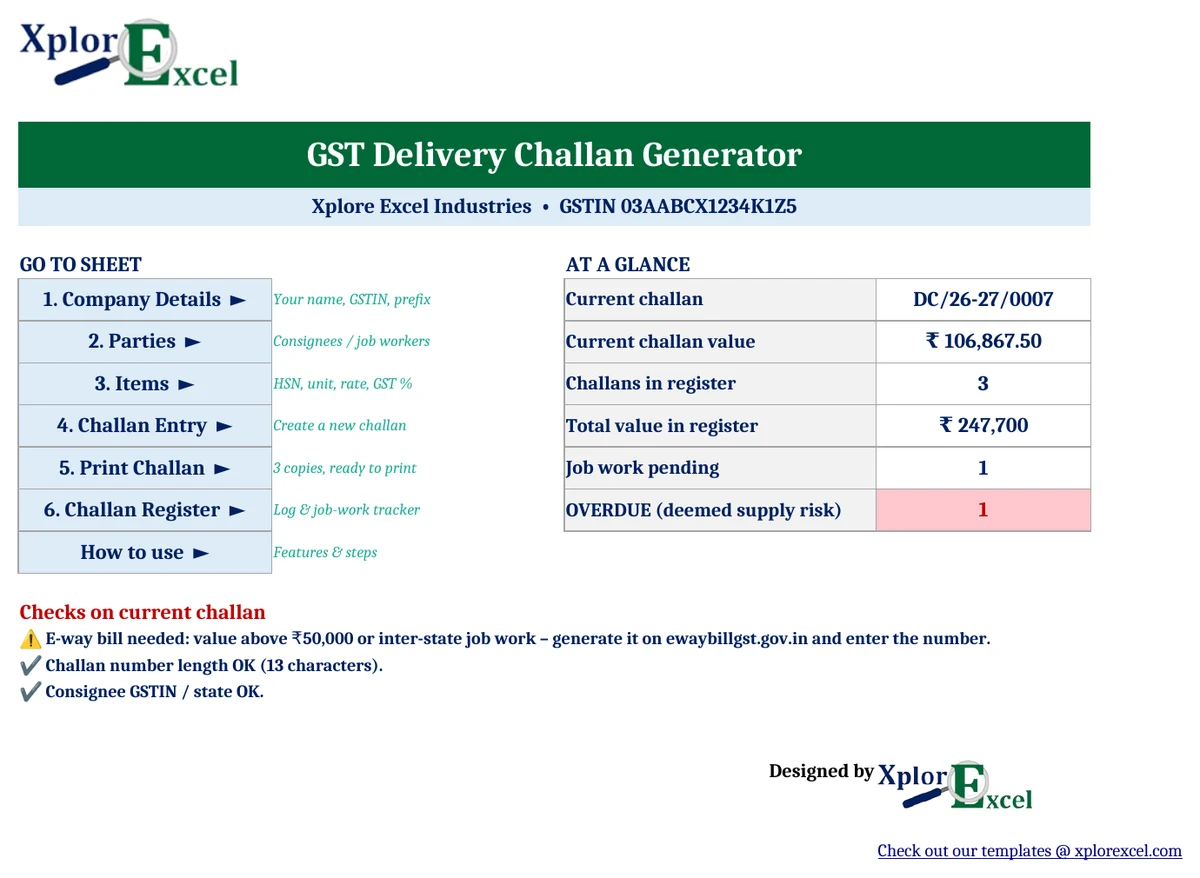
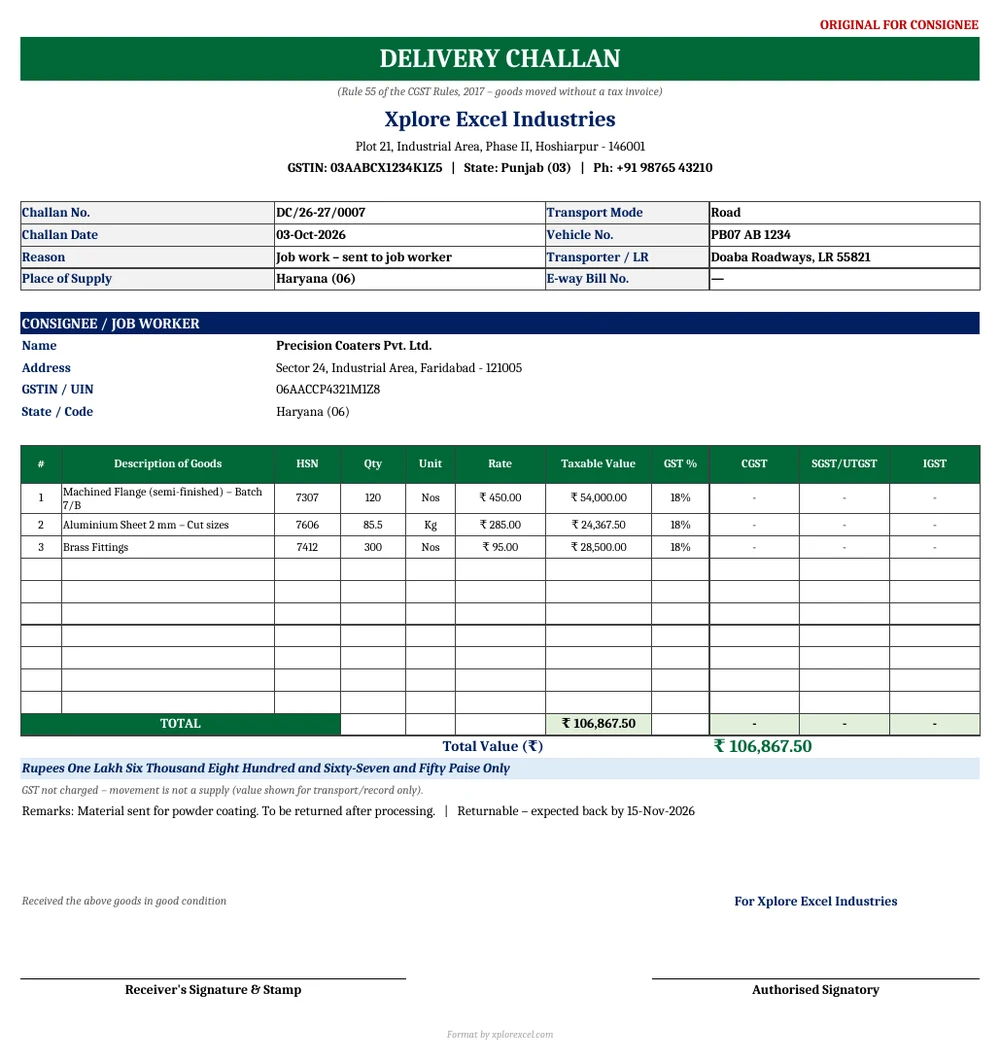
- Covers every Rule 55 field and prints Original, Duplicate and Triplicate copies with a single Ctrl + P.
- Pick the party and items from dropdowns, and the HSN, unit, rate and GST % fill in automatically.
- Works out CGST + SGST/UTGST or IGST from the consignee’s state. GST is shown only when the movement is a supply, so not for job work.
- Reminds you when an e-way bill is needed and checks every GSTIN against its state code.
- Includes a job-work tracker that flags goods not returned within 1 year (inputs) or 3 years (capital goods).
When do you need a delivery challan under GST?
Issue a delivery challan instead of a tax invoice when goods move but no sale is happening yet. The usual cases under Rule 55 are:
- Job work: sending inputs or capital goods to a job worker, and the job worker sending them back.
- Supply on approval or sale-or-return: the customer hasn’t accepted the goods yet.
- Exhibitions, display and samples: goods sent to a trade fair or showroom.
- Liquid gas: the exact quantity isn’t known when the goods are removed.
- Goods sent in lots: machinery shipped in semi-knocked-down (SKD) or completely-knocked-down (CKD) condition. The invoice goes before the first lot, and each lot travels with a challan.
- Other movements that aren’t a supply: for example, sending goods for repair, or moving stock between two places registered under the same GSTIN.
Note: moving stock to your own branch with a different GSTIN (for example, in another state) counts as a supply. That needs a tax invoice, not a delivery challan.
Delivery challan format: the fields Rule 55 requires
| Required field | Where it comes from in the template |
|---|---|
| Challan number (max 16 characters, serial and unique for the financial year) | Challan Entry, with an automatic length check |
| Date of challan | Challan Entry |
| Consigner’s name, address and GSTIN | Company Details |
| Consignee’s name, address and GSTIN/UIN (if registered) | Parties list, picked from a dropdown |
| HSN code and description of goods | Items list, filled automatically |
| Quantity (provisional if not known) | Challan Entry |
| Taxable value | Quantity × rate |
| Tax rate and amount: CGST, SGST/UTGST, IGST (where it’s a supply) | Worked out from the consignee’s state |
| Place of supply (inter-state movement) | Taken from the consignee’s state |
| Signature | Signature boxes on every copy |
Why three copies?
Rule 55 requires the challan in triplicate: Original for Consignee, Duplicate for Transporter and Triplicate for Consigner. The Print Challan sheet stacks all three copies, one per A4 page, so a single print gives you the full set.
How to make a delivery challan in Excel (5 steps)
- Company Details: Enter your business name, address, GSTIN, state and challan prefix (one-time setup). The sheet checks that your GSTIN starts with your state code.
- Parties and Items: Add your consignees or job workers and the goods you send out, with their HSN code, unit, rate and GST % (also one-time).
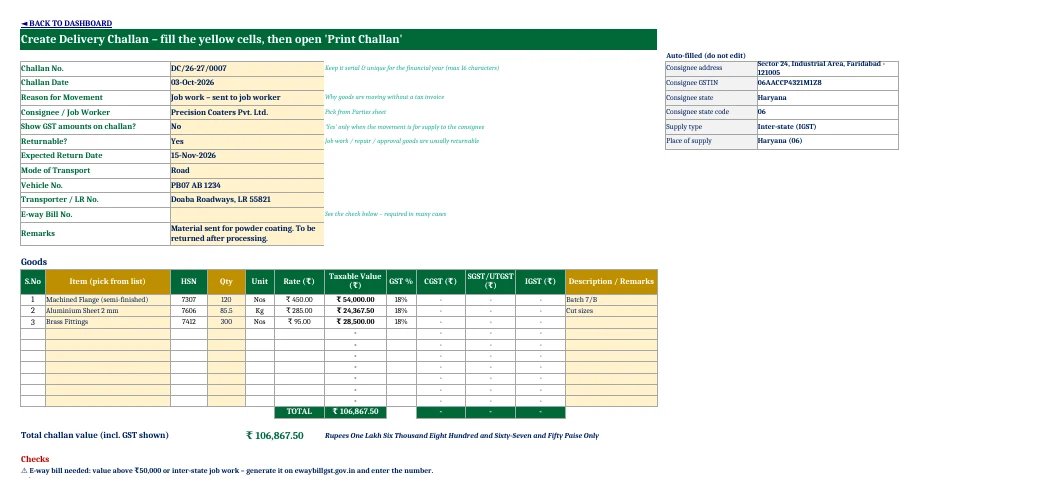
- Challan Entry: Type the challan number and date, then choose the reason, the consignee and whether to show GST. Add the transport details, pick the items and enter the quantities.
- Checks: Clear the warnings: e-way bill needed, challan number too long, or GSTIN not matching the state.
- Print and record: Print all three copies, and paste the green summary row into the Challan Register to keep a log.
Delivery challan format for job work: rules to know
| Rule | What it means | How the template helps |
|---|---|---|
| No GST on the job-work challan | Sending goods to a job worker is not a supply, so you show the value but don’t charge tax | “Show GST amounts” = No prints “GST not charged” |
| E-way bill | Needed when the consignment value is above ₹50,000. For inter-state job work it’s needed whatever the value | E-way bill check on Challan Entry and the Dashboard |
| Return time limit (Section 143, CGST Act) | Inputs must come back within 1 year and capital goods within 3 years. If they don’t, they’re treated as supplied by you on the day they were sent | The Challan Register shows “OVERDUE – deemed supply” |
| Returning goods | The job worker sends the processed goods back under their own challan | Choose “Job work – returned to principal” |

Delivery challan vs tax invoice
| Delivery challan | Tax invoice | |
|---|---|---|
| When | Goods move without a supply (job work, approval, exhibition, repair, lots) | A sale or other taxable supply |
| GST charged? | Usually no (tax is shown only where the movement is for supply) | Yes |
| Copies | Triplicate (consignee, transporter, consigner) | Triplicate for goods |
| Serial number | Separate series, max 16 characters | Separate series, max 16 characters |
| Reported in GSTR-1? | Challans for job work are tracked in the job-work returns (ITC-04), not as sales | Yes, as outward supply |
GST rates in the template (GST 2.0)
From 22 September 2025, the main GST slabs are 0%, 5%, 18% and 40%. The old 12% and 28% slabs were removed, and special rates such as 0.25% and 3% still apply to some goods. The Items sheet offers these rates in a dropdown, and you can type any other rate if needed.
Download the GST Delivery Challan Generator (Free)
File: GST Delivery Challan Generator 1.0 · Format: .xlsx · Macros: none · Price: free.

The sample data (a job-work challan from Hoshiarpur, Punjab to a coater in Faridabad, Haryana) is there to show how it works. Replace it with your own parties and items.
Frequently asked questions
What is a delivery challan in GST?
A delivery challan is a document issued under Rule 55 of the CGST Rules when goods are moved without a tax invoice, such as for job work, supply on approval, exhibitions or liquid gas of unknown quantity. It records what was sent, to whom and why.
Is GST charged on a delivery challan?
Usually not, because the movement isn’t a supply. Rule 55 asks for the tax rate and amount only when goods are transported for supply to the consignee, such as liquid gas or goods sent in lots.
How many copies of a delivery challan are required?
Three: Original for Consignee, Duplicate for Transporter and Triplicate for Consigner.
Is an e-way bill required with a delivery challan?
Yes, when the consignment value is more than ₹50,000. For inter-state movement of goods to a job worker, an e-way bill is required whatever the value.
What happens if job-work goods are not returned in time?
If inputs aren’t returned within 1 year, or capital goods within 3 years, the goods are treated as supplied by the principal on the day they were sent, and GST becomes payable.
Can I use a delivery challan for stock transfer to another branch?
Only when both places are under the same GSTIN. A transfer to a branch with a different GSTIN (another state) is a supply, and it needs a tax invoice.
Can I use this delivery challan format in Google Sheets?
Yes. Upload the .xlsx to Google Drive and open it with Google Sheets. It has no macros, so all formulas work.
More free GST and business templates from Xplorexcel
- 5 Free GST Invoice Templates in Excel and Google Sheets
- Inventory Management Template in Excel
- Attendance and Salary Sheet with Salary Slip
- Rent Receipt Generator with HRA Calculator
- All Excel templates
Disclaimer: GST rules, rates and e-way bill limits change from time to time and some limits vary by state. Verify them before use. This template is a documentation aid, not tax advice. Last reviewed: September 2026.