
For stitching units, hosiery & knitwear makers, kurti, shirt & uniform units and fabricators
Style costing to GST invoice — your garment unit in one Excel file.
Cost a style once and get its selling price, then book the buyer’s order size-wise. Record cutting, karigar piece-rate work, job work and dispatch — XploreGarment works out the GST invoice, karigar wages, buyer dues and the actual profit on every order against what you costed.
- Instant Download
- Lifetime Access
- No subscription
- Works offline
Order to profit without separate registers
Calculators & registers
- Cost per piece worked out once, then forgotten
- Cutting, karigar and job-work registers that don’t talk
- Karigar wages totalled from slips every Saturday
- Pieces “with the printer” lost track of
- Order done — but did it actually make money?
With XploreGarment
- Selling price, price per dozen and GST % from your costing
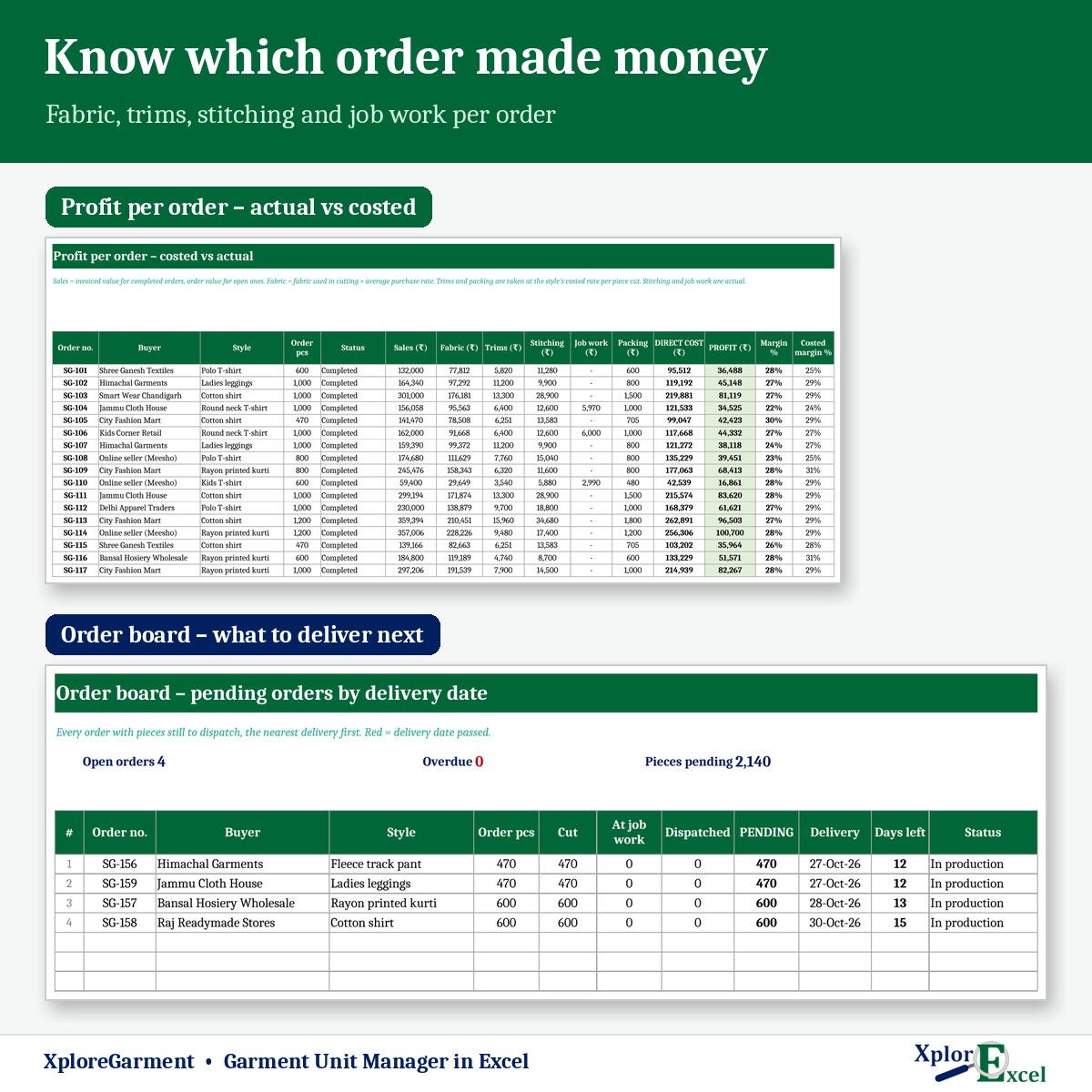
- Order board: cut, at job work, dispatched and pending
- Karigar balance and wage slip from the work log
- Pieces pending with each job worker, with challan no.
- Actual profit per order against the costed profit
What you get
One Excel file for a financial year. Each page does one job and passes the numbers on by itself.
01
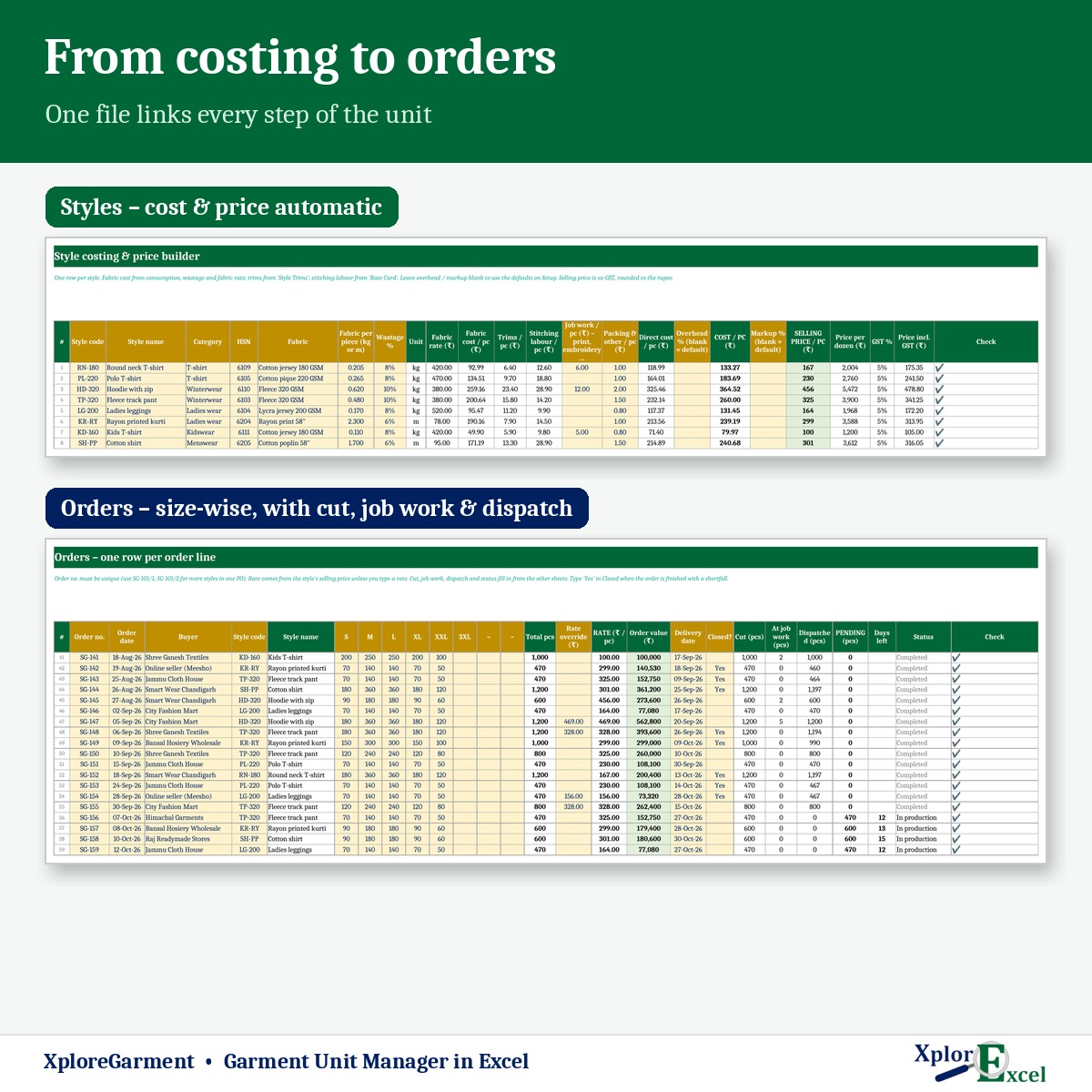
Style costing
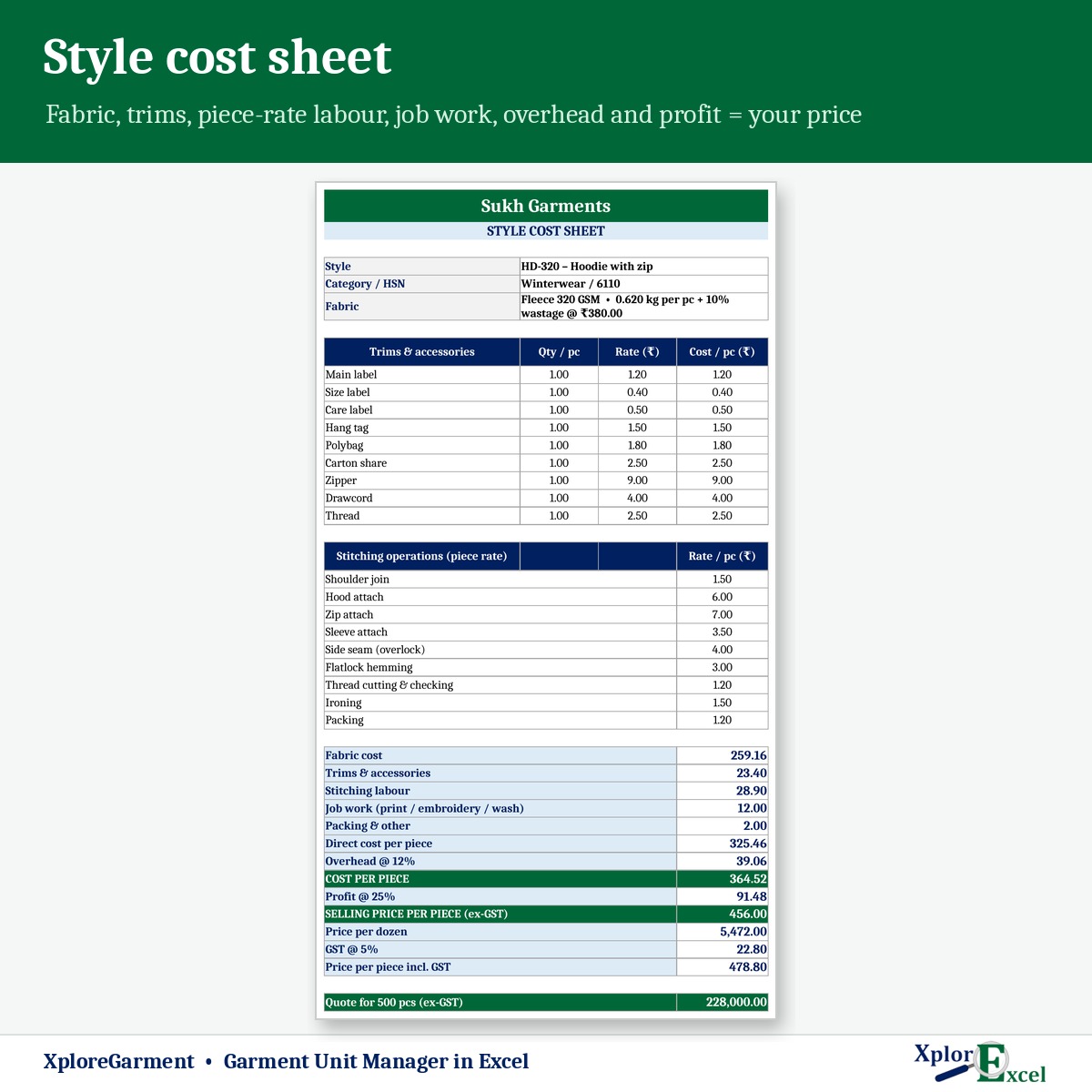
Fabric × wastage × rate, trims, piece-rate labour, job work, packing, overhead and markup.
02
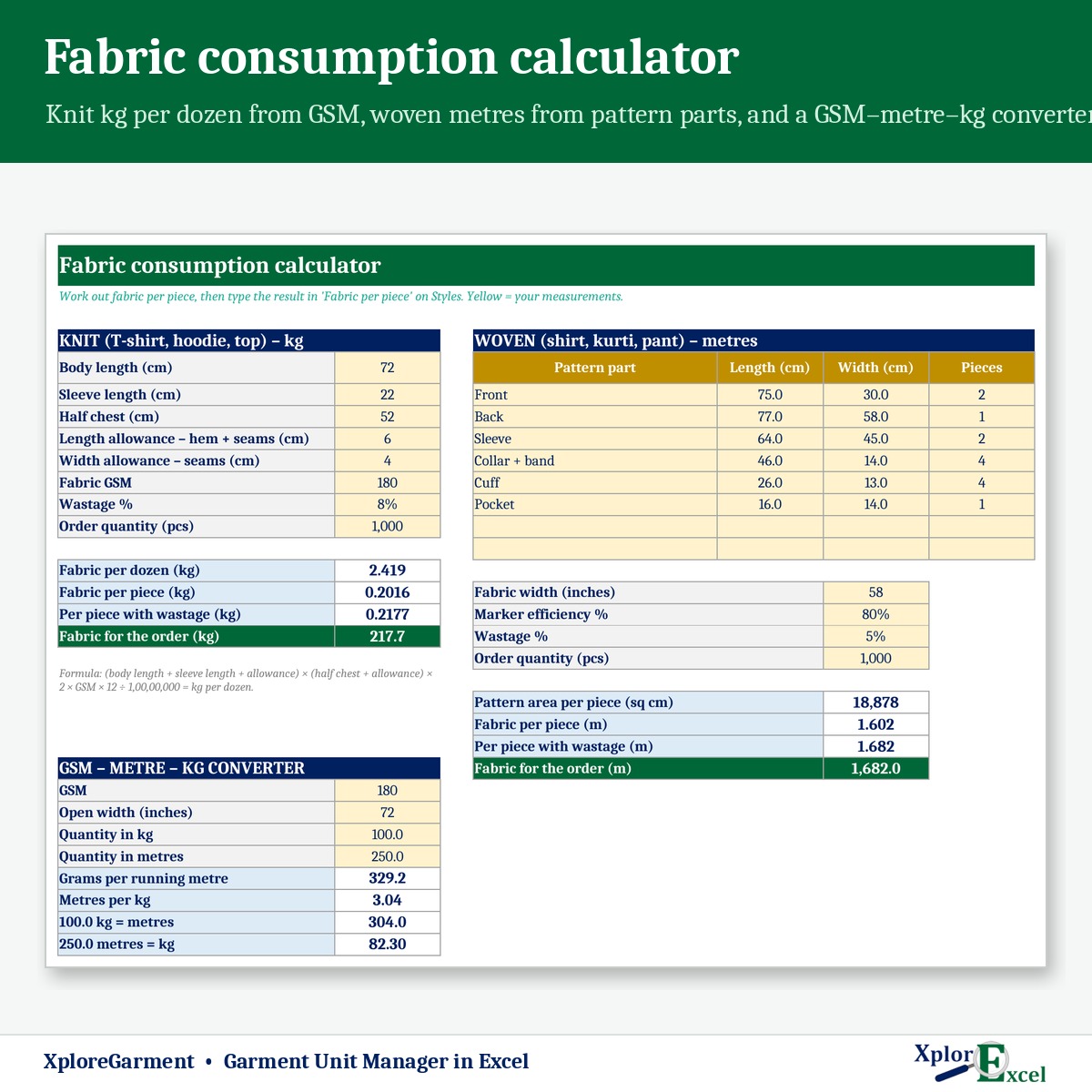
Fabric calculator
Knit kg per dozen from measurements and GSM; woven metres from parts, width and marker.
03
Orders & order board
Up to 8 sizes. Cut, at job work, dispatched, pending and days to delivery.
04
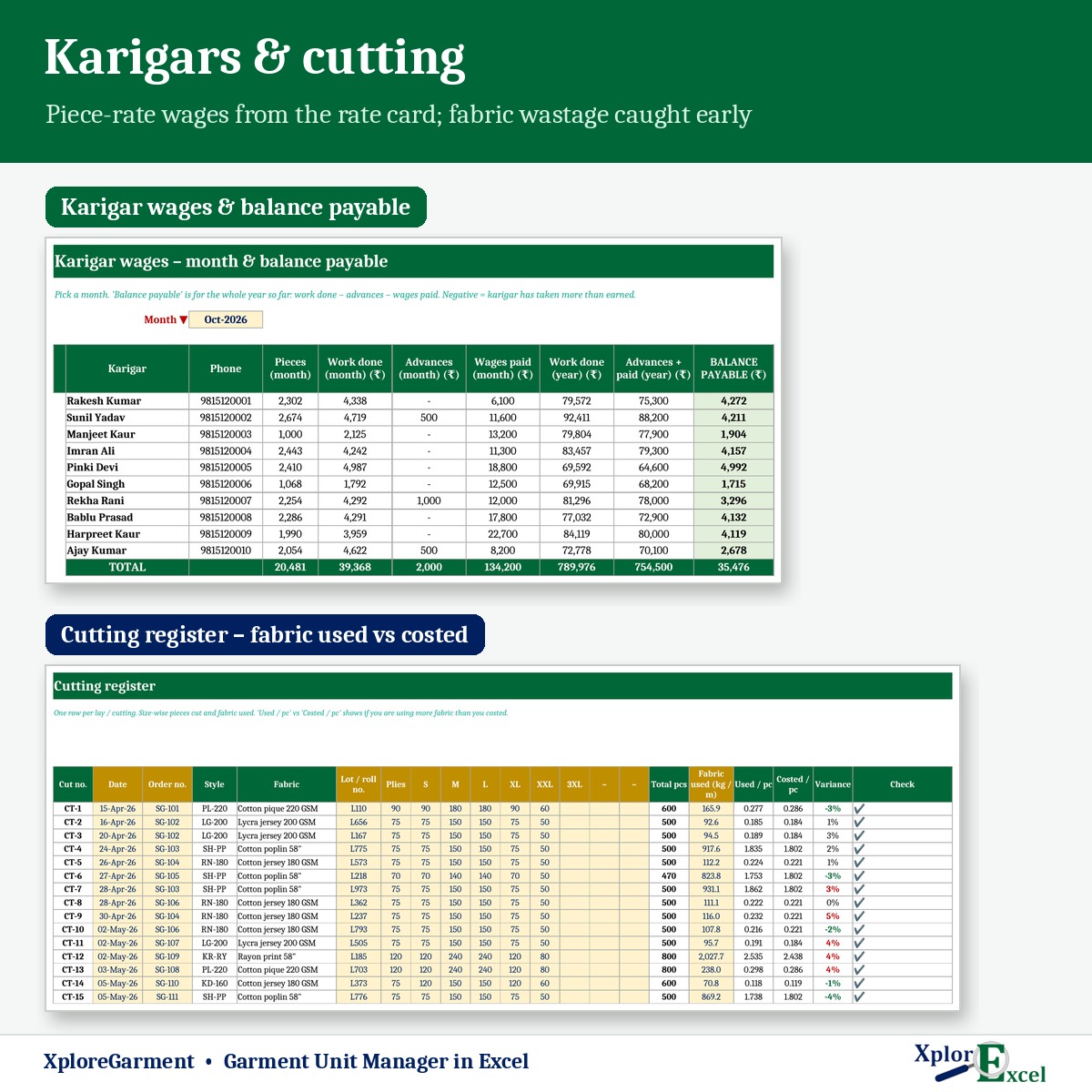
Cutting & fabric stock
Size-wise pieces and fabric used, average rate, stock in hand and reorder alerts.
05
Karigar wages
Piece-rate work log, advances and wages paid, balance and a printable wage slip.
06
Job work
Printing, embroidery, washing or fabricator — sent, received, owed and pending.
07
GST invoice
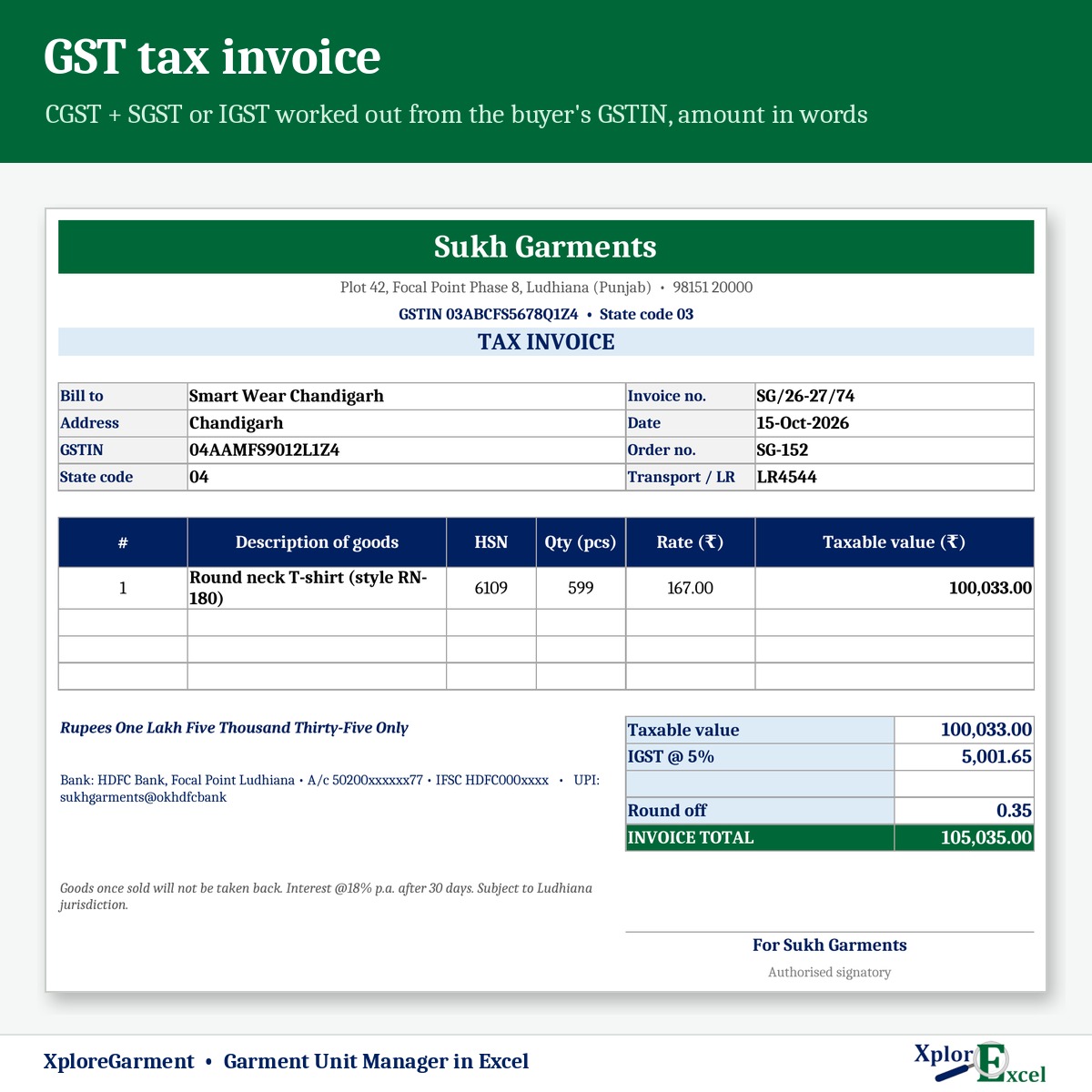
CGST + SGST or IGST from the buyer’s GSTIN, rate by price per piece, amount in words.
08
Profit & dues
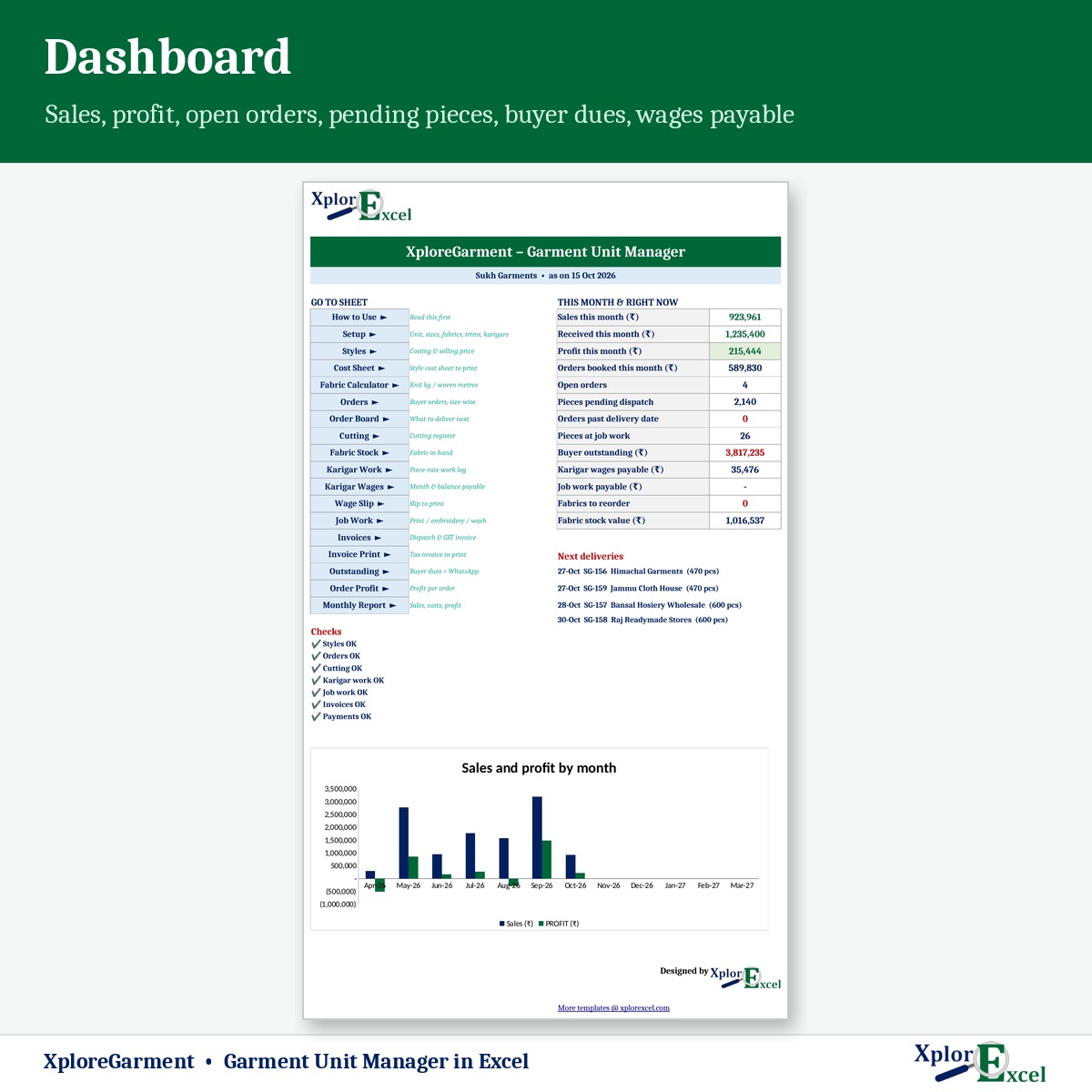
Profit per order, buyer outstanding with WhatsApp, monthly report and dashboard.
09Macro edition
Every karigar’s wage slip as PDF, in one click
Press “PDF for all” — a separate wage slip for every karigar, ready for pay day.
See the real sheets
These are pages from the sample file in your download: 8 styles, 10 buyers and 59 orders.
Macro edition: fill-in forms on your PC
Click a button, fill a short form, press Save. These are real screens from the macro edition.


Made for
- Stitching units and fabricators
- Hosiery and knitwear makers
- Kurti and ladies’ wear units
- Shirt and uniform makers
Not the right fit if
- You run more than 500 order lines a year
- You need barcode stock or retail billing
- You need e-invoicing (IRN) or e-way bills from the file
Pick your plan
Same costing, invoices and reports in both. Choose how you want to enter data.
Formula edition
₹699
- Works on phone and PC
- Type straight into the yellow boxes
- All costing, invoices and reports
Best for the unit office
Macro edition
₹999
- Everything in the formula edition
- 12 fill-in forms — orders, cutting, karigar work, job work, invoices and more — on a Windows computer
- “PDF for all”: every karigar’s wage slip as a separate PDF, in one click
- GST invoice, cost sheets, order board and outstanding — print or PDF in one click
- Includes a phone copy for the Excel mobile app
Pay with UPI, cards or net banking. Digital file, so no refunds — but if the file doesn’t work for you, we’ll fix it.
Not sure yet? Try a free template first
Same builder, same yellow-box style. If our free templates work for you, XploreGarment will too.
Hi, I’m Amanpreet
I run XplorExcel from Punjab. I build these files for the way Indian garment units and small businesses actually work. If something in the file doesn’t make sense, message me.
Questions
How is the selling price worked out?
Fabric (consumption × wastage × rate), trims, stitching labour from the piece-rate card, job work, packing, overhead % and markup % give the cost per piece, selling price, price per dozen and GST %.
Does it work for both knit and woven?
Yes. The fabric calculator works out knit consumption in kg per dozen from measurements and GSM, and woven in metres from pattern parts, fabric width and marker efficiency.
How are karigar wages calculated?
Each work entry takes the rate from the rate card for that style and operation. Advances and wages paid are recorded, giving the balance payable and a printable wage slip.
Is the GST rate set automatically?
Yes — by price per piece, using the limit and rates on Setup, and CGST + SGST or IGST from the buyer’s GSTIN. Garment GST rates can change, so confirm them with your CA.
Will it work on my phone?
Yes. The formula edition opens in the Excel app on Android and iPhone, and the macro edition includes a phone copy too. The fill-in forms and one-click PDFs work on a Windows computer.
Which Excel do I need?
Excel 2016 or later on Windows or Mac for the formula edition. The macro edition’s forms need Excel on Windows.
The buttons don’t work — what do I do?
Windows blocks macros in downloaded files. Right-click the .xlsm file → Properties → tick “Unblock” → OK. Then open it and click “Enable Content” on the yellow bar.
How do I get the file?
The download link appears as soon as payment goes through and is also sent to your email. You can download it again anytime — there is no expiry.
Know your real profit on every order.
Pay once · Instant Download · Lifetime Access