
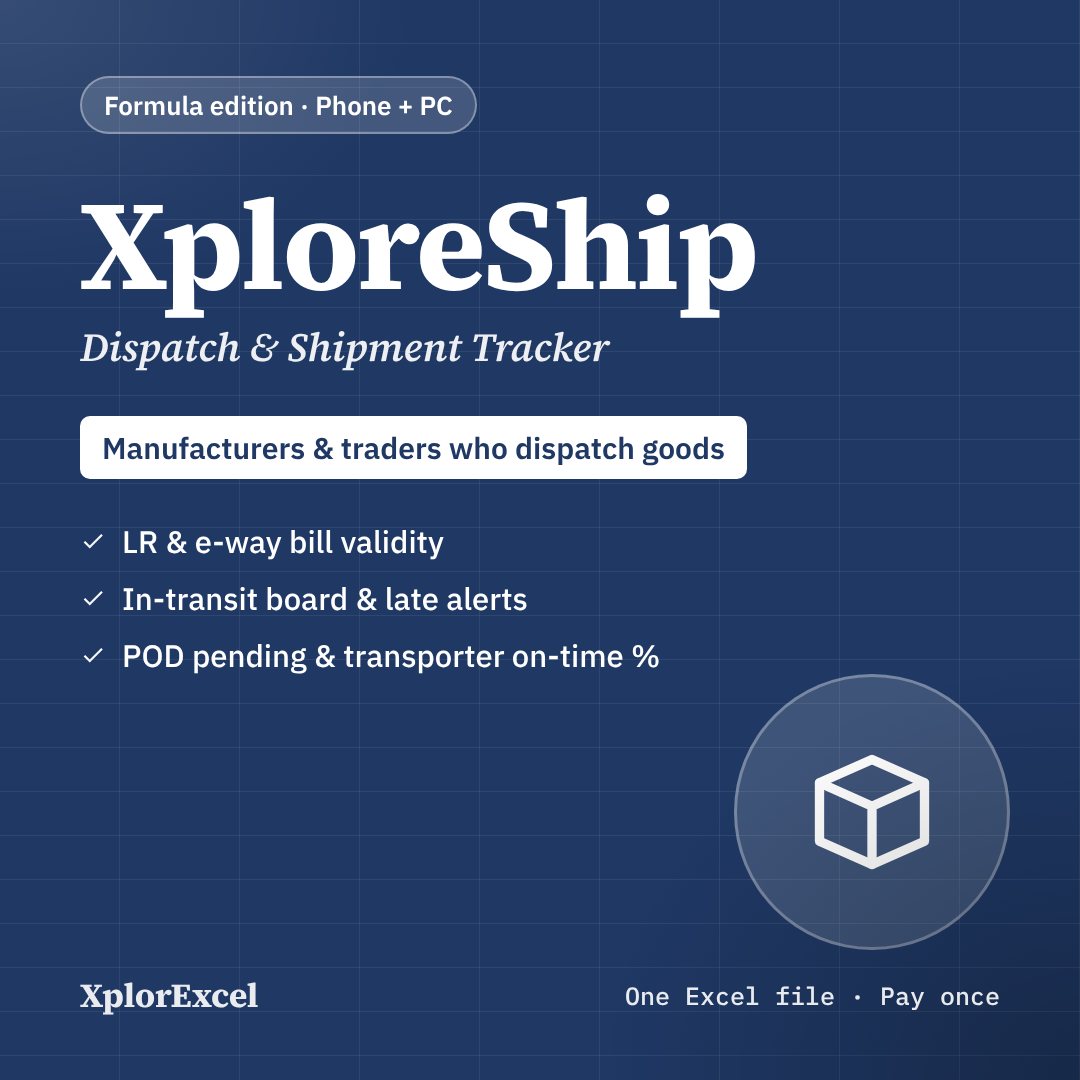
Quick answer: A shipment tracking sheet keeps one row for every consignment you send. Record:
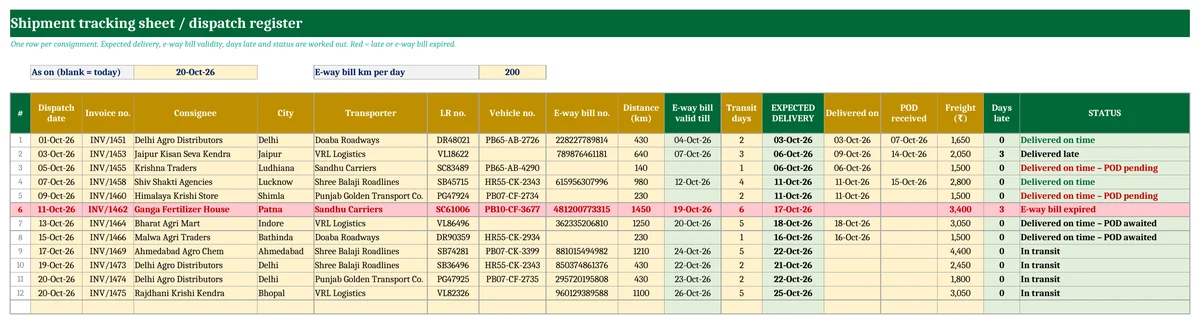
- the dispatch date, invoice and consignee
- the transporter, LR number and vehicle number
- the e-way bill number
- the expected delivery date
- the date it was delivered and the date the POD (signed LR) came back
From these, it shows what is in transit, what is late, whose e-way bill has run out and which PODs you still need to chase. Download a free shipment tracking sheet in Excel below. It also has a transporter summary with each transporter’s on-time %.
Key takeaways
- Dispatch register for 100 consignments. Expected delivery = dispatch date + transit days.
- E-way bill valid till is worked out from the distance (200 km a day for normal cargo).
- Automatic status: In transit, Due today, Late, E-way bill expired, Delivered on time or late, POD pending. Late rows turn red.
- Transporter summary: shipments, on-time %, in transit, late now, PODs pending and freight per shipment.
- Free, with no macros. Works in Excel and Google Sheets.
What to record for every consignment
| Column | Why it matters |
|---|---|
| Dispatch date, invoice no., consignee | Links the shipment to your sale and your customer. |
| Transporter, LR / GR no., vehicle no. | What the transporter asks for when you call about a shipment. |
| E-way bill no. and distance | Goods moving on an expired e-way bill can be detained and fined. |
| Transit days and expected delivery | The date you promise the customer, and the date to chase the transporter. |
| Delivered on and POD received | Proof of delivery settles customer disputes and releases the transporter’s freight. |
| Freight | Freight per shipment and freight as a share of the invoice value. |
How e-way bill validity is counted
For normal cargo, an e-way bill is valid for one day for every 200 km or part of it. For over-dimensional cargo it is one day for every 20 km. Each day runs to midnight of the following day. For example, a bill for 640 km, generated on 3 October, is valid for 4 days and ends at midnight on 7 October.
The sheet assumes the e-way bill was generated on the dispatch date. Change the km per day at the top for over-dimensional cargo. If a truck breaks down, extend the bill on the e-way bill portal before it expires. The portal is the final word.
Transporter summary
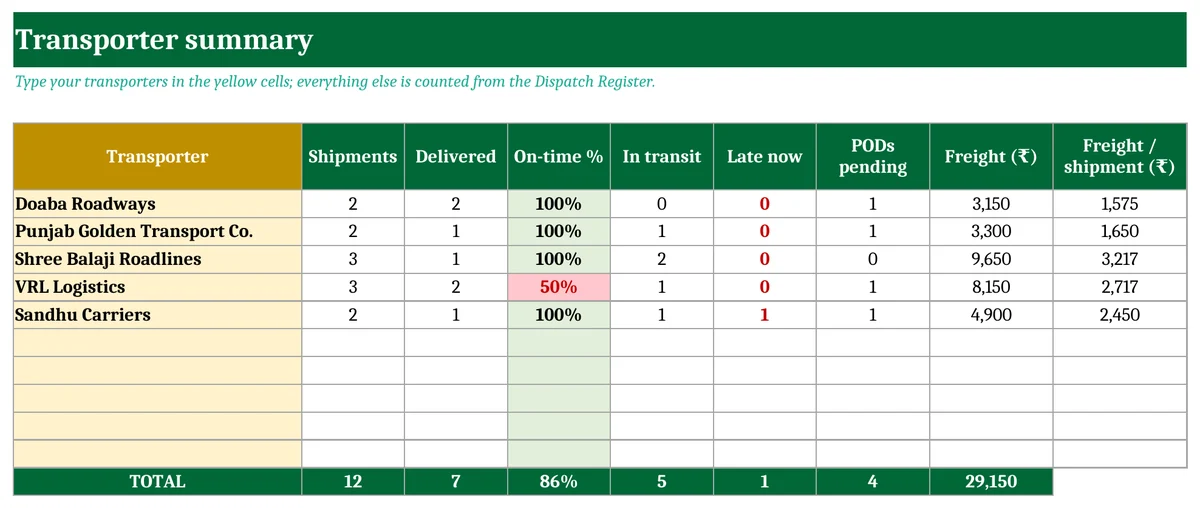
After a few months the summary shows which transporter delivers on time and which one you keep chasing. That is useful when you negotiate rates or decide where to send urgent loads.
Daily routine (5 minutes)
- Filter the STATUS column for Late and E-way bill expired, and call those transporters first.
- Type the Delivered on date as soon as the customer confirms delivery.
- Type POD received when the signed LR comes back. Anything showing “POD pending” is more than 7 days old.
Download the free Shipment Tracking Sheet & Dispatch Register
There are two sheets: Dispatch Register and Transporter Summary. Fill in the yellow cells; everything else is worked out.
Get updates and new free templates
Your download below doesn’t need this. Leave your WhatsApp number or email and I’ll send you fixes for this file and new free templates. No spam, unsubscribe anytime.

Was this template useful?
Related free templates Free Excel files people download with this one
FAQs
What is a POD in transport?
Proof of delivery: the copy of the LR (lorry receipt) signed and stamped by the consignee when the goods arrive. Most companies pay the transporter’s freight only after they get the POD.
What is the difference between the LR and the e-way bill?
The LR (or GR) is the transporter’s receipt for the goods. The e-way bill is a GST document generated on the government portal for goods above the value limit. A shipment usually has both.
Can I use it in Google Sheets?
Yes. Upload the file to Google Drive and open it with Google Sheets. All the formulas work there.
