
Quick answer: To work out your vehicle’s real mileage, fill the tank to full and note the odometer reading. At the next full fill, divide the kilometres driven since the last full tank by the litres you just filled: Mileage = km driven ÷ litres filled. If you made partial fills in between, add those litres too. The free Xplorexcel Vehicle Log does this automatically for every fill. It also records service, repairs, insurance and PUC, and shows your running cost per km and reminders for when the next service or renewal is due.
Key takeaways
- Up to 5 vehicles: car, bike, scooter or SUV, running on petrol, diesel, CNG or electric.
- True mileage by the full-tank method. Partial fills are handled correctly, and unusual mileage is flagged.
- One log for service, repairs, tyres, battery, insurance, PUC, tolls and challans.
- Reminders for insurance and PUC expiry, and for the next service by date or by km, whichever comes first.
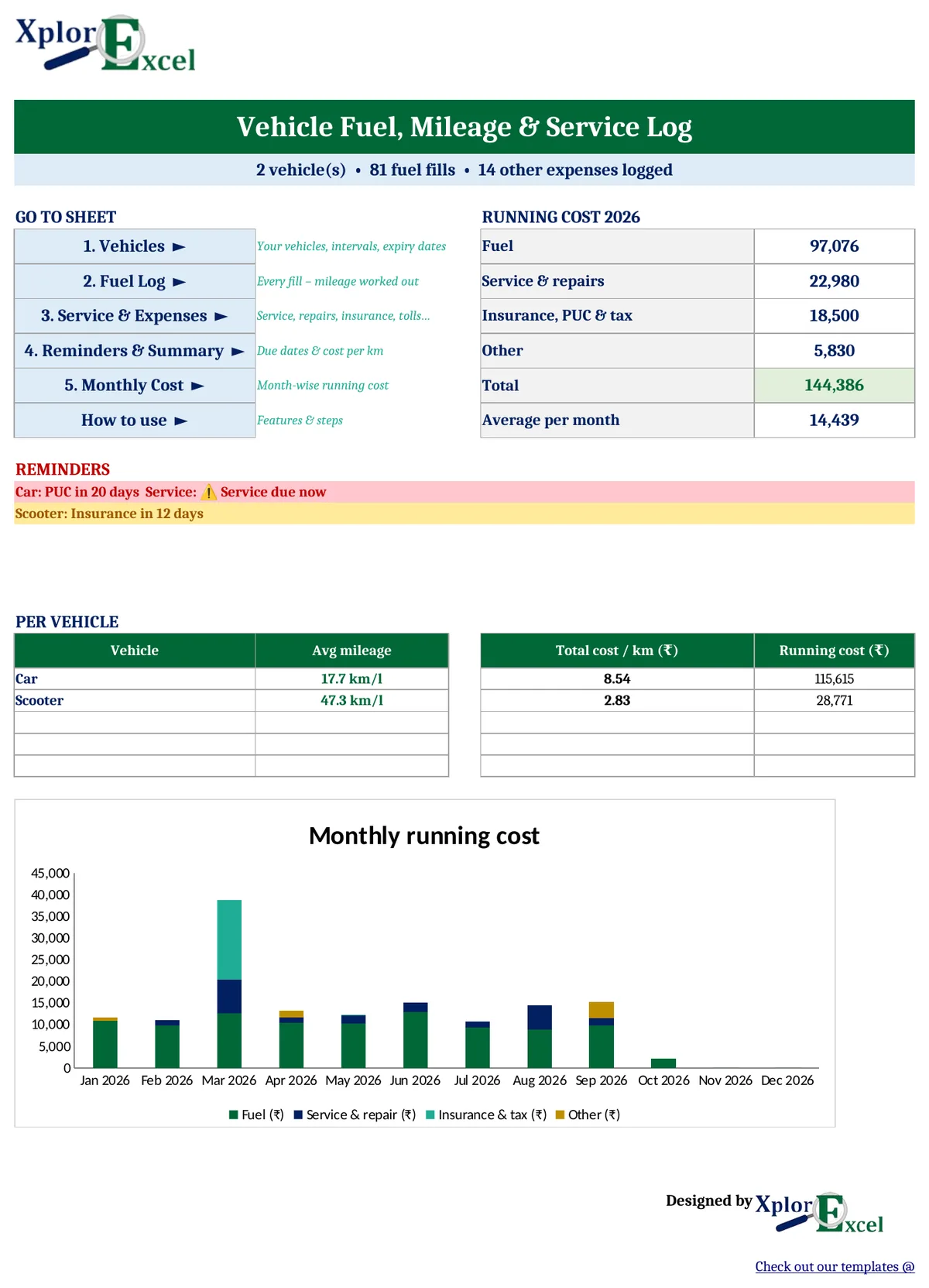
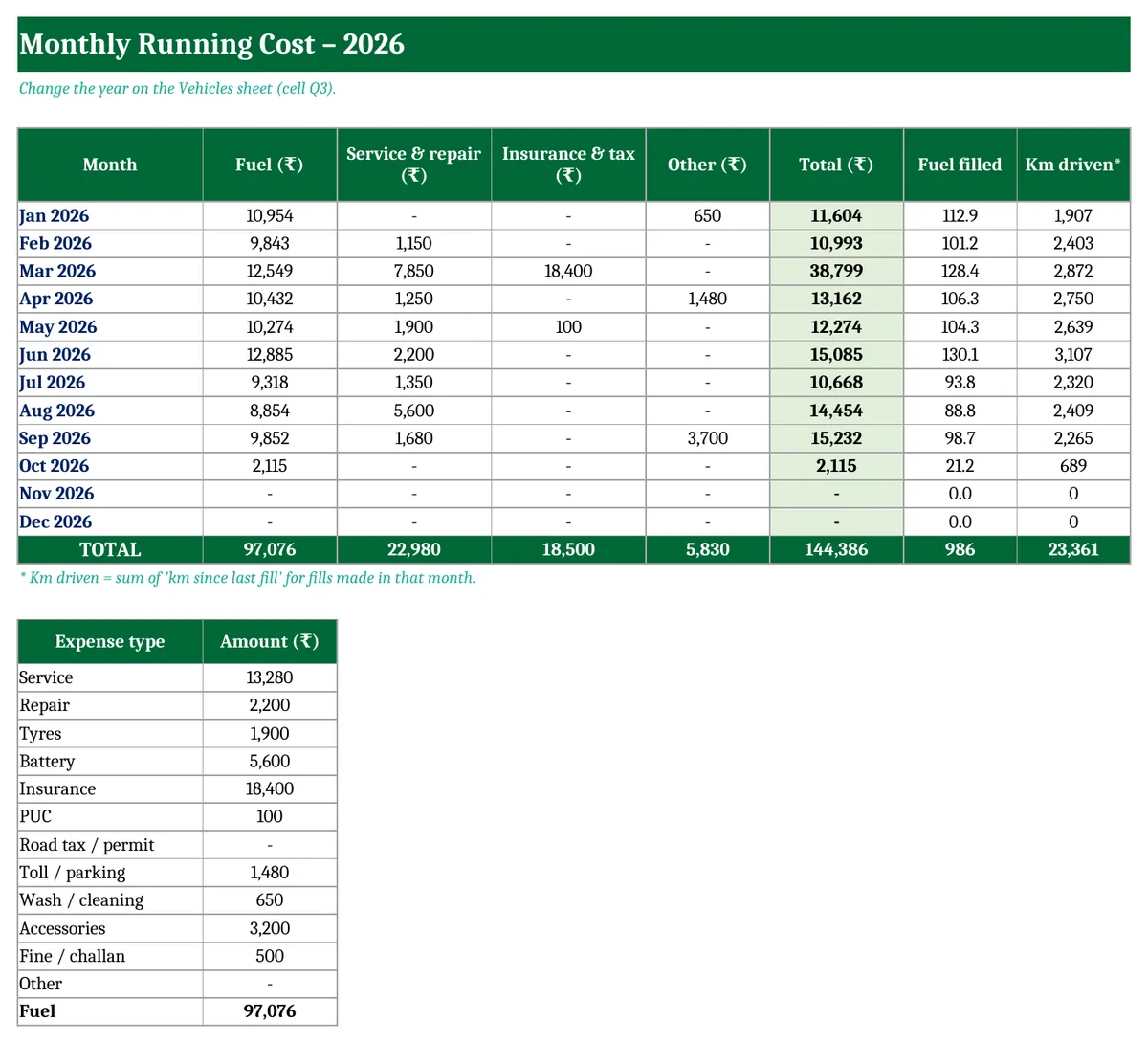
- Running cost per km and a month-by-month cost report with a chart.
How to calculate mileage correctly (full-tank method)
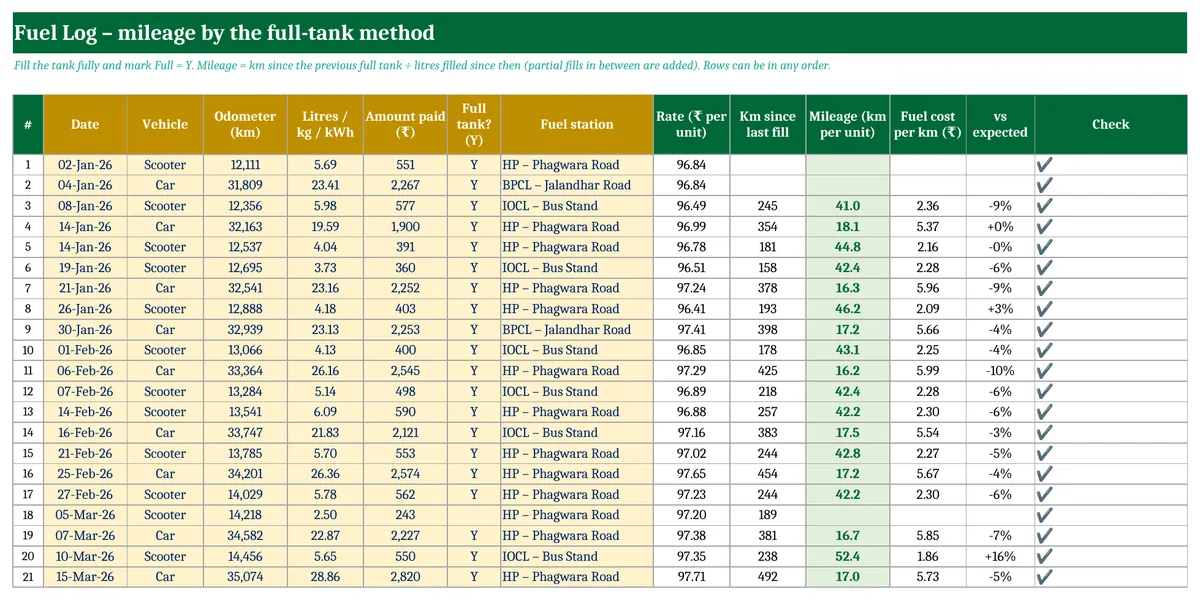
- Fill the tank to full and note the odometer reading, for example 32,163 km.
- Drive as usual. If you add some fuel in between without filling up, note those litres as well.
- At the next full fill, note the odometer (32,541 km) and the litres filled (23.16 L).
- Mileage = (32,541 − 32,163) ÷ 23.16 = 378 ÷ 23.16 = 16.3 km/l.
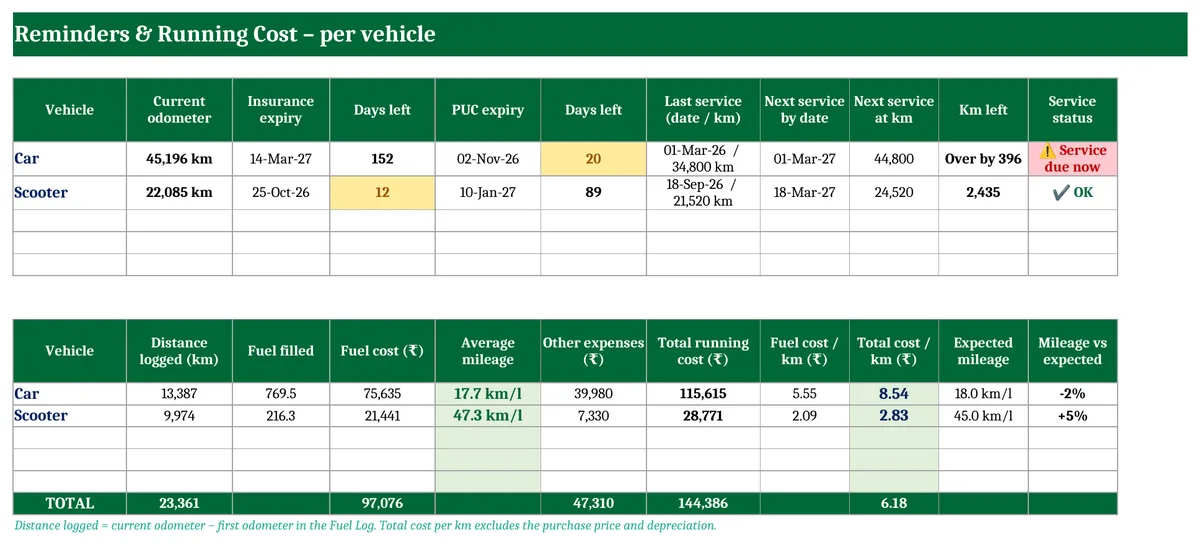
A single tank can mislead, because pumps stop at slightly different levels. Over several tanks the template’s average mileage (total km ÷ total litres between full fills) is the figure to trust. In the sample, the car averages 17.7 km/l against an expected 18, and the scooter 47.3 km/l against an expected 45.
Why your mileage may be lower than the company figure
- Claimed mileage comes from test-cycle conditions. Real-world city driving is usually lower.
- Low tyre pressure, a dirty air filter or an overdue service.
- Heavy use of the AC, short trips, traffic, and carrying extra load.
- A sudden drop of 10% or more, compared with your own usual figure, is worth a check. The template flags fills that are very different from the expected mileage.
Vehicle service record and expenses
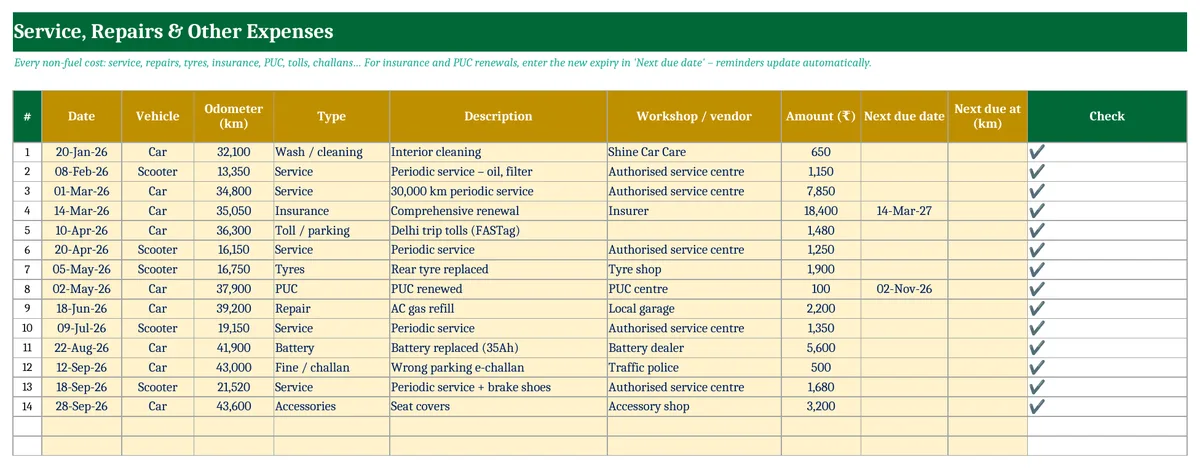
Log every cost other than fuel with its date, vehicle, odometer reading, type, description, workshop and amount. The types are service, repair, tyres, battery, insurance, PUC, road tax or permit, toll or parking, wash, accessories, fine or challan, and other. When you renew insurance or PUC, enter the new expiry date in Next due date and the reminder updates.
Reminders: service, insurance and PUC
| Reminder | How the due date is worked out |
|---|---|
| Next service | Last service date + the service interval in months, or last service odometer + the interval in km, whichever comes first |
| Insurance | The expiry date on the Vehicles sheet, or the latest insurance renewal you have logged |
| PUC | The expiry date on the Vehicles sheet, or the latest PUC entry. A PUC certificate is usually valid for 6 or 12 months, so check yours |
Anything due within 30 days shows in yellow on the dashboard, and anything expired or overdue shows in red. Third-party insurance and a valid PUC are compulsory for driving on Indian roads, and missing either can mean a fine.
What does it really cost to run your vehicle?
Total cost per km = (fuel + all other running expenses) ÷ km driven. In the sample, the car costs ₹5.55 per km in fuel alone but ₹8.54 per km once service, insurance, battery and the other costs are added. The scooter costs ₹2.83 per km in total. This figure helps when you compare taking the car with a cab, or decide whether a CNG or EV switch is worth it.

How to use the vehicle log (4 steps)
- Vehicles: Add each vehicle with its starting odometer, expected mileage, service interval and insurance and PUC expiry dates.
- Fuel Log: At every fill, enter the odometer, litres and amount. Fill the tank fully and mark Full = Y.
- Service & Expenses: Log every other cost. For renewals, enter the new expiry date.
- Dashboard: Check the reminders and running cost. The detail is on the Reminders & Summary and Monthly Cost sheets.
Download the Vehicle Fuel & Service Log in Excel (Free)
File: Vehicle Fuel, Mileage and Service Log 1.0 · Format: .xlsx · Macros: none · Price: free.
Get updates and new free templates
Your download below doesn’t need this. Leave your WhatsApp number or email and I’ll send you fixes for this file and new free templates. No spam, unsubscribe anytime.

Was this template useful?
Related free templates Free Excel files people download with this one

Tip: keep the file in Google Drive and add each fill from your phone at the pump with the Google Sheets app. It takes about 20 seconds.
Frequently asked questions
How do I calculate the mileage of my bike or car?
Fill the tank fully and note the odometer. At the next full fill, divide the kilometres driven by the litres filled. For example, 378 km on 23.16 litres is 16.3 km/l. Average it over several fills for an accurate figure.
Can I track a CNG or electric vehicle?
Yes. Enter kg of CNG or kWh of charge in the Litres column and the amount paid. The template then shows km per kg or km per kWh, and the cost per km.
What if I don’t fill the tank fully every time?
Leave Full blank for partial fills. Their litres are added to the next full fill, so the mileage stays correct. Mileage is calculated only on full-tank rows.
How often should I service my car?
Follow your owner’s manual. Most cars need a service every 10,000 km or 12 months, and most two-wheelers every 3,000–5,000 km or 6 months, whichever comes first. Set both intervals on the Vehicles sheet.
How do I calculate the cost per km of my vehicle?
Add up fuel and all other running costs over a period and divide by the kilometres driven in that period. The template does this for each vehicle. It does not include the purchase price or depreciation.
Can I use this on my phone?
Yes. Upload the .xlsx file to Google Drive and open it in the Google Sheets app. It has no macros, so everything works.
More free personal templates from Xplorexcel
Service intervals and PUC validity vary by manufacturer and state. Follow your vehicle manual and certificate. Last reviewed: October 2026.
