
Quick answer: An OPD register needs one row per visit with these columns:
- token no., date, patient name, age / sex and phone
- complaint and doctor
- fee (consultation + services), discount, paid, mode and balance
- next visit date, so follow-ups aren’t missed
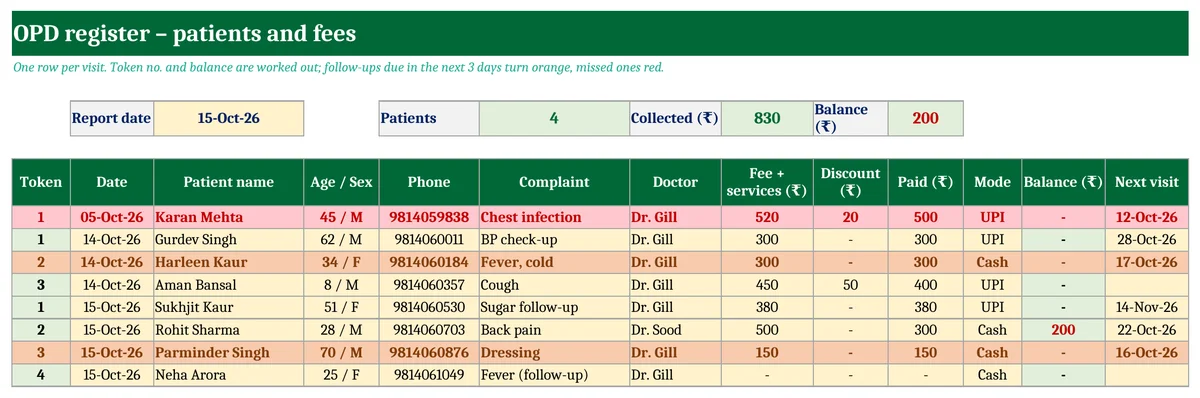
Download a free OPD register in Excel below. Token numbers restart every day, the day’s patients and collection are totalled, and follow-ups due soon or missed are coloured. It also has a printable OPD slip with an Rx area and the bill.
Key takeaways
- OPD register for 200 visits, with the token no. and balance worked out automatically.
- Daily totals: type a date to see patients, collection and balance for that day.
- Follow-up alerts: next visits in the next 3 days in orange, missed ones in red.
- Printable OPD slip with clinic header, vitals, Rx space and bill. Free, no macros.
What an OPD register should record
| Column | Why it matters |
|---|---|
| Token no. and date | Patients are called in order; the count gives daily OPD numbers. |
| Patient name, age / sex, phone | Identifies the patient and lets you call for follow-ups. |
| Complaint and doctor | Shows the reason for the visit and who saw the patient (useful with visiting doctors). |
| Fee, discount, paid, mode | Daily cash and UPI collection must match the register. |
| Balance and next visit | Nothing pending is forgotten, and patients come back on time. |
OPD slip format with bill
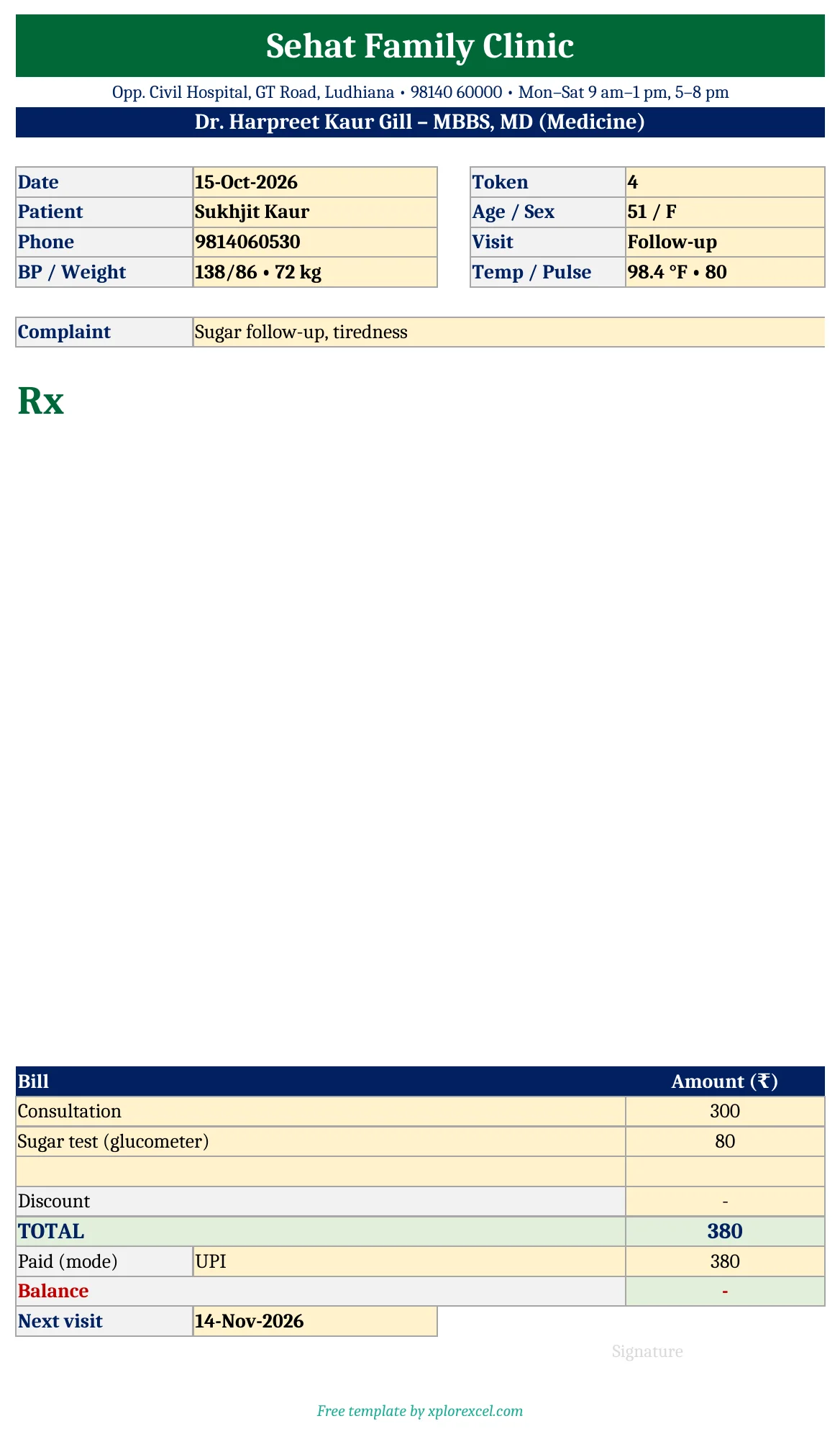
The slip has:
- clinic name, address, phone and timings, and the doctor’s name and qualification
- date, token, patient, age / sex, phone and visit type
- BP, weight, temperature and pulse
- a blank Rx area for the doctor to write in
- bill lines, discount, total, paid, balance and next visit date
Change the header once with your clinic details, then fill the yellow cells for each patient and print on A4 or A5.
Tips for running the OPD desk
- Enter each patient at the reception desk as they arrive. The token no. fills itself.
- At closing time, type today’s date at the top and match the collection with the cash drawer and UPI app.
- Check the red rows once a day and call those patients. Missed follow-ups are lost revenue and, often, worse outcomes.
- Keep one file per year and save a backup copy every week.
Running a busy clinic? XploreClinic – Clinic OPD & Billing Manager in Excel keeps a patient register with patient numbers and age from date of birth. Each visit is marked New, Revisit or free follow-up automatically, with the right fee. It prints the OPD slip from the bill no., gives a daily report by cash / UPI / card and by doctor, sends follow-up reminders on WhatsApp, works out the visiting doctor’s share and makes a monthly report.
Download the free OPD Register & OPD Slip
There are two sheets: OPD Register and OPD Slip. Fill in the yellow cells; everything else is worked out.

FAQs
Is this a medical records system?
No. It is an OPD register and billing sheet. Keep clinical notes as your state rules and medical council require.
Can I use it for a dental or physiotherapy clinic?
Yes. Change the complaint column to “treatment” and the fee to your procedure rates.
Does it work on mobile?
Yes. Open it in the Excel or Google Sheets app at the reception desk.
