
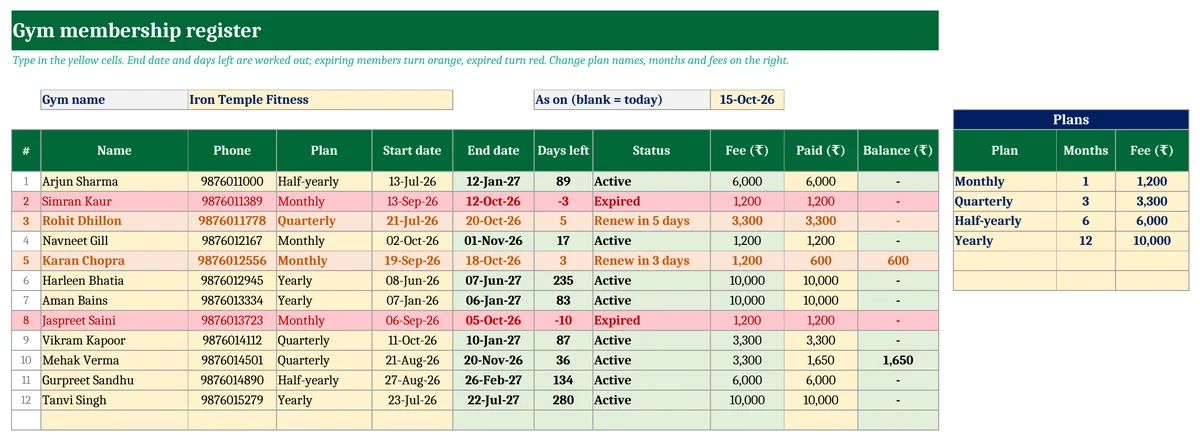
Quick answer: A gym membership register keeps one row per member with these columns:
- name and phone
- plan and start date
- end date (start + plan months − 1 day)
- days left and a status: active, renew soon or expired
- fee, amount paid and balance
Download the free Excel register below. It works out the end date and days left, highlights members due for renewal in orange and expired members in red, and prints a fee receipt for any member.
Key takeaways
- End date and days left are worked out from the plan. Monthly, quarterly, half-yearly and yearly plans are included, and the names, months and fees can be changed.
- Renewal alert: members expiring within 7 days turn orange and expired members turn red.
- Fee, paid and balance for each member, so part payments aren’t forgotten.
- A printable fee receipt with the amount in words and the membership validity. Free, with no macros.
What to record for every gym member
| Column | Why it matters |
|---|---|
| Name and phone | The phone number is how you send renewal reminders, usually on WhatsApp. |
| Plan and start date | These decide the end date. A quarterly plan from 21 July ends on 20 October. |
| End date and days left | Your renewal list: who to remind this week. |
| Fee, paid and balance | Part payments are common. The balance column stops them being forgotten. |
How the end date is calculated
End date = start date + plan months − 1 day. Excel’s EDATE function adds the months, so a monthly plan starting 19 September ends on 18 October. For a plan counted in days, such as a 15-day pass, add the days instead.
Days left = end date − today. When days left is 7 or less the member shows as “Renew in X days”. Once it goes below zero, the member shows as “Expired”.
Gym fee receipt format
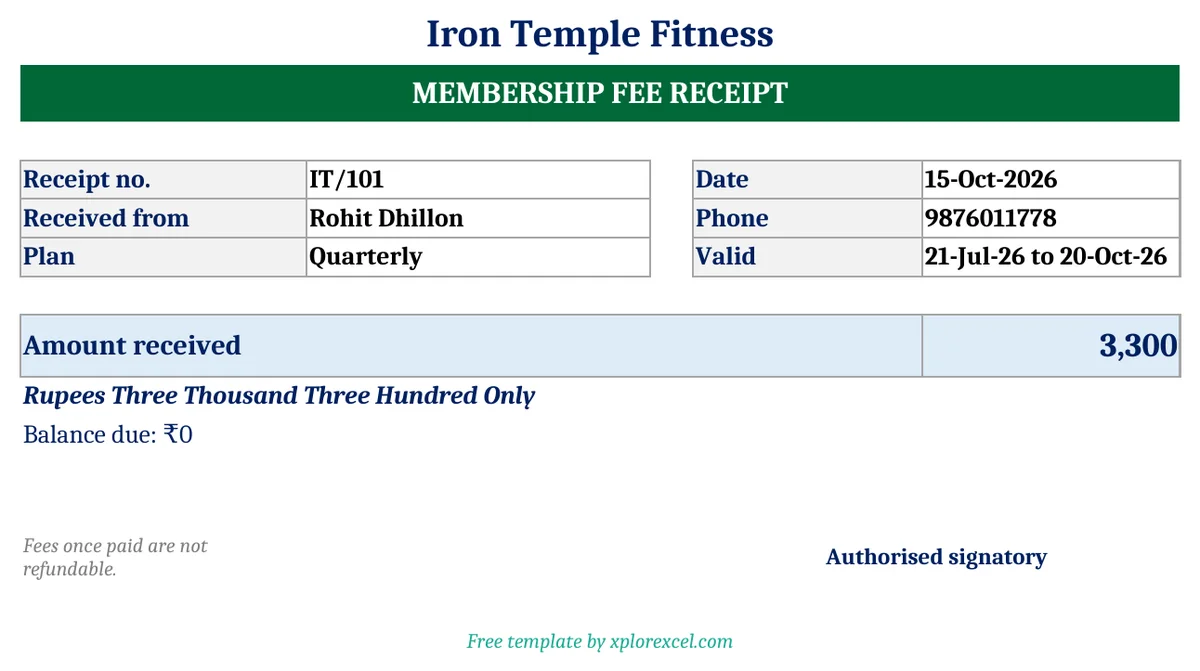
A gym fee receipt should show:
- the gym name
- the receipt number and date
- the member’s name
- the plan and its validity
- the amount in figures and words
- any balance still due
If your gym is registered for GST, also show your GSTIN and the GST charged.
Tips to improve renewals
- Remind before expiry, not after. A message 5–7 days before the end date gets more renewals than one a week after.
- Offer the longer plan at renewal. Members who are already coming regularly are the most likely to move from monthly to quarterly.
- Watch members who stop visiting. Someone who hasn’t come for 10 days is unlikely to renew. A quick call can save the membership.
Running a full gym? XploreGym – Gym & Fitness Membership Manager in Excel handles up to 500 members. It detects new members and renewals automatically and adds freeze days. It sends renewal and pending-fee reminders on WhatsApp and records part payments with receipts in member and office copies. It also covers daily check-in with expired-membership warnings, expenses, and a monthly report with renewal rate.
Download the free Gym Membership Register
There are two sheets: Member Register (up to 100 members) and Fee Receipt. Fill in the yellow cells. It works in Excel, Excel for Mac and Google Sheets.

FAQs
Can I use it for a yoga studio, dance class or coaching?
Yes. Rename the plans, for example to “Monthly batch” or “10-class pack”, and set the months and fees. Everything else works the same.
How do I renew a member?
Change the start date to the renewal date, update the plan if it’s different, and update the amount paid. If you want to keep the full history of every renewal, XploreGym records each renewal as a separate entry.
Does a gym need to charge GST?
Gym services are taxable under GST, but a gym only needs to register once its turnover crosses the registration limit for services. Check with your CA. If you’re not registered, don’t add GST to your receipts.
