
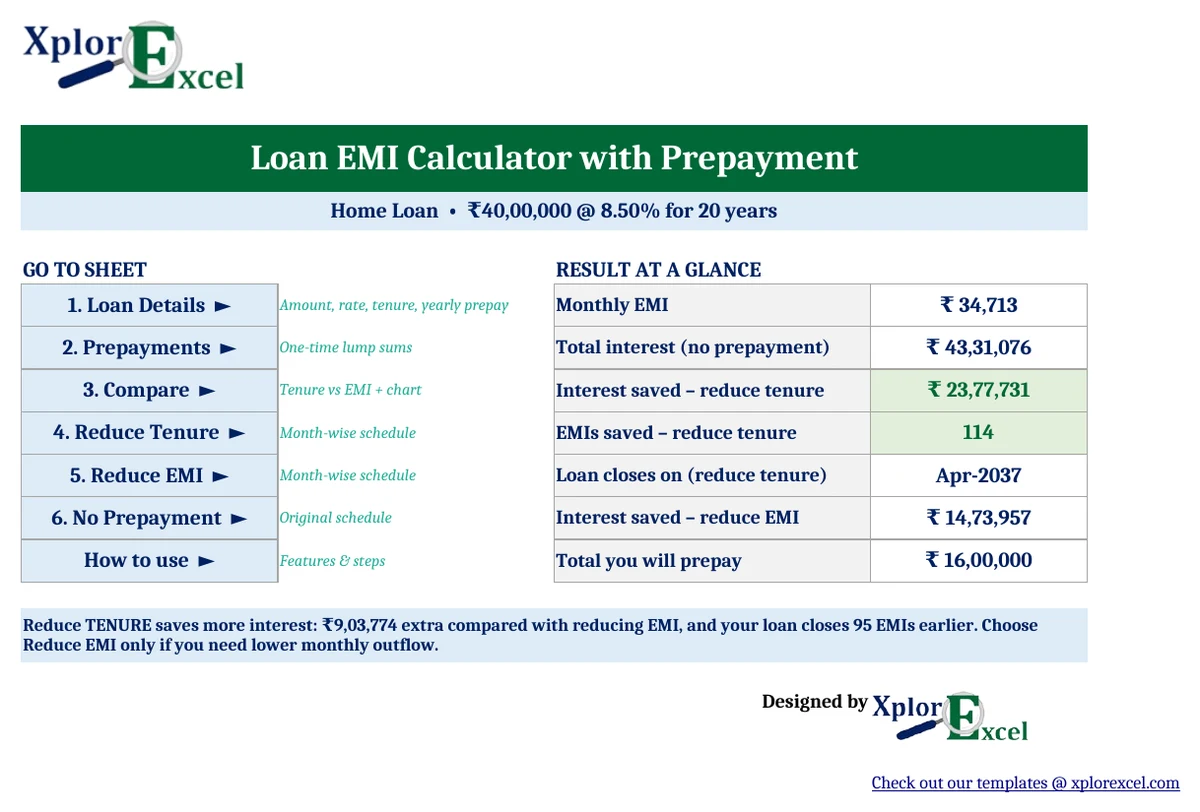
Quick answer: An EMI calculator uses this formula: EMI = P × r × (1 + r)n ÷ ((1 + r)n − 1), where P is the loan amount, r is the monthly interest rate and n is the number of months. In Excel, that is =PMT(rate/12, months, -loan). A ₹40 lakh home loan at 8.5% for 20 years has an EMI of ₹34,713. Prepaying ₹1 lakh every March (plus two lump sums) and keeping the EMI the same saves about ₹23.8 lakh in interest and closes the loan 9.5 years early. The free Xplorexcel EMI Calculator with Prepayment shows this for your own loan.
Key takeaways
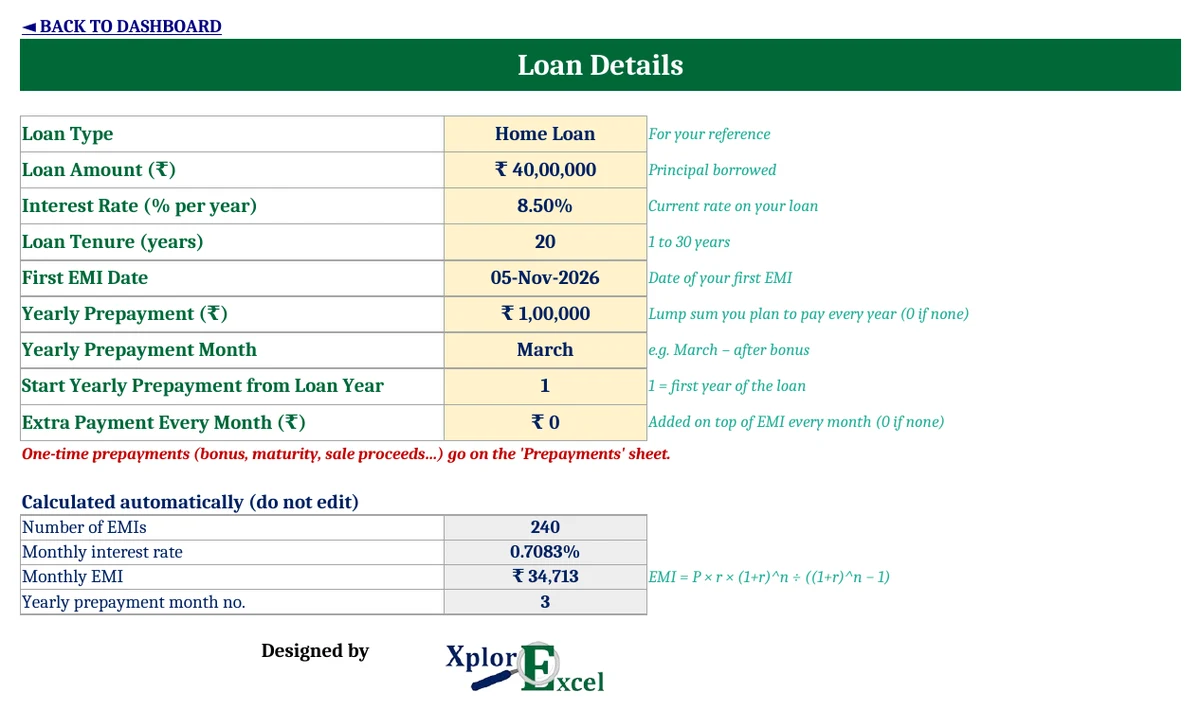
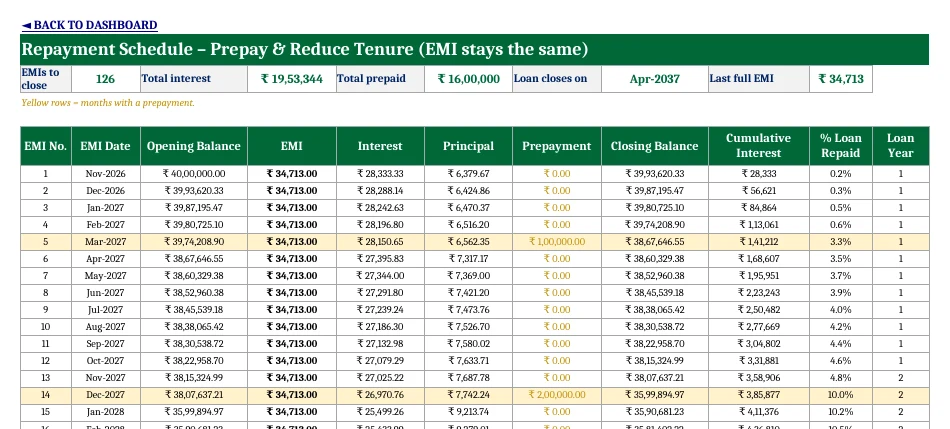
- Calculates your EMI and a full month-by-month amortization schedule (up to 30 years).
- Handles a yearly prepayment (e.g. from your bonus), up to 30 one-time lump sums and an optional extra payment every month.
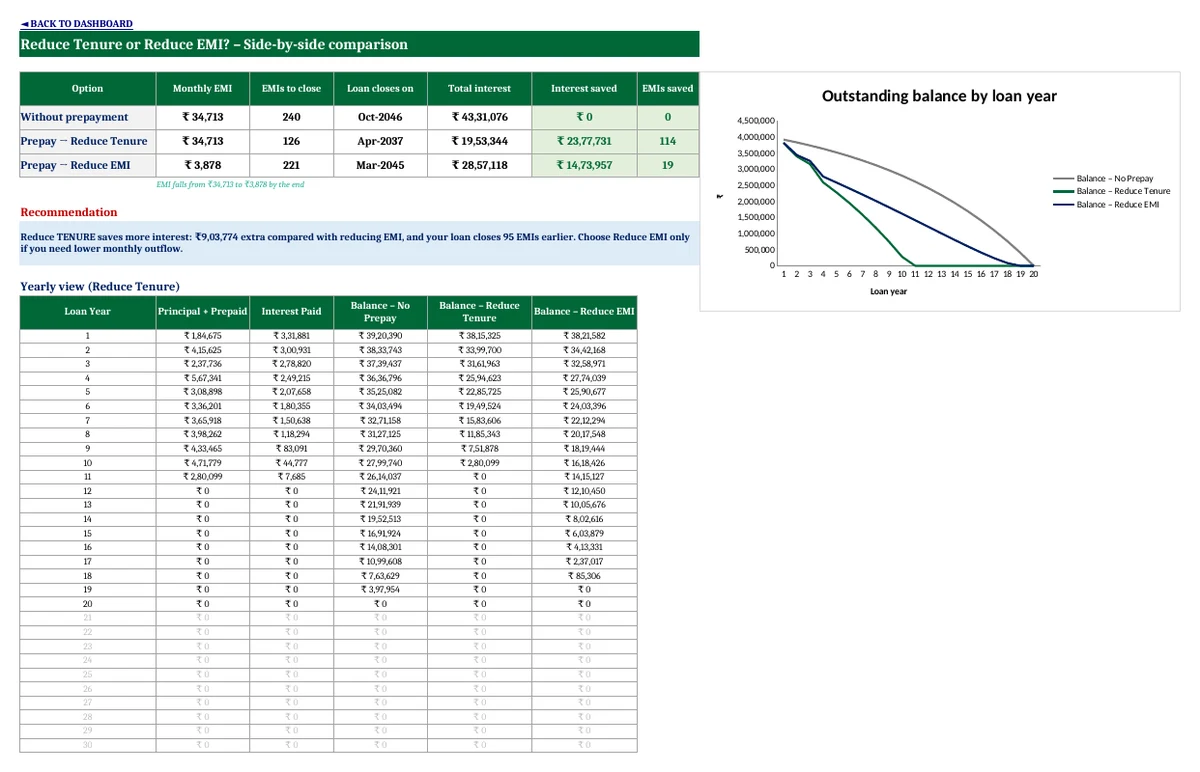
- Builds three schedules side by side: no prepayment, prepay and reduce tenure, and prepay and reduce EMI.
- Shows the interest saved, EMIs saved and new closing date for each, then tells you which option is better.
- Amounts use the Indian format (₹40,00,000), and a chart shows the outstanding balance year by year.

How is EMI calculated?
An EMI (equated monthly instalment) is a fixed monthly amount that covers that month’s interest plus part of the principal. The formula is:
EMI = P × r × (1 + r)n ÷ ((1 + r)n − 1)
- P = loan amount (principal)
- r = monthly interest rate = annual rate ÷ 12 (8.5% ÷ 12 = 0.7083%)
- n = number of monthly instalments (20 years = 240)
In Excel you don’t have to type the formula, because the PMT function does it for you:
=PMT(8.5%/12, 240, -4000000) → ₹34,713
Each month, interest = outstanding balance × r, and whatever is left of the EMI reduces the principal. In the early years most of the EMI goes to interest. That’s why prepaying early has such a big effect.
Prepayment: reduce EMI or reduce tenure?
After a prepayment, your bank usually asks whether you want to:
- Reduce tenure: keep paying the same EMI, so the loan finishes earlier, or
- Reduce EMI: keep the same end date and pay a smaller EMI from then on.
Reducing tenure almost always saves more interest, because you keep paying down principal at the higher EMI. Reducing EMI helps if you need more room in your monthly budget. The template calculates both for your loan, so you can see the actual difference in rupees.
Worked example: ₹40 lakh home loan at 8.5% for 20 years
Prepayments: ₹1,00,000 every March, plus ₹2,00,000 in December 2027 and ₹3,00,000 in June 2030.
| Option | EMI | EMIs paid | Loan closes | Total interest | Interest saved |
|---|---|---|---|---|---|
| No prepayment | ₹34,713 | 240 | Oct 2046 | ₹43,31,076 | — |
| Prepay → reduce tenure | ₹34,713 | 126 | Apr 2037 | ₹19,53,344 | ₹23,77,731 |
| Prepay → reduce EMI | falls to ₹3,878 | 221 | Mar 2045 | ₹28,57,118 | ₹14,73,957 |
Here, choosing reduce tenure saves about ₹9 lakh more than reduce EMI and finishes the loan 95 months earlier.
How to use the EMI calculator with prepayment in Excel (3 steps)
- Loan Details: Enter the loan amount, interest rate, tenure in years and first EMI date. If you plan to prepay every year, add the yearly amount, the month and the loan year it starts from. You can also add an extra payment every month.
- Prepayments: List any one-time lump sums, such as a bonus or FD maturity, with their dates. Each one is applied in that EMI month.
- Read the results: The Dashboard and Compare sheets show your EMI, interest saved and the better option. Open Reduce Tenure, Reduce EMI or No Prepayment for the month-by-month schedule. Prepayment months are highlighted in yellow.
Things to check before you prepay
- Prepayment charges: Under RBI rules, banks and NBFCs can’t charge a prepayment or foreclosure penalty on floating-rate loans taken by individuals for non-business purposes. RBI’s 2025 directions extend this to many individual and small-business (MSE) loans sanctioned or renewed from 1 January 2026. Fixed-rate loans may still carry a charge, so check your loan agreement.
- Keep an emergency fund: Don’t prepay money you might need in the next 6 to 12 months.
- Compare with other returns: If your investments earn safely more (after tax) than your loan rate, prepaying may not be the best use of the money.
- Tax benefit: Home loan interest and principal can reduce your tax under the old regime, so prepaying lowers that benefit. Check the current rules before deciding.
- Ask for a revised schedule: After each prepayment, ask your lender for the new repayment schedule and tell them whether you want the EMI or the tenure reduced.
Download the Loan EMI Calculator with Prepayment (Free)
File: Loan EMI Calculator with Prepayment 1.0 · Format: .xlsx · Macros: none · Price: free.

The sample shows a ₹40 lakh home loan at 8.5% for 20 years. Replace it with your own loan details. The template assumes the interest rate stays the same, so if your floating rate changes, update the rate and re-check.
Frequently asked questions
How do I calculate EMI in Excel?
Use the PMT function: =PMT(annual rate/12, number of months, -loan amount). For example, =PMT(8.5%/12, 240, -4000000) gives an EMI of ₹34,713 for a ₹40 lakh loan at 8.5% for 20 years.
Is it better to reduce EMI or tenure after prepayment?
Reducing tenure usually saves more interest, because you keep paying the higher EMI and the principal falls faster. Reduce EMI only if you need a lower monthly payment.
How much interest can I save by prepaying my home loan?
It depends on the amount and timing. In our example, prepaying ₹1 lakh every year plus ₹5 lakh in lump sums on a ₹40 lakh, 20-year loan at 8.5% saves about ₹23.8 lakh and closes the loan 114 EMIs early. Enter your own numbers in the template to see your savings.
Is there a penalty for prepaying a home loan?
Not for floating-rate loans taken by individuals for non-business purposes. Banks and NBFCs aren’t allowed to charge a prepayment penalty on them. Fixed-rate loans may carry a charge, so check your loan agreement.
When is the best time to prepay a loan?
As early as possible. In the early years most of each EMI goes to interest, so a prepayment then cuts much more interest than the same amount paid later.
Does this calculator work for car, personal and education loans?
Yes. It works for any loan repaid in equal monthly instalments. Enter the amount, rate and tenure of that loan.
Can I use it in Google Sheets?
Yes. Upload the .xlsx file to Google Drive and open it with Google Sheets. It has no macros.
More free finance templates from Xplorexcel
- Saving Tracker Template
- Income and Expenses Tracker Template
- Rent Receipt Generator with HRA Calculator
- Cash Book Template
- All Excel templates
Disclaimer: This calculator is a planning aid and assumes a constant interest rate. Your lender’s figures may differ slightly because of rounding, rate changes and the posting dates of payments. This is not financial advice. Last reviewed: September 2026.