
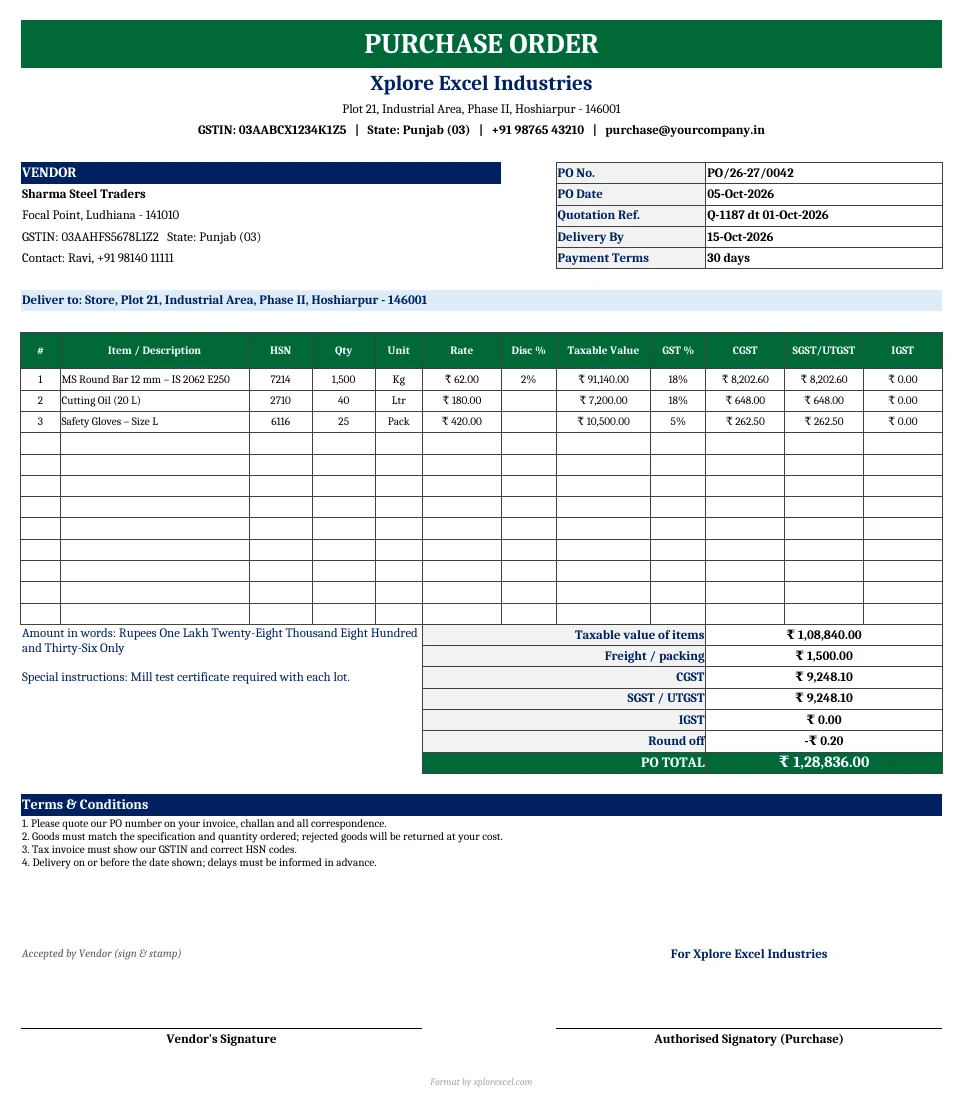
Quick answer: A purchase order (PO) is the document a buyer sends a supplier to confirm what it wants to buy, how much, at what price and by when. A GST-ready purchase order format shows both parties’ GSTINs, HSN codes, taxable value, CGST + SGST or IGST, freight, the total in words, delivery and payment terms, and signatures. This free purchase order format in Excel builds all of this from your vendor and item lists. It prints a one-page A4 PO and keeps a register that tracks deliveries and MSME payment deadlines.
Key takeaways
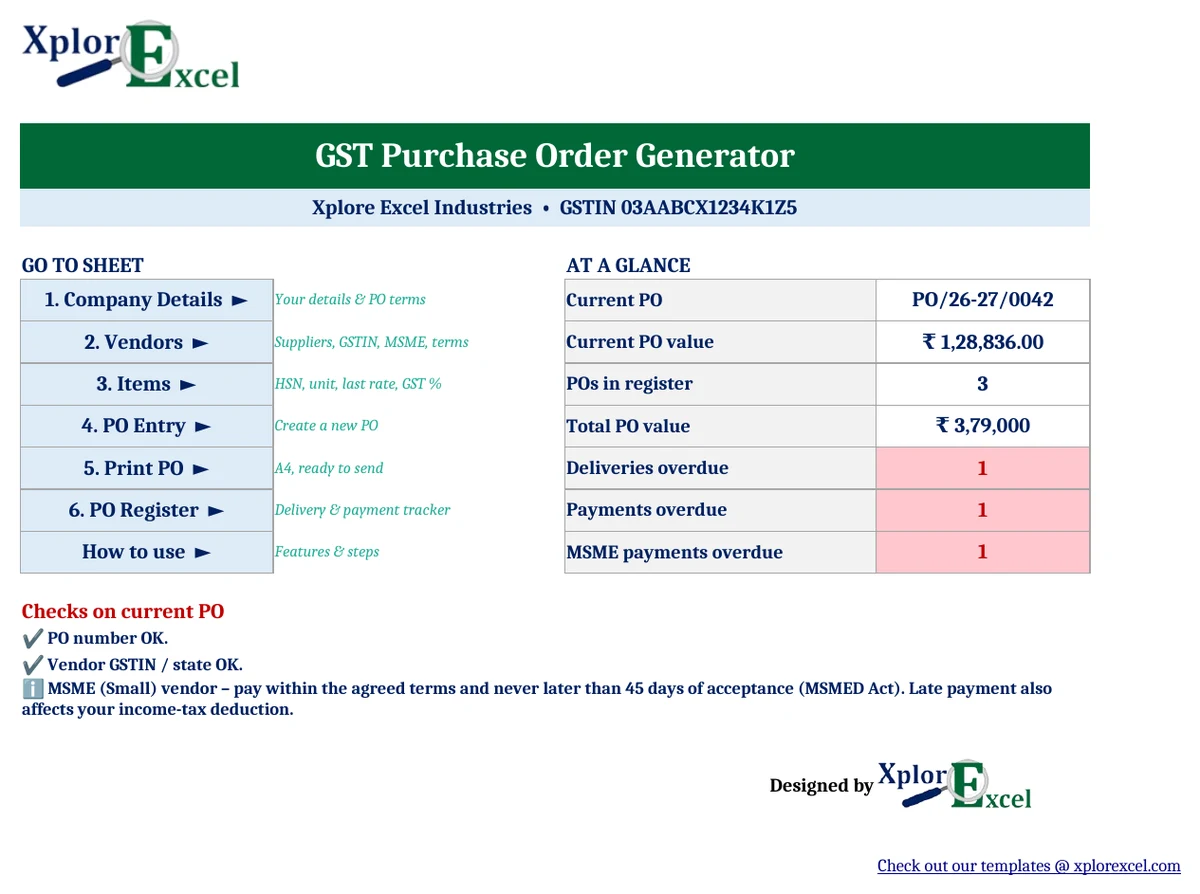
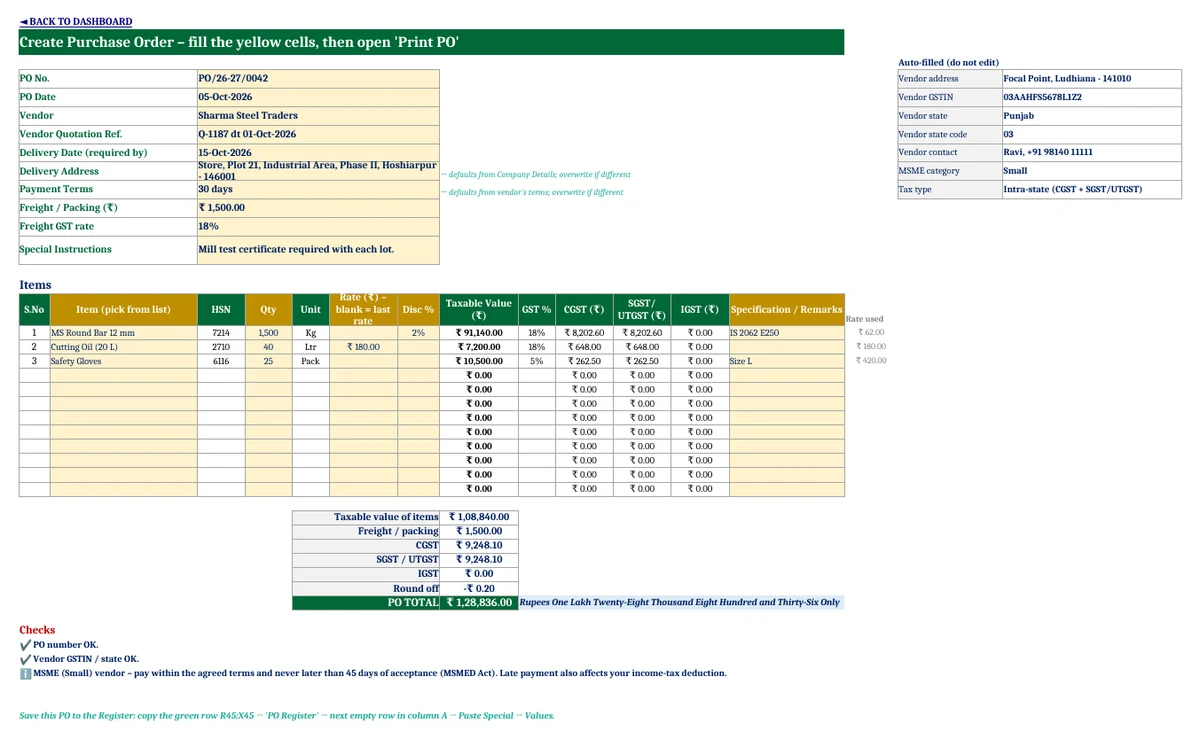
- Choose a vendor and items from dropdowns. The GSTIN, address, HSN code, unit, last rate and GST % fill in automatically.
- Works out CGST + SGST/UTGST or IGST from the vendor’s state, with line discounts, freight (with GST), round-off and the total in words.
- Prints a one-page A4 purchase order with your terms and signature boxes.
- Checks the PO number length and the vendor’s GSTIN, and flags unregistered vendors (possible reverse charge).
- The PO Register tracks deliveries and payment due dates, with a 45-day MSME payment alert.
Purchase order format: what should a PO contain?
GST law doesn’t prescribe a format for purchase orders, but a good PO prevents disputes and helps you match the supplier’s tax invoice later. It should have:
- The PO number and date (keep it short so the vendor can quote it on the invoice)
- Buyer details: name, billing address and GSTIN
- Vendor details: name, address, GSTIN and contact person
- Item description, HSN code, quantity, unit and rate
- Discount, taxable value, GST rate and CGST/SGST or IGST
- Freight or packing charges and the PO total, in figures and in words
- Delivery address and the date goods are needed by
- Payment terms and your standard terms and conditions
- Signatures from the buyer and, ideally, the vendor accepting the order
How to make a purchase order in Excel (5 steps)
- Company Details: Enter your business name, address, GSTIN, state, PO prefix, default delivery address and standard terms (one-time).
- Vendors and Items: Add your suppliers with their GSTIN, state, MSME category and payment terms, and the items you buy with HSN code, unit, last rate and GST % (also one-time).
- PO Entry: Enter the PO number and date, then pick the vendor, delivery date and items. Enter the quantities and any discount or freight. Leave the rate blank to use the last rate from the Items sheet.
- Print PO: Press Ctrl + P, or save as PDF and email it.
- PO Register: Paste the green summary row, then fill in the goods-received date, vendor invoice and paid date as they happen.
How GST is calculated on a purchase order
| Vendor location | Tax on the PO | Example (₹10,000 at 18%) |
|---|---|---|
| Same state as you | CGST + SGST (or UTGST), half each | CGST ₹900 + SGST ₹900 |
| Different state | IGST, full rate | IGST ₹1,800 |
| Unregistered vendor | No GST from vendor; you may owe GST under reverse charge for notified goods/services | Check the notification list |
The template compares the vendor’s state code with yours and chooses the tax type automatically. Freight or packing is taxed at the rate you choose. GST rates follow GST 2.0 (from 22 September 2025): 0%, 5%, 18% and 40%, with special rates such as 0.25% and 3% for some goods.
Worked example
An order for 1,500 kg of MS round bar at ₹62 less 2% discount, 40 L of cutting oil at ₹180, and 25 packs of gloves at ₹420, plus ₹1,500 freight, from a Punjab vendor (same state):
| Taxable value of items | ₹1,08,840.00 |
| Freight / packing | ₹1,500.00 |
| CGST | ₹9,248.10 |
| SGST | ₹9,248.10 |
| Round off | −₹0.20 |
| PO total | ₹1,28,836.00 |
Paying MSME suppliers on time
If your supplier is a registered micro or small enterprise, the MSMED Act requires you to pay within the agreed period, and never later than 45 days from the day you accept the goods (15 days if nothing was agreed). Late payment attracts compound interest, and under income-tax law, dues to micro and small suppliers that aren’t paid on time can’t be claimed as an expense until they’re paid.
That’s why the Vendors sheet records each supplier’s MSME category. In the PO Register, the payment due date for micro and small vendors is capped at 45 days, and an “OVERDUE – MSME” alert shows up on the Dashboard.

Purchase order vs quotation vs invoice
| Document | Issued by | Purpose |
|---|---|---|
| Quotation | Supplier | Offers prices and terms |
| Purchase order | Buyer | Confirms the order: items, quantity, price, delivery and payment terms |
| Delivery challan | Supplier (or you, for job work) | Moves goods without a sale, or in lots |
| Tax invoice | Supplier | Bills the supply. Your input tax credit depends on it |
Download the GST Purchase Order Generator (Free)
File: GST Purchase Order Generator 1.0 · Format: .xlsx · Macros: none · Price: free.
Get updates and new free templates
Your download below doesn’t need this. Leave your WhatsApp number or email and I’ll send you fixes for this file and new free templates. No spam, unsubscribe anytime.

The sample shows a Punjab manufacturer buying from three vendors. Replace it with your own vendors and items.
Frequently asked questions
Is a purchase order mandatory under GST?
No. GST law requires the supplier’s tax invoice, not a purchase order. A PO is still good practice: it confirms price, quantity and terms, and makes it easier to check the invoice before you claim input tax credit.
Should GST be shown on a purchase order?
Yes, it’s recommended. Showing the GST rate and amount means both sides agree on the total, and it helps you spot a wrong rate or tax type on the vendor’s invoice.
How do I decide between CGST+SGST and IGST on a PO?
If the vendor is in the same state as the place of supply, charge CGST + SGST (or UTGST). If the vendor is in a different state, charge IGST. The template decides this from the vendor’s state code.
What is the payment time limit for MSME suppliers?
Payment is due within the agreed period, but not more than 45 days from acceptance of the goods or services (15 days if nothing was agreed), under the MSMED Act.
Can I use this purchase order format for services?
Yes. Add the service to the Items sheet with its SAC code (in place of the HSN code) and GST rate, and use “Nos” or another suitable unit.
Can I use this purchase order template in Google Sheets?
Yes. Upload the .xlsx to Google Drive and open it with Google Sheets. It has no macros.
More free GST templates from Xplorexcel
- GST Delivery Challan Format with Job Work Tracker
- 5 Free GST Invoice Templates in Excel and Google Sheets
- Inventory Management Template in Excel
- Cash Book Template
- All Excel templates
Disclaimer: GST and MSME rules change from time to time. Verify them before use. This template is a documentation aid, not legal or tax advice. Last reviewed: September 2026.