
Quick answer: A depreciation calculator in Excel works out how much of a fixed asset’s cost is charged as an expense each year. Under the Companies Act, 2013 (Schedule II), depreciation is based on the asset’s useful life with a residual value of up to 5% of cost. Straight Line (SLM) charges the same amount every year: (Cost − Residual value) ÷ Useful life. Written Down Value (WDV) charges a fixed rate on the reducing balance: Rate = 1 − (Residual ÷ Cost)1/Life. Income Tax uses a different system: block-wise WDV rates such as 15% for plant and machinery and 40% for computers, at half the rate for assets used less than 180 days. The free Xplorexcel template calculates both from one fixed asset register.
Key takeaways
- A fixed asset register for up to 100 assets: ID, category, location, put-to-use date, cost and sale details.
- Companies Act depreciation by SLM or WDV, chosen for each asset and worked out pro-rata by the days the asset was used.
- An editable depreciation rate chart that works out SLM and WDV rates from the useful life.
- A PPE schedule in Schedule III style (gross block, depreciation and net block), plus profit or loss on assets sold.
- Income Tax depreciation by block with the 180-day half-rate rule, and the difference between book and tax depreciation.
Depreciation formulas: SLM and WDV
| Method | Yearly depreciation | Rate |
|---|---|---|
| Straight Line (SLM) | (Cost − Residual value) ÷ Useful life | (100% − Residual %) ÷ Useful life |
| Written Down Value (WDV) | Opening book value × WDV rate | 1 − (Residual value ÷ Cost)1 ÷ Useful life |
In the year an asset is bought or sold, depreciation is charged only for the days it was in use: yearly depreciation × days used ÷ days in the year. Depreciation stops once the book value reaches the residual value.
In Excel, =SLN(2500000,125000,60) gives the yearly SLM figure of ₹39,583. For the WDV rate, use =1-(5%)^(1/15), which gives 18.10%. Excel’s built-in DB function rounds the rate to three decimals, so its answers differ slightly from the Schedule II rate.
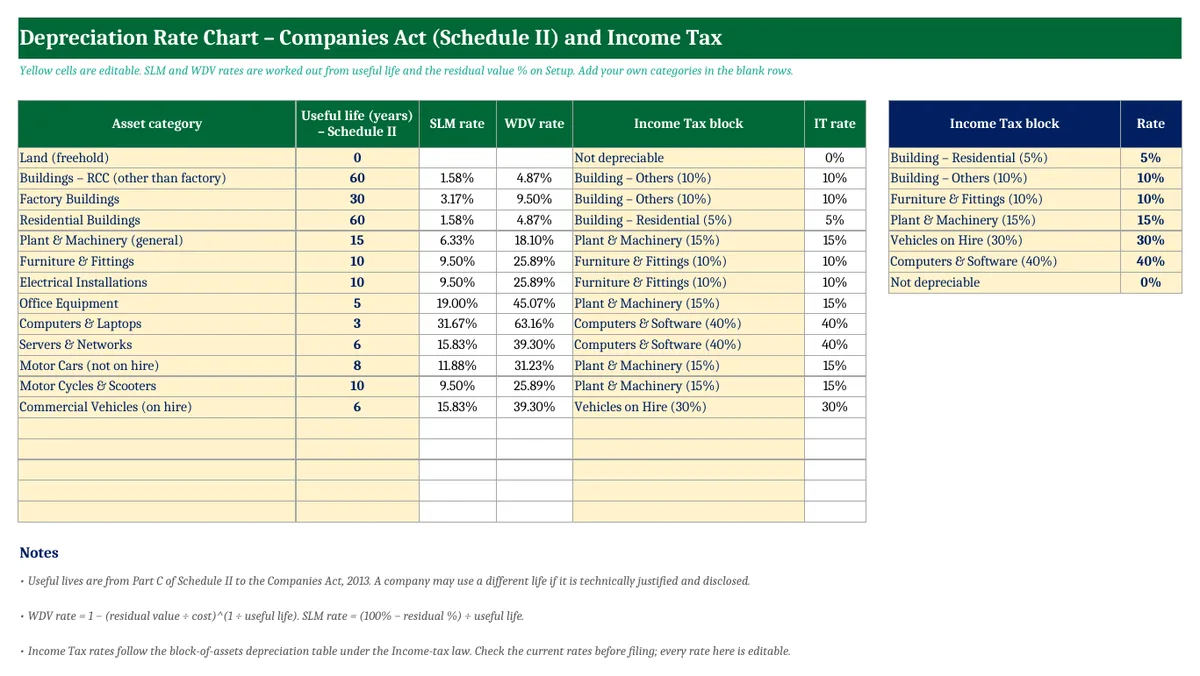
Depreciation rate chart as per Companies Act (Schedule II)
The rates below assume a 5% residual value.
| Asset | Useful life | SLM rate | WDV rate | Income Tax rate |
|---|---|---|---|---|
| Buildings (RCC, other than factory) | 60 years | 1.58% | 4.87% | 10% (5% if residential) |
| Factory buildings | 30 years | 3.17% | 9.50% | 10% |
| Plant & machinery (general) | 15 years | 6.33% | 18.10% | 15% |
| Furniture & fittings, electrical installations | 10 years | 9.50% | 25.89% | 10% |
| Office equipment | 5 years | 19.00% | 45.07% | 15% |
| Computers & laptops | 3 years | 31.67% | 63.16% | 40% |
| Servers & networks | 6 years | 15.83% | 39.30% | 40% |
| Motor cars (not on hire) | 8 years | 11.88% | 31.23% | 15% |
| Motor cycles & scooters | 10 years | 9.50% | 25.89% | 15% |
| Commercial vehicles used on hire | 6 years | 15.83% | 39.30% | 30% |
| Land | Not depreciated | |||
Fixed asset register format
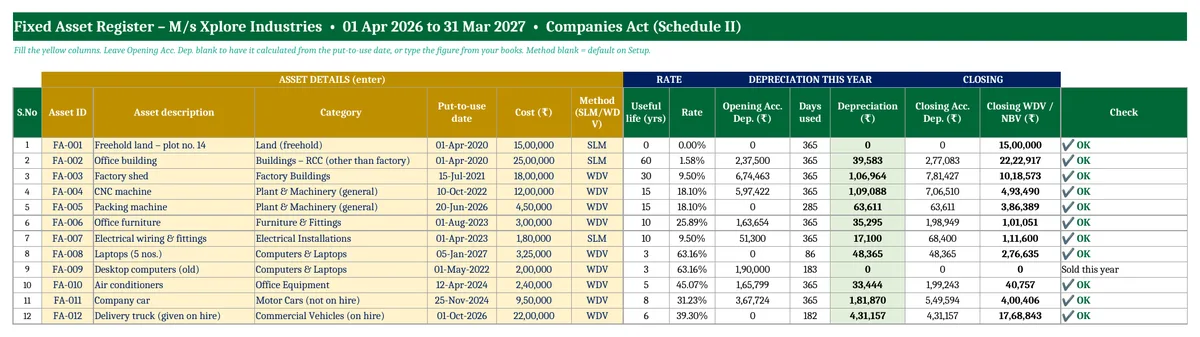
Each asset gets one row. You enter the yellow columns: asset ID, description, category, location, put-to-use date, cost, method (SLM or WDV), and the sale date and value if the asset was sold. The template fills in the useful life, rate, residual value, opening accumulated depreciation, days used, depreciation for the year, closing book value and profit or loss on sale.
For assets bought in earlier years, leave Opening Acc. Dep. blank and the template calculates it from the put-to-use date. If your books show a different figure, type it in and the template uses yours.
Worked examples (M/s Xplore Industries, FY 2026-27)
| Asset | Working | Depreciation |
|---|---|---|
| Office building, SLM, cost ₹25,00,000, 60 years | (25,00,000 − 1,25,000) ÷ 60 | ₹39,583 |
| CNC machine, WDV, opening book value ₹6,02,578 | 6,02,578 × 18.10% | ₹1,09,088 |
| Delivery truck, WDV, ₹22,00,000, used from 1 October 2026 | 22,00,000 × 39.30% × 182 ÷ 365 | ₹4,31,157 |
| Old desktops, fully depreciated, sold for ₹15,000 | 15,000 − book value 10,000 | Profit ₹5,000 |
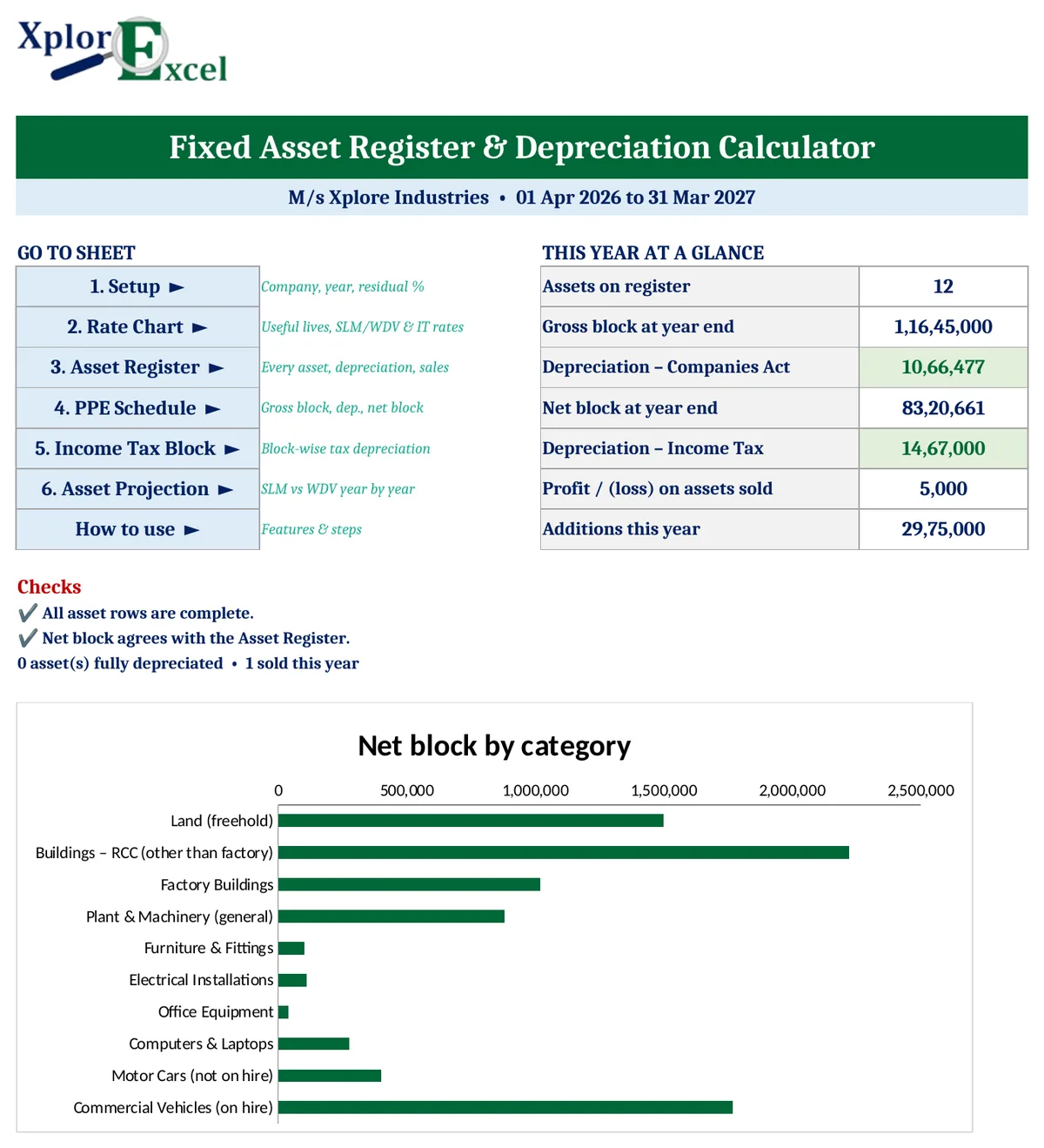
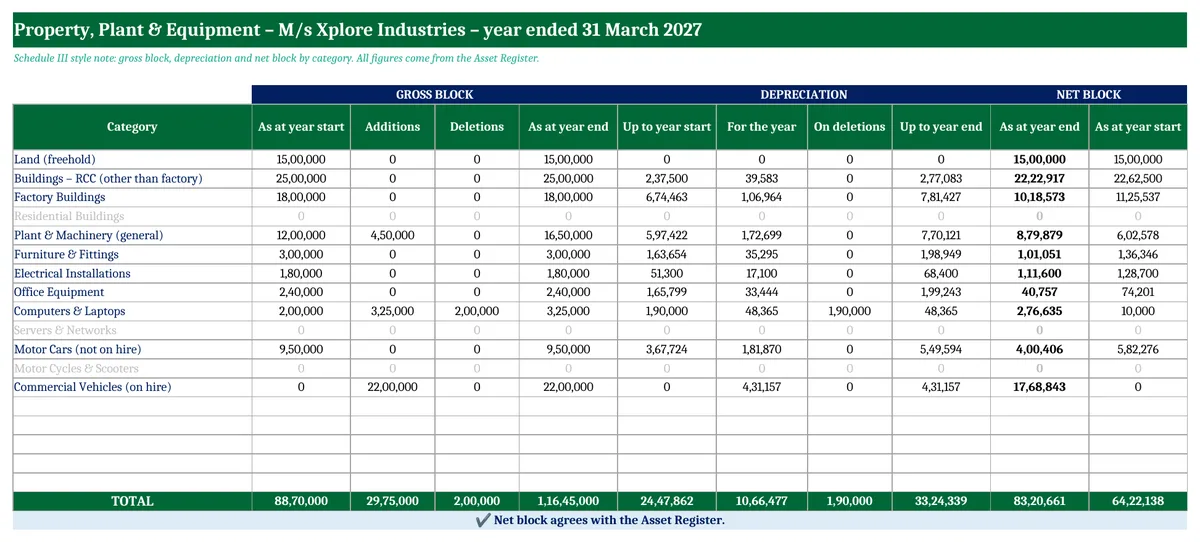
Across all 12 sample assets, depreciation under the Companies Act is ₹10,66,477 and the net block at the year end is ₹83,20,661.
PPE schedule (Schedule III note)
Company accounts show property, plant and equipment by category, with columns for gross block, depreciation and net block. The PPE Schedule sheet builds this note from the register and checks that its net block agrees with the register.
Depreciation as per Income Tax (block of assets)
For Income Tax, assets are pooled into blocks that share a rate, and depreciation is charged on the block’s written down value:
- Start with the opening WDV of the block.
- Add assets bought during the year and subtract the sale proceeds of assets sold.
- Apply the full rate. For additions used for less than 180 days in the year, apply half the rate.
- If the sale proceeds are more than the block’s value, the excess is a short-term capital gain.
In the sample, the computer block had an opening WDV of ₹60,000, sales of ₹15,000 and new laptops of ₹3,25,000 used for 86 days. The working is (60,000 − 15,000) × 40% + 3,25,000 × 20% = ₹83,000. The truck was used for 182 days, so it gets the full 30%.
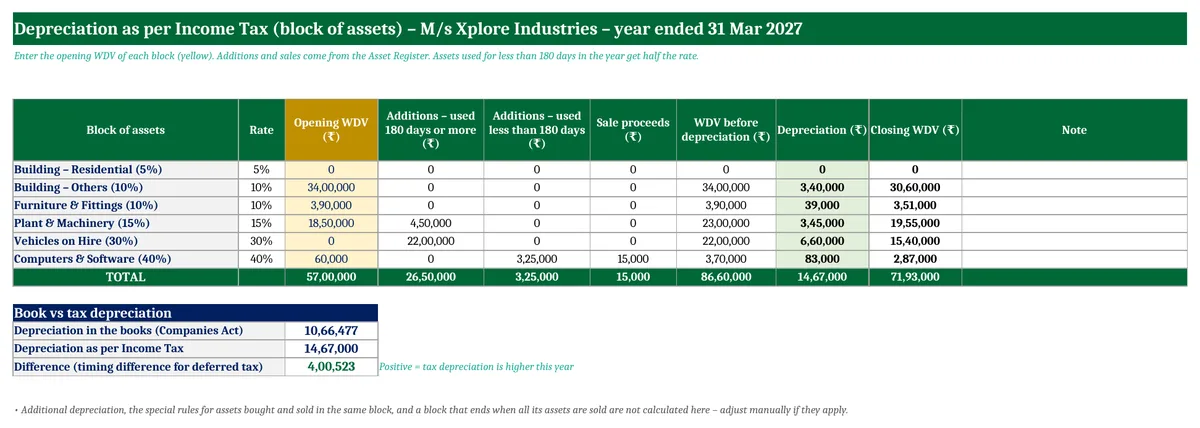
Total tax depreciation in the sample is ₹14,67,000, against ₹10,66,477 in the books. The ₹4,00,523 difference is a timing difference, which companies use to work out deferred tax.
SLM vs WDV: which shows a lower book value?
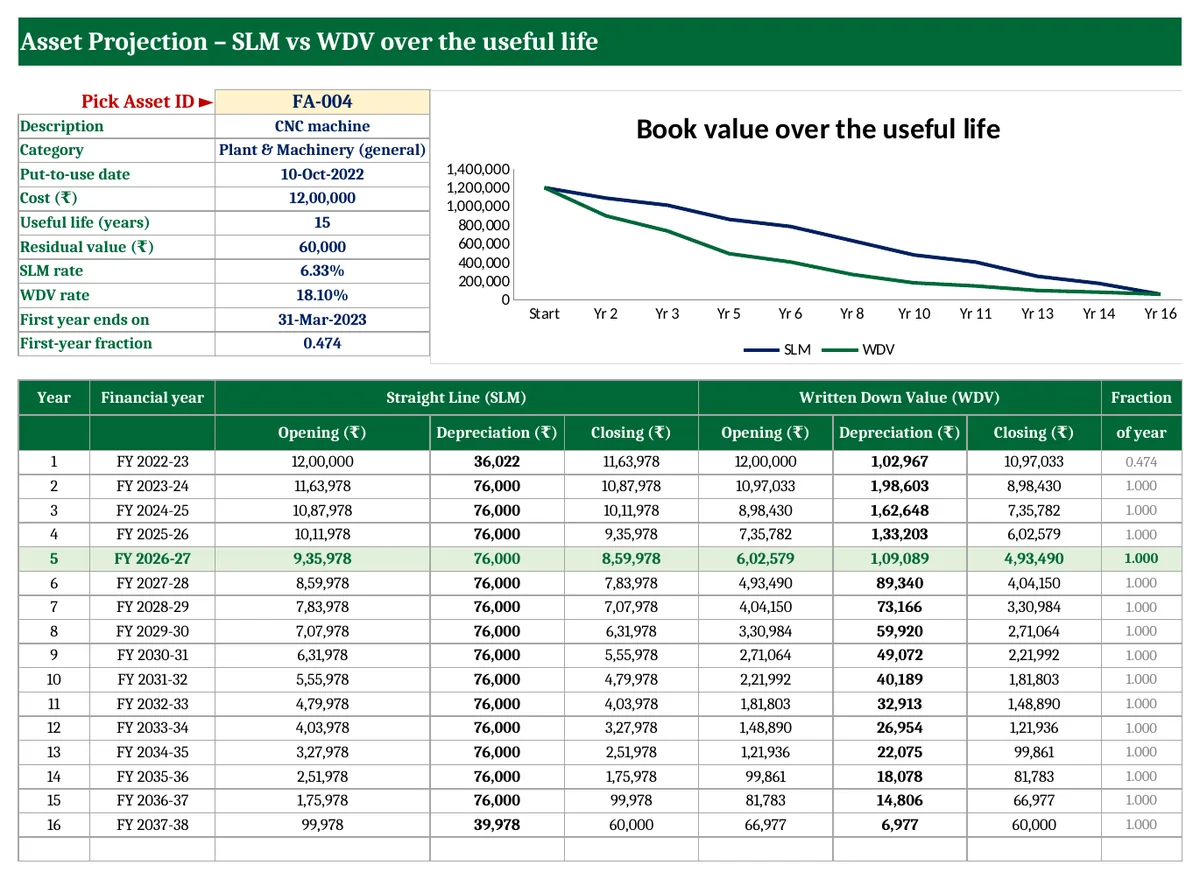
WDV charges more in the early years and less later, while SLM is the same every year. The Asset Projection sheet shows any asset’s book value year by year under both methods, and the current year is highlighted.
How to use the depreciation calculator in Excel (4 steps)
- Setup: Enter the company name, the start of the financial year, the residual value % and the default method.
- Rate Chart: Check the useful lives and Income Tax blocks, and add any categories of your own.
- Asset Register: Enter every asset, with the sale date and value for any you sold. Fix anything the Check column flags.
- Read the results: Use the PPE Schedule for the accounts and the Income Tax Block for the return, after entering each block’s opening WDV.
Download the Depreciation Calculator in Excel (Free)
File: Fixed Asset Register and Depreciation Calculator 1.0 · Format: .xlsx · Macros: none · Price: free.
Free download · one quick step
Unlock this free template
This one is a full working system, not a one-page format. It stays free. I only ask for a way to reach you, because:
- It has several linked sheets with a filled-in sample, so you see it working before you type your own entries.
- The formulas are locked so one wrong click can’t break your totals. If something still goes wrong, you’ll know where to ask.
- Tax and labour rules change. When GST, TDS or payroll rules change, I send the corrected file to the number or email you give here.
- No spam. A few messages a month at most, unsubscribe any time.
Made by Amanpreet Kaur Bharaj, XplorExcel, Hoshiarpur. You only need to do this once on this device.
The sample data has 12 assets so you can see how it works. Delete them and enter your own.
Frequently asked questions
How do I calculate depreciation in Excel?
For SLM, use =SLN(cost, residual value, life). For WDV, work out the rate with =1-(residual/cost)^(1/life), then multiply it by the opening book value each year. In the year of purchase or sale, multiply by days used ÷ 365. This template does all of this for every asset automatically.
What is the depreciation rate on computers as per the Companies Act?
End-user computers and laptops have a useful life of 3 years under Schedule II. With a 5% residual value, that is 31.67% under SLM or 63.16% under WDV. Servers and networks have a 6-year life. For Income Tax, computers fall in the 40% block.
Is depreciation charged on land?
No. Land does not wear out, so it is not depreciated under the Companies Act or Income Tax. Buildings on the land are depreciated separately.
What is the 180-day rule for depreciation in Income Tax?
If an asset is bought and put to use for less than 180 days in the financial year, only half the normal rate is allowed in that year. The rest of the cost stays in the block and is depreciated in later years.
Can I use SLM in the books and WDV for Income Tax?
Yes. A company can choose SLM or WDV for its books under the Companies Act, while Income Tax generally uses block-wise WDV rates. That is why the two depreciation figures differ, and the difference is a timing difference.
What residual value should I use?
Schedule II takes the residual value as normally not more than 5% of the original cost. A higher figure is allowed if it is justified and disclosed. The template uses 5%, and you can change it on the Setup sheet.
Can I use this template in Google Sheets?
Yes. Upload the .xlsx file to Google Drive and open it with Google Sheets. It has no macros.
More free accounting templates from Xplorexcel
- Trading and Profit and Loss Account Format in Excel
- Income Tax Calculator FY 2026-27
- Loan EMI Calculator with Prepayment
- All Excel templates
Disclaimer: Useful lives are from Schedule II to the Companies Act, 2013, and Income Tax rates are from the block-of-assets table. Both are for guidance only, so confirm with your auditor or tax adviser before finalising accounts or returns. Last reviewed: October 2026.
