
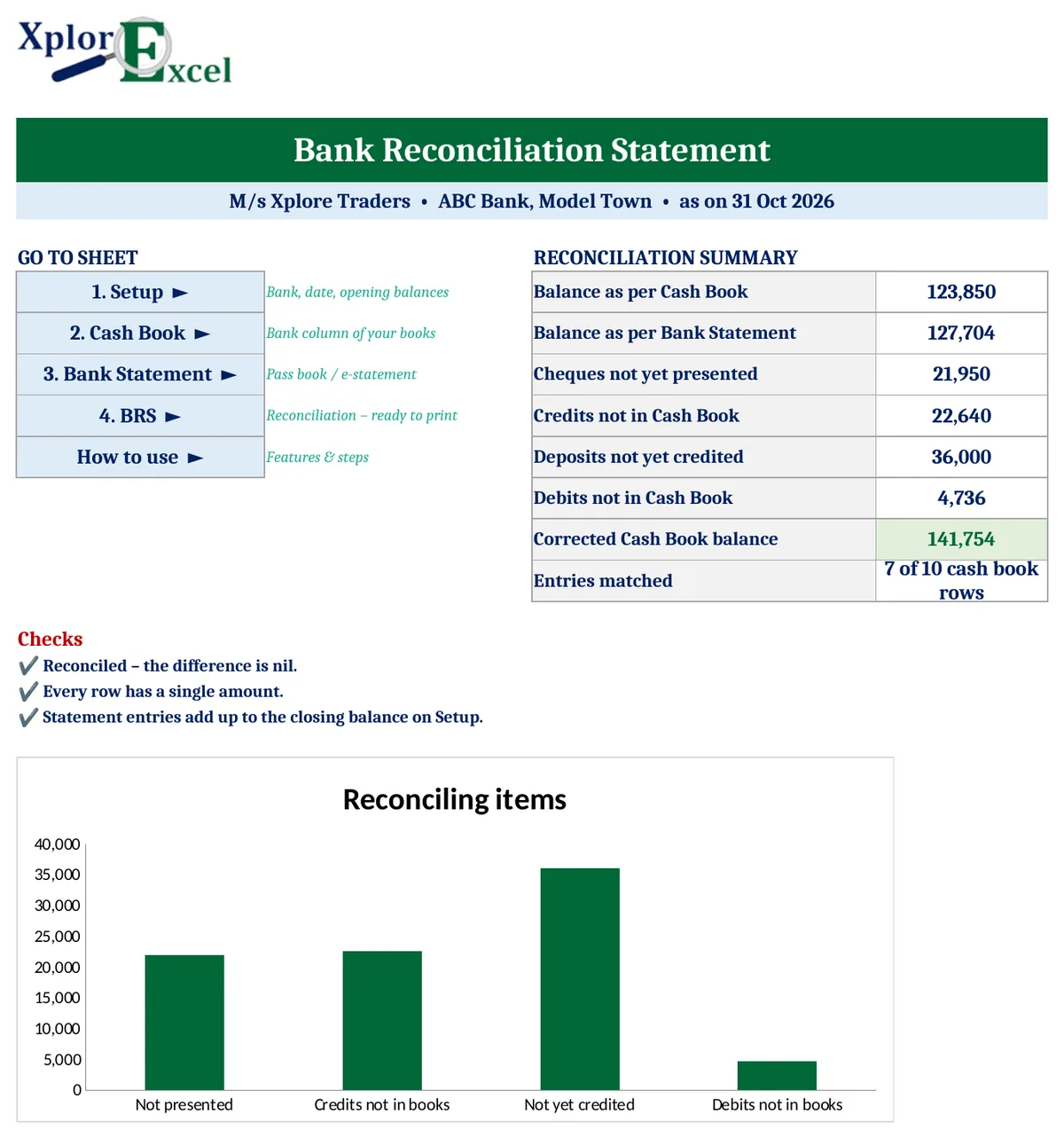
Quick answer: A bank reconciliation statement (BRS) explains why the bank balance in your Cash Book differs from the balance on the bank statement on the same date. Start with the Cash Book balance. Add cheques issued but not yet presented, and amounts the bank credited that are not in your books. Less cheques deposited but not yet credited, and amounts the bank debited that are not in your books. The result should equal the bank statement balance. The free Xplorexcel BRS template matches your Cash Book with the bank statement automatically, lists every unmatched item, and prepares the BRS ready to print.
Key takeaways
- Enter the bank column of your Cash Book and the bank statement, up to 200 entries each. You can paste the statement straight from your bank’s Excel download.
- Automatic matching: receipts are paired with deposits and payments with withdrawals, one-to-one by amount. A Match ID column lets you pair entries by hand.
- Prints a BRS in the standard format that grows or shrinks with the number of items, with a “Reconciled” check.
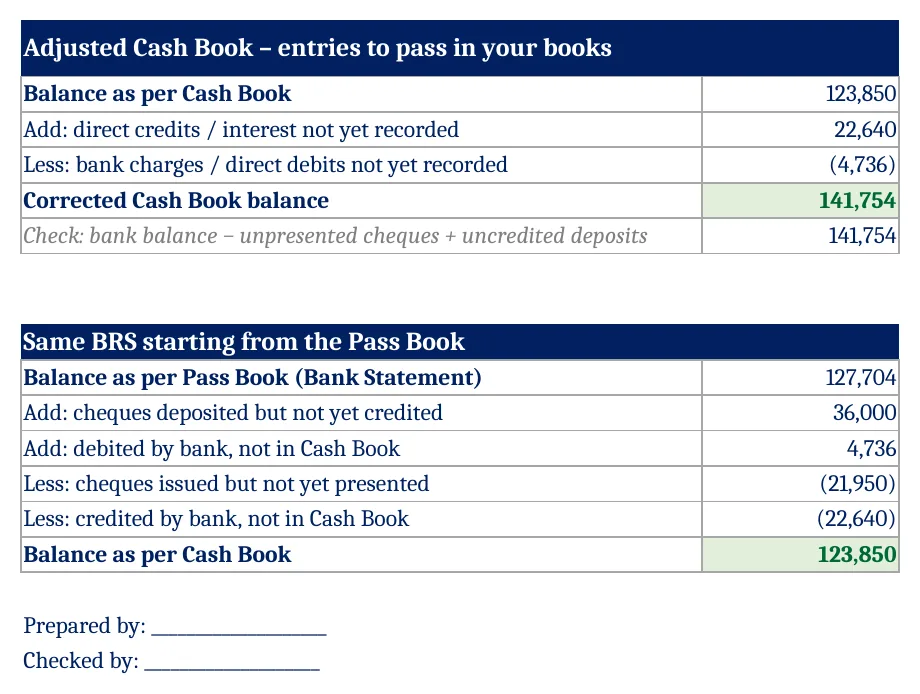
- An Adjusted Cash Book shows the entries you still need to pass, and the same BRS starting from the Pass Book is included for students.
- Last period’s uncleared cheques (B/F) are handled without counting them twice.
Why the Cash Book and the bank statement don’t agree
The two records are kept by different people at different times, so on any date some entries appear in one and not yet in the other:
| Reason | In the Cash Book? | On the bank statement? | Effect on bank balance |
|---|---|---|---|
| Cheque issued but not yet presented | Yes (payment) | Not yet | Bank shows more |
| Cheque deposited but not yet credited | Yes (receipt) | Not yet | Bank shows less |
| Direct deposit by a customer (NEFT, UPI), interest credited | Not yet | Yes (credit) | Bank shows more |
| Bank charges, NACH or ECS debits, cheque bounced | Not yet | Yes (debit) | Bank shows less |
| Errors in either record | Corrected in whichever record has the error | ||
Bank reconciliation statement format
| Particulars | ₹ |
|---|---|
| Balance as per Cash Book | xxx |
| Add: Cheques issued but not yet presented | xxx |
| Add: Amounts credited by the bank but not in the Cash Book | xxx |
| Less: Cheques deposited but not yet credited | (xxx) |
| Less: Amounts debited by the bank but not in the Cash Book | (xxx) |
| Balance as per Bank Statement (Pass Book) | xxx |
If you start from the Pass Book balance instead, every Add becomes Less and every Less becomes Add. For an overdraft, which is a credit balance in the Cash Book, the signs also reverse. The template handles this when you enter the overdraft as a minus figure.
Worked example: M/s Xplore Traders, October 2026
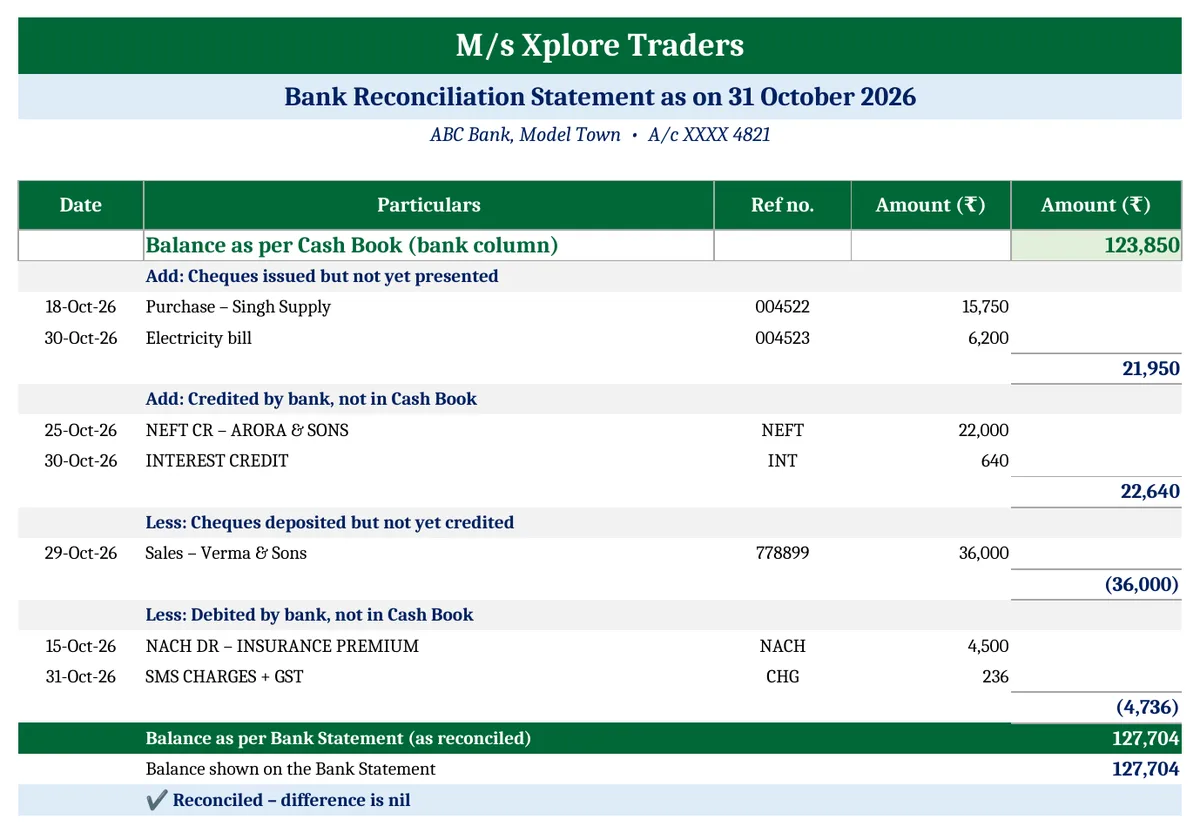
| Balance as per Cash Book on 31 October | ₹1,23,850 |
| Add: cheques 004522 and 004523 not yet presented (15,750 + 6,200) | ₹21,950 |
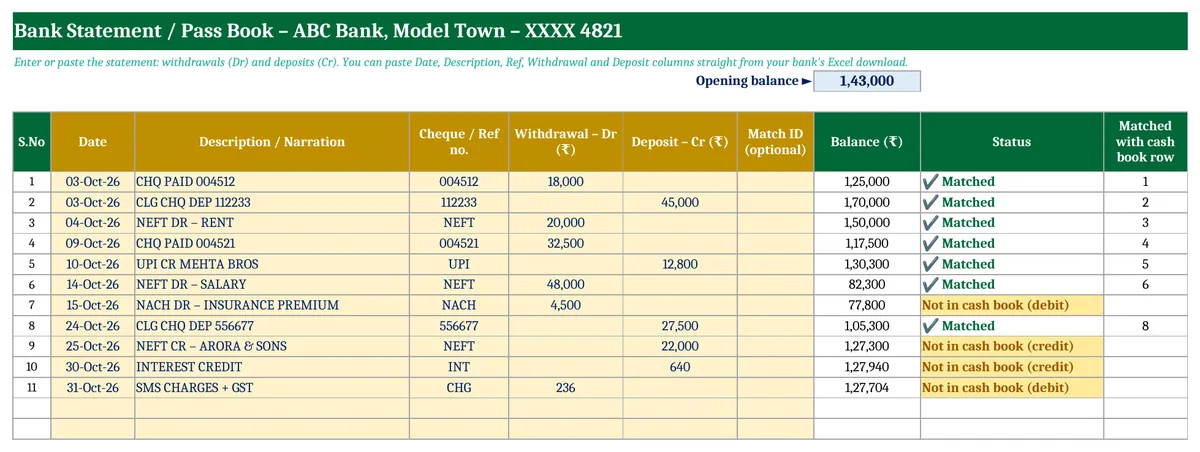
| Add: NEFT from Arora & Sons and interest, not in the Cash Book (22,000 + 640) | ₹22,640 |
| Less: cheque 778899 deposited on 29 October, not yet credited | (₹36,000) |
| Less: insurance NACH and SMS charges, not in the Cash Book (4,500 + 236) | (₹4,736) |
| Balance as per Bank Statement | ₹1,27,704 ✔ |
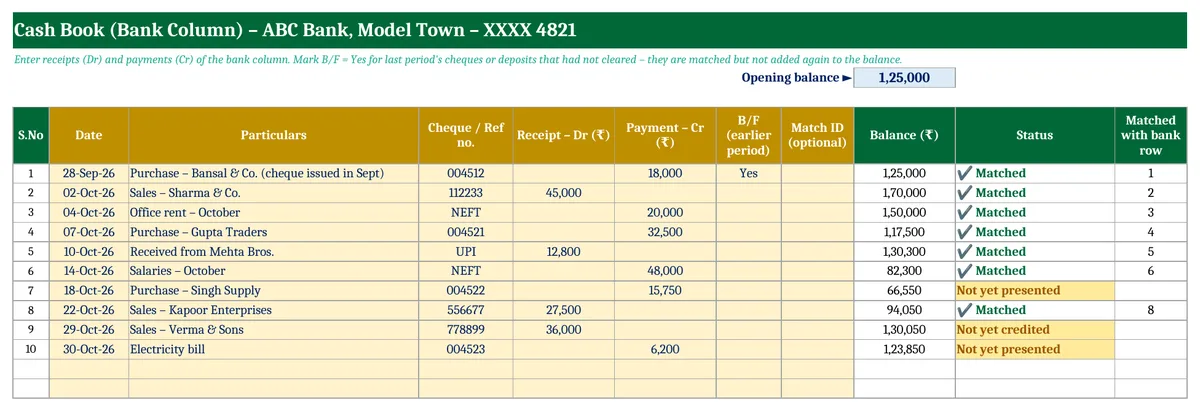
The cheque issued in September (004512, ₹18,000) was marked B/F in the Cash Book. It was presented on 3 October, so the template matched it without changing October’s balance.
How the automatic matching works
Every Cash Book receipt is paired with a bank deposit of the same amount, and every payment with a withdrawal of the same amount, one-to-one. If the same amount appears twice, the entries pair in date order. Both sheets show the status of each row: Matched, Not yet presented, Not yet credited or Not in cash book.
When amounts don’t match exactly, for example when two cheques were deposited together and the bank shows one total, type the same Match ID (such as A1) on both rows to pair them by hand.
Adjusted Cash Book: the entries still to pass
The bank’s direct credits and debits are genuine transactions you haven’t recorded yet. Pass them in your books, and the corrected Cash Book balance then differs from the bank only by the timing items (cheques not yet presented or credited).
How to prepare a bank reconciliation statement in Excel (4 steps)
- Setup: Enter the business and bank name, the reconciliation date, both opening balances and the closing balance shown on the bank statement.
- Cash Book: Enter this period’s bank receipts and payments. Add last period’s uncleared items with B/F set to Yes.
- Bank Statement: Enter or paste the withdrawals and deposits.
- BRS: Check that it says “Reconciled”, pass the Adjusted Cash Book entries in your books, then print.
Download the Bank Reconciliation Statement in Excel (Free)
File: Bank Reconciliation Statement 1.0 · Format: .xlsx · Macros: none · Price: free.
Free download · one quick step
Unlock this free template
This one is a full working system, not a one-page format. It stays free. I only ask for a way to reach you, because:
- It has several linked sheets with a filled-in sample, so you see it working before you type your own entries.
- The formulas are locked so one wrong click can’t break your totals. If something still goes wrong, you’ll know where to ask.
- Tax and labour rules change. When GST, TDS or payroll rules change, I send the corrected file to the number or email you give here.
- No spam. A few messages a month at most, unsubscribe any time.
Made by Amanpreet Kaur Bharaj, XplorExcel, Hoshiarpur. You only need to do this once on this device.
Students can enter a textbook question as a Cash Book and a Pass Book, and the template gives the answer both ways: starting from the Cash Book and starting from the Pass Book.
Frequently asked questions
What is a bank reconciliation statement?
A statement prepared on a given date that explains the difference between the bank balance in the Cash Book and the balance on the bank statement. It lists items such as cheques not yet presented, deposits not yet credited, and bank credits and charges not yet recorded in the books.
How often should I prepare a BRS?
At least monthly, when the bank statement arrives. Businesses with many transactions often reconcile weekly. Regular reconciliation catches errors, missed entries, bounced cheques and fraud early.
What is added to the Cash Book balance in a BRS?
Cheques issued but not yet presented for payment, and amounts the bank credited that are not yet in the Cash Book, such as direct deposits, interest and dividends collected.
What is deducted from the Cash Book balance in a BRS?
Cheques deposited but not yet credited by the bank, and amounts the bank debited that are not yet in the Cash Book, such as bank charges, NACH or ECS payments, interest on overdraft and dishonoured cheques.
How do I prepare a BRS when there is an overdraft?
An overdraft is a credit balance in the Cash Book and a debit balance in the Pass Book. Enter it as a minus figure and the same formula still works. In a handwritten BRS, the additions and deductions are reversed.
Can I use this template in Google Sheets?
Yes. Upload the .xlsx file to Google Drive and open it with Google Sheets. It has no macros.
More free accounting templates from Xplorexcel
- Cash Book Template
- Petty Cash Book Format in Excel
- Trading and Profit and Loss Account Format
- Depreciation Calculator in Excel
- All Excel templates
Last reviewed: October 2026.
