
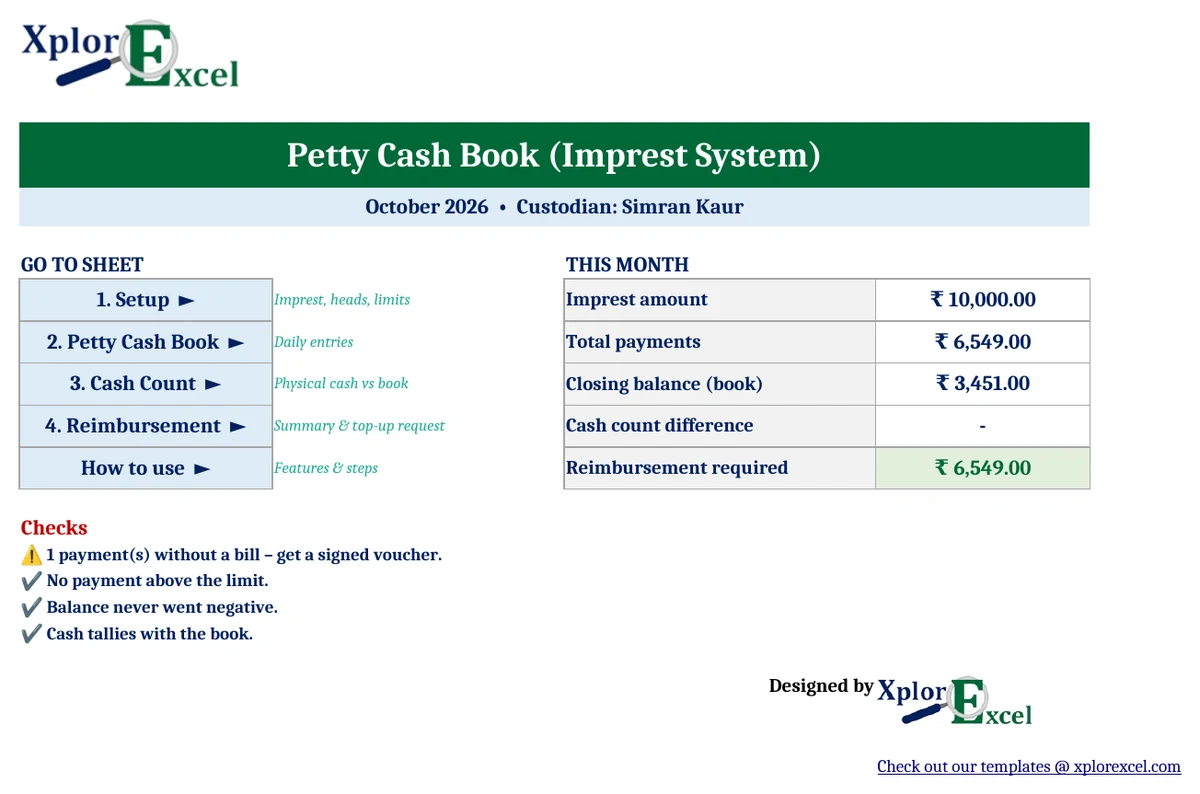
Quick answer: A petty cash book format records the small cash payments an office makes, such as stationery, courier, tea and local conveyance. Each entry shows the date, voucher number, who was paid, the amount and the expense head. Under the imprest system, the cashier starts with a fixed float (say ₹10,000), and at month-end is reimbursed exactly what was spent, which brings the float back to the fixed amount. The free Xplorexcel petty cash book format in Excel keeps the running balance, splits every payment by expense head, checks the physical cash, and prints the reimbursement request.
Key takeaways
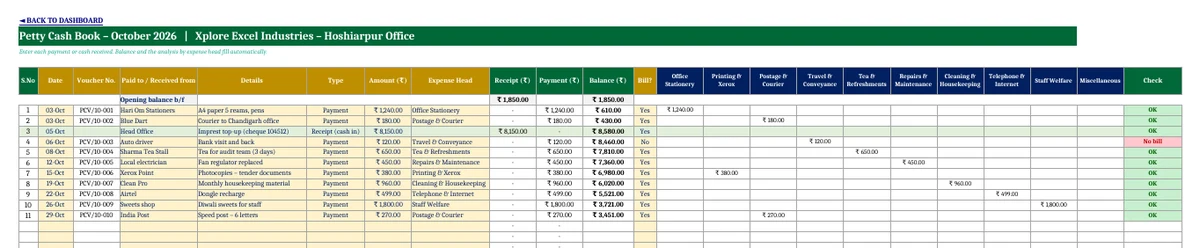
- An analytical (columnar) petty cash book: each payment is split automatically into up to 10 expense heads that you name.
- Imprest system: a running balance and an automatic reimbursement amount to restore the float.
- Voucher numbers are generated automatically, and every row is checked for a missing bill, a payment over the limit or a negative balance.
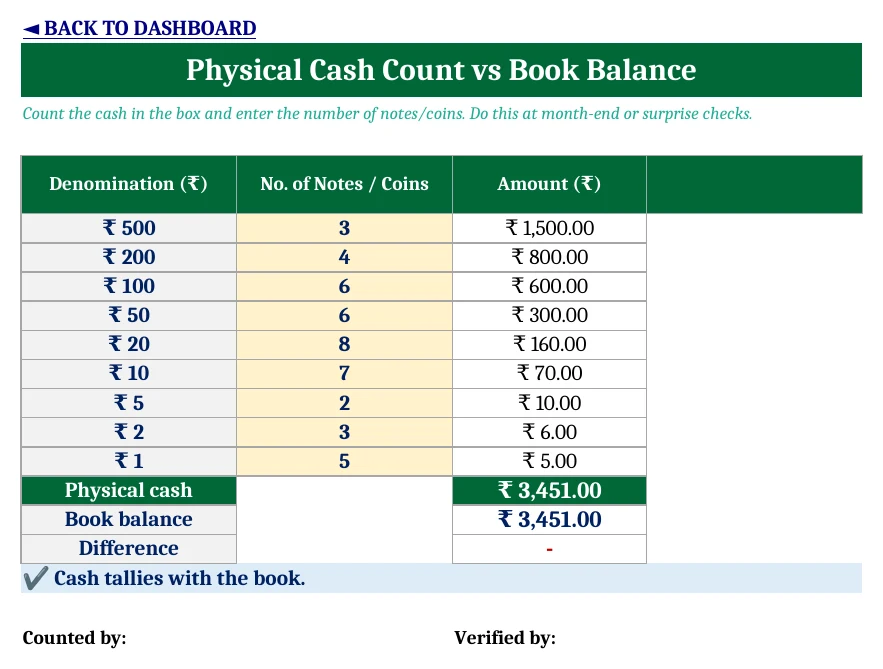
- A cash count by denomination shows any shortage or excess against the book balance.
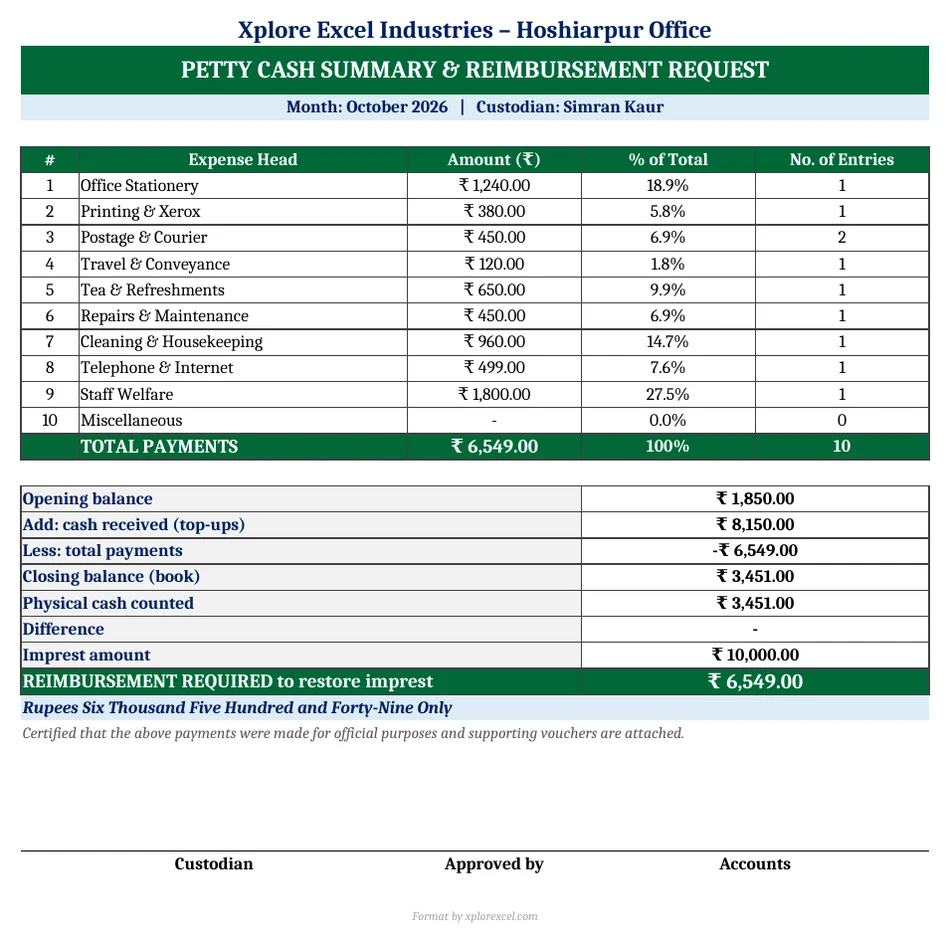
- Prints a one-page monthly summary and reimbursement request, with the amount in words and signature boxes.
What is a petty cash book?
A petty cash book is a record of small, day-to-day cash expenses that aren’t worth paying by cheque or bank transfer. Payments are usually made by a petty cashier (custodian) from a cash box. Keeping them in a separate book keeps the main cash book clean, and it makes the small expenses easy to check.
Petty cash book format: the columns you need
| Column | What goes in it |
|---|---|
| Date | Date of payment or receipt |
| Voucher No. | Serial number of the petty cash voucher (automatic in the template) |
| Paid to / Received from | Shop, person or office |
| Details | What was bought or paid for |
| Receipt | Cash received, such as the imprest top-up |
| Payment | Cash paid out |
| Balance | Running cash in hand |
| Analysis columns | The same payment repeated under its expense head (stationery, postage, conveyance and so on) |
| Bill? | Whether a bill or receipt is attached |
How the imprest system works
- The custodian is given a fixed float, the imprest, for example ₹10,000.
- Small payments are made from it during the month, each with a voucher and a bill.
- At month-end, the total paid out is reimbursed, so the cash is back to ₹10,000.
Reimbursement = Imprest amount − Closing cash balance (which equals total payments, provided no other cash came in).
Worked example: October 2026
| Opening balance | ₹1,850 |
| Add: top-up received on 5 October | ₹8,150 |
| Less: payments (10 vouchers) | − ₹6,549 |
| Closing balance | ₹3,451 |
| Physical cash counted | ₹3,451 (tallies) |
| Reimbursement required (₹10,000 − ₹3,451) | ₹6,549 |
Checking the physical cash
Count the notes and coins in the cash box by denomination and enter them on the Cash Count sheet. The template compares the total with the book balance and flags any shortage (usually a payment not recorded) or excess (usually a receipt not recorded). Surprise counts are a simple internal-control step that auditors like to see.
How to use the petty cash book format in Excel (4 steps)
- Setup: Enter the organisation, custodian, month, imprest amount, opening balance and single-payment limit. Name up to 10 expense heads.
- Petty Cash Book: For every payment, enter the date, paid to, details, type, amount, expense head and whether there’s a bill. Record top-ups as “Receipt (cash in)”.
- Cash Count: At month-end, count the cash and clear any difference.
- Reimbursement: Print, sign, attach the vouchers and send it for the top-up. For the next month, save a copy and enter the new opening balance.
Download the Petty Cash Book Format in Excel (Free)
File: Petty Cash Book Imprest 1.0 · Format: .xlsx · Macros: none · Price: free.

Frequently asked questions
What is the imprest system of petty cash?
The petty cashier is given a fixed amount (the imprest). At the end of each period, they’re reimbursed exactly what was spent, so the cash in hand goes back to the fixed amount. It keeps control simple, because cash plus vouchers should always equal the imprest.
What is an analytical petty cash book?
It’s a petty cash book with extra columns for each type of expense, such as stationery, postage and conveyance. Each payment is written in the total column and again under its expense head, so the monthly total for every head is ready for posting to the ledger.
How is petty cash reimbursement calculated?
Reimbursement = imprest amount − closing cash balance. If no other cash was received, it equals the total payments made during the period.
What should be done if petty cash does not tally?
Recheck the vouchers against the book entries. A shortage usually means a payment wasn’t recorded, and an excess usually means a receipt wasn’t. If it still doesn’t tally, record the difference with the approval of the person in charge.
What is the maximum petty cash payment?
Each organisation sets its own limit. Larger payments should go through bank or cheque. The template lets you set a limit and flags any payment above it.
Can I use this petty cash book format in Google Sheets?
Yes. Upload the .xlsx to Google Drive and open it with Google Sheets. It has no macros.
More free accounting templates from Xplorexcel
- Cash Book Template – Free Dynamic Excel Workbook
- Income and Expenses Tracker Template
- TA DA Bill Format in Excel
- Purchase Order Format in Excel with GST
- All Excel templates
Last reviewed: September 2026.