
Quick answer: A customer outstanding report lists every unpaid bill, who owes it and for how long. Receivables ageing splits that outstanding into time bands: not yet due, 1–30, 31–60, 61–90 and over 90 days past the due date. The older a bill, the harder it is to collect, so you chase the oldest and biggest amounts first. The free Xplorexcel tracker does this automatically from your bills and payments. It also matches payments bill-wise, prints a customer statement and writes a ready-to-send WhatsApp payment reminder.
Key takeaways
- Enter bills and payments. The due date, balance, days overdue and age band are worked out for you.
- Bill-wise matching: mark a payment against a bill, or leave it “on account” and it clears the oldest bills first.
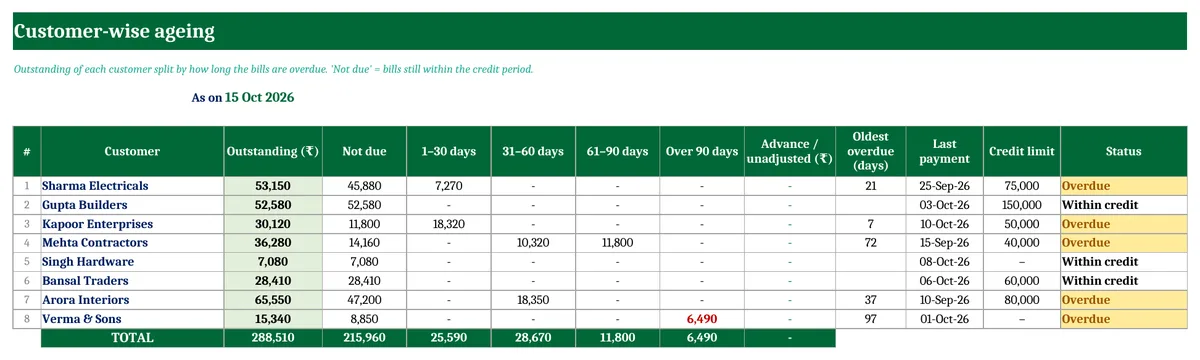
- Customer-wise ageing (not due, 1–30, 31–60, 61–90, 90+), with credit-limit alerts.
- A printable statement and a WhatsApp reminder for any customer, with your UPI ID.
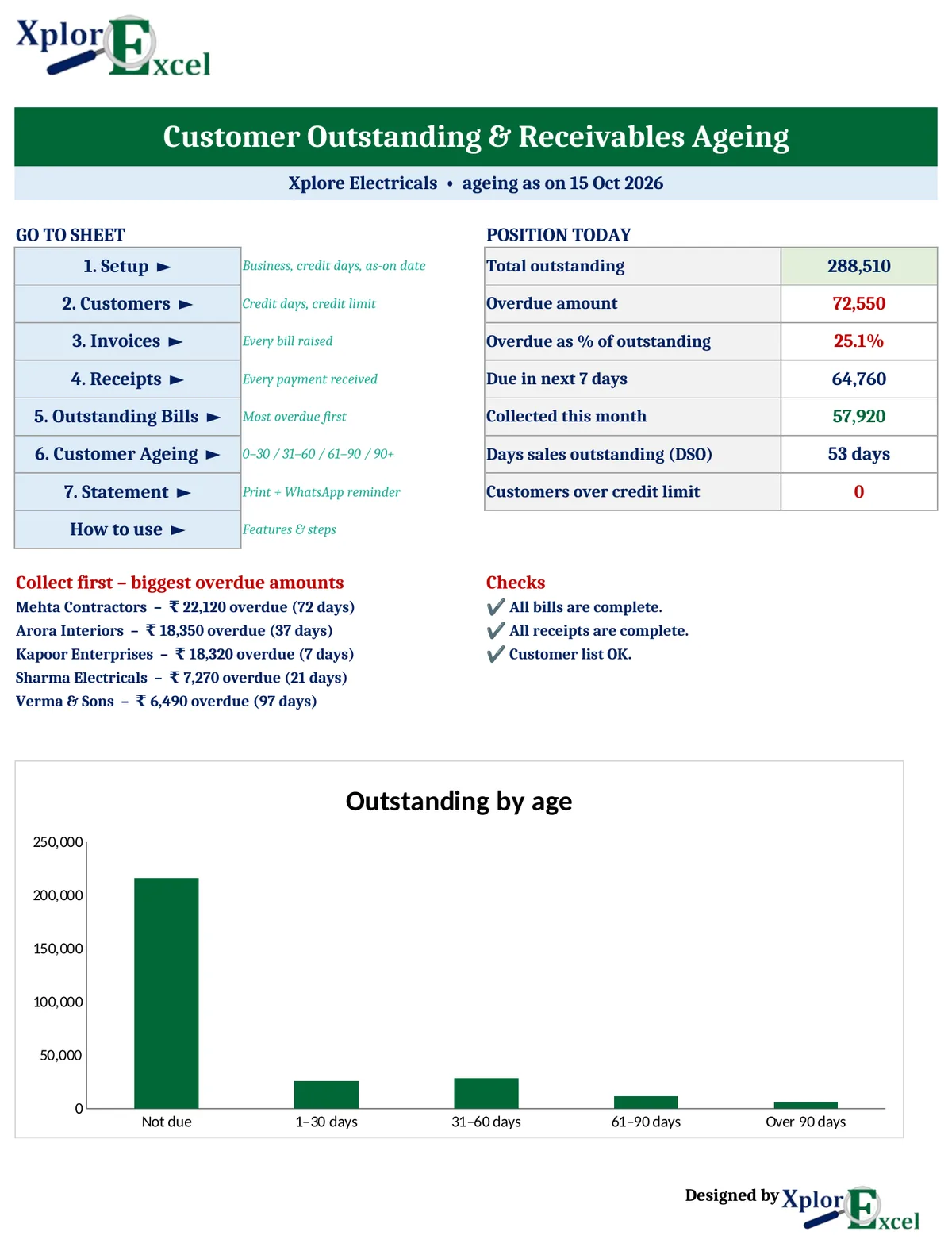
- A dashboard showing total outstanding, overdue %, amounts due in the next 7 days, collections and DSO.
What is receivables ageing?
An ageing report (also written aging) groups the money customers owe you by how long it has been overdue. The bands this template uses are the common ones:
| Age band | Meaning | What to do |
|---|---|---|
| Not due | The bill is still within the customer’s credit period | Nothing yet. Remind a few days before the due date |
| 1–30 days | Just missed the due date | Send a polite reminder |
| 31–60 days | Clearly late | Call, and send the statement |
| 61–90 days | Seriously late | Put further credit on hold |
| Over 90 days | At risk of becoming a bad debt | Follow up personally, and consider stopping supplies |
Days overdue = ageing date − due date, where due date = bill date + the customer’s credit days. Example: a bill dated 8 September with 30 days’ credit is due on 8 October. On 15 October it is 7 days overdue and falls in the 1–30 band.
Bill-wise payment matching (FIFO)
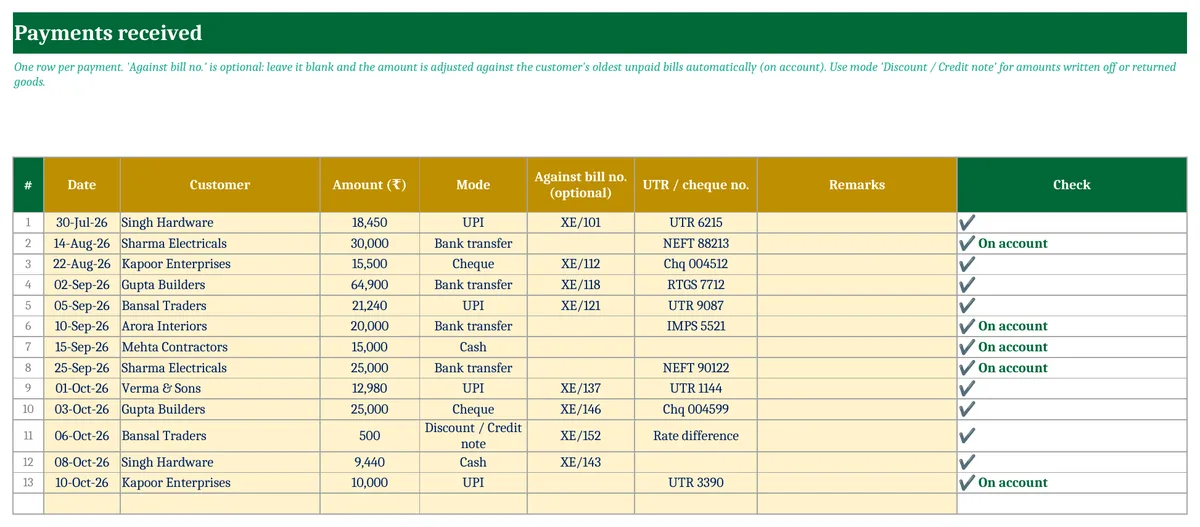
Customers often pay a round amount without saying which bill it is for. In the Receipts sheet you have two choices:
- Against bill no.: type the bill number, and the payment reduces that bill only.
- Leave it blank (on account): the payment is adjusted against the customer’s oldest unpaid bill first, then the next oldest, and so on. This is the first-in, first-out method most businesses and auditors follow.
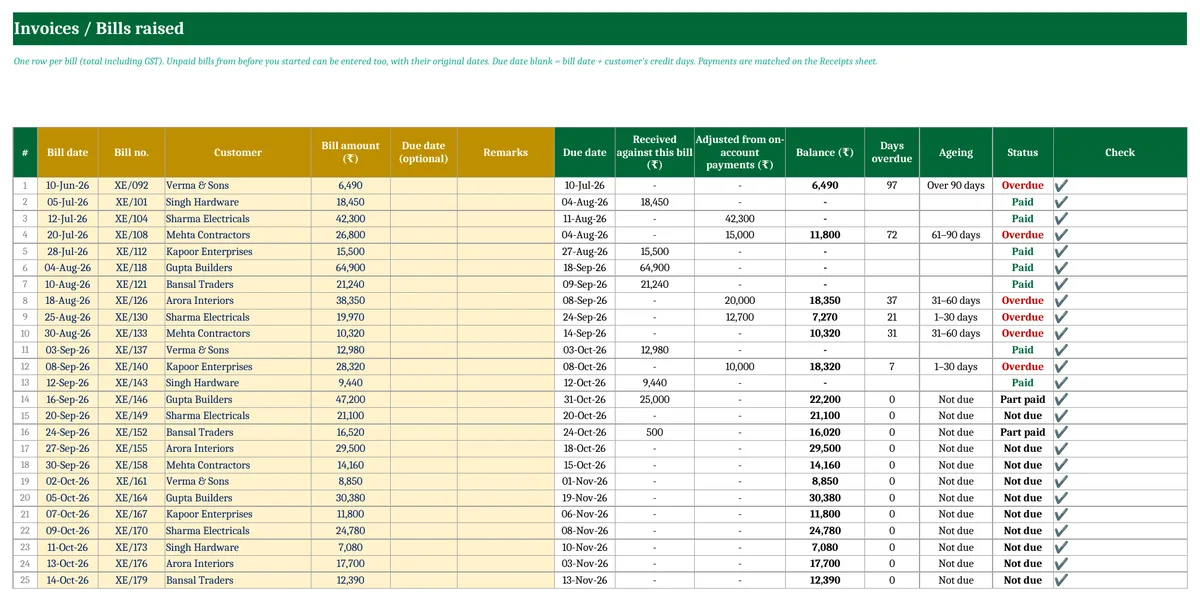
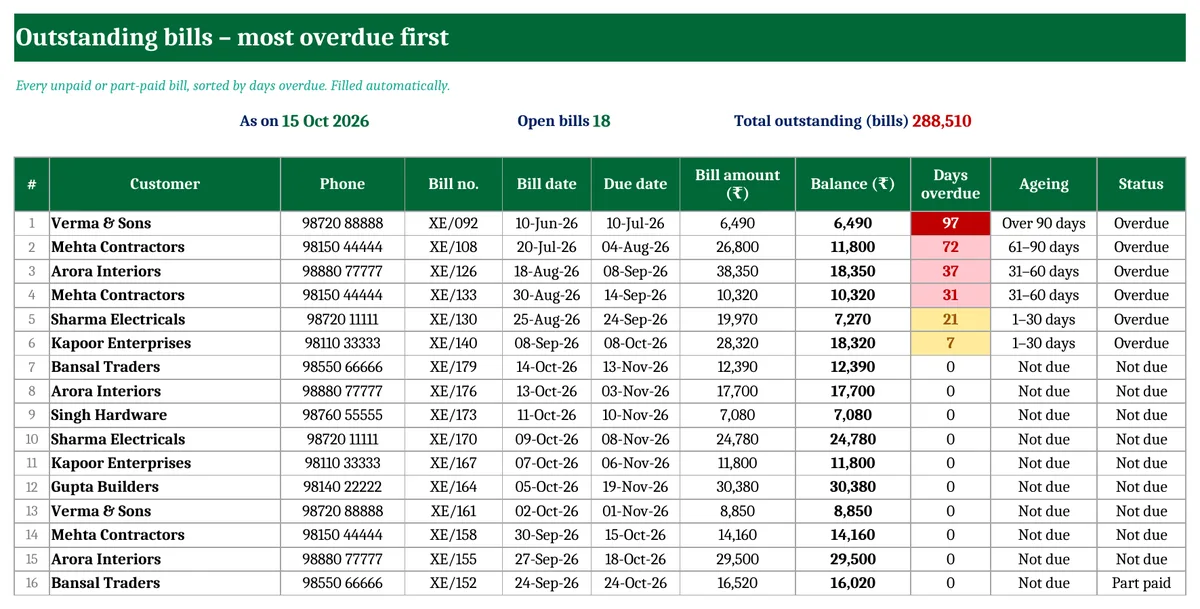
Example from the sample file: Sharma Electricals has bills of ₹42,300 (12 July) and ₹19,970 (25 August), and paid ₹30,000 and ₹25,000 on account. The ₹55,000 first clears the July bill in full, and the remaining ₹12,700 goes against the August bill, leaving ₹7,270 outstanding on it, 21 days overdue.
Outstanding bills, most overdue first
The Outstanding Bills sheet lists every unpaid or part-paid bill, sorted by days overdue, with the customer’s phone number. Bills over 30 days late are highlighted, and bills over 90 days late turn red. Work down this list for your follow-up calls.
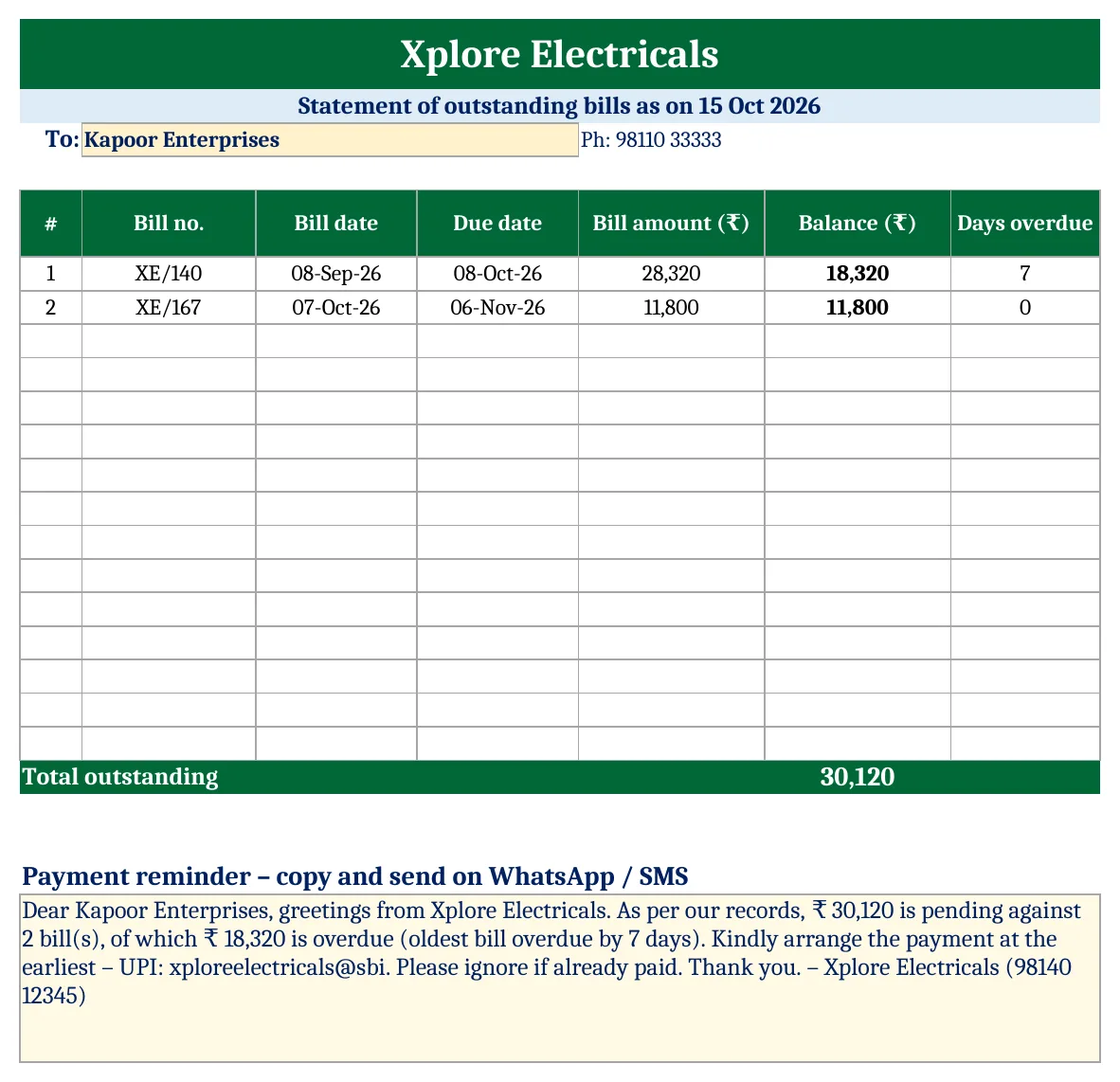
Customer statement and WhatsApp payment reminder
Pick a customer on the Statement sheet to get a one-page statement of their unpaid bills, ready to print or save as PDF. Below it, a payment reminder is written for you with the total pending, the overdue amount, the oldest overdue bill and your UPI ID. Copy it into WhatsApp or SMS.
DSO: how many days of sales are stuck with customers?
Days Sales Outstanding (DSO) = total outstanding ÷ average daily credit sales. The template uses the last 90 days of bills: DSO = outstanding ÷ (bills of the last 90 days ÷ 90). In the sample, ₹2,88,510 outstanding against about ₹4.9 lakh of 90-day sales gives a DSO of 53 days. If your usual credit period is 30 days, customers are paying about three weeks late on average. A rising DSO is an early warning of cash-flow trouble.
How to use the receivables tracker (5 steps)
- Setup: enter your business name, WhatsApp number, UPI ID and default credit days. Leave “Ageing as on” blank to age up to today.
- Customers: add each customer, with their own credit days and credit limit if different.
- Invoices: enter every bill (total including GST). Enter old unpaid bills with their original dates.
- Receipts: enter every payment. Add the bill number if you know it, otherwise leave it blank.
- Follow up: check the Dashboard and Outstanding Bills, then send statements and reminders.
Download the Customer Outstanding & Receivables Ageing Tracker (Free)
File: Customer Outstanding and Receivables Ageing Tracker 1.0 · Format: .xlsx · Macros: none · Price: free.

Customer Outstanding and Receivables Ageing Tracker 1.0
The sample has 8 customers, 25 bills and 13 payments. Clear the yellow cells on Customers, Invoices and Receipts and enter your own.
Frequently asked questions
How do I make an ageing report in Excel?
List each unpaid bill with its due date and balance. Work out days overdue as the report date minus the due date, then group the balances into bands (0–30, 31–60, 61–90, 90+) with SUMIFS for each customer. This template does all of it, and also handles part payments and on-account payments.
What is the difference between “not due” and “overdue”?
A bill is not due while it is still inside the credit period you gave the customer. It becomes overdue the day after the due date. Only overdue amounts need chasing.
What does “on account” payment mean?
A payment the customer made without naming a bill. The template applies it to that customer’s oldest unpaid bills first, so your ageing stays realistic.
How do I record a discount or returned goods?
In Receipts, choose the mode “Discount / Credit note” and enter the amount. Fill in the bill number if it relates to one bill.
What is a good DSO?
Close to your normal credit period. If you give 30 days’ credit, a DSO of 30–40 days is healthy. A DSO far above your credit days means customers are paying late.
Can I use this in Google Sheets?
Yes. Upload the .xlsx file to Google Drive and open it with Google Sheets. It has no macros.
More free business templates from Xplorexcel
- GST Invoice Format in Excel
- Cash Book Template
- Inventory Management Template
- Income & Expenses Tracker
- All Excel templates
Last reviewed: October 2026.
