
Quick answer: A supplier payables tracker lists every purchase bill you have not paid yet, when each one is due and how late any of them already are. In India there is a second deadline to watch: bills from Micro and Small (MSME) suppliers must be paid within the agreed credit period, but never later than 45 days, and within 15 days if there is no written agreement. If you pay later, that purchase can be disallowed as an expense for the year. The free Xplorexcel template works out both dates for every bill. It sorts your bills into a payment plan, soonest first, and shows supplier-wise ageing.
Key takeaways
- Enter bills and payments. The due date, balance, days overdue and the MSME last date are worked out for you.
- The Payment Planner lists every unpaid bill by pay-by date with a running total, so you know how much cash this week needs.
- Red MSME alerts show bills that are already late or coming due within your warning days.
- Pay against a bill, or pay “on account” and the payment clears the oldest bills first.
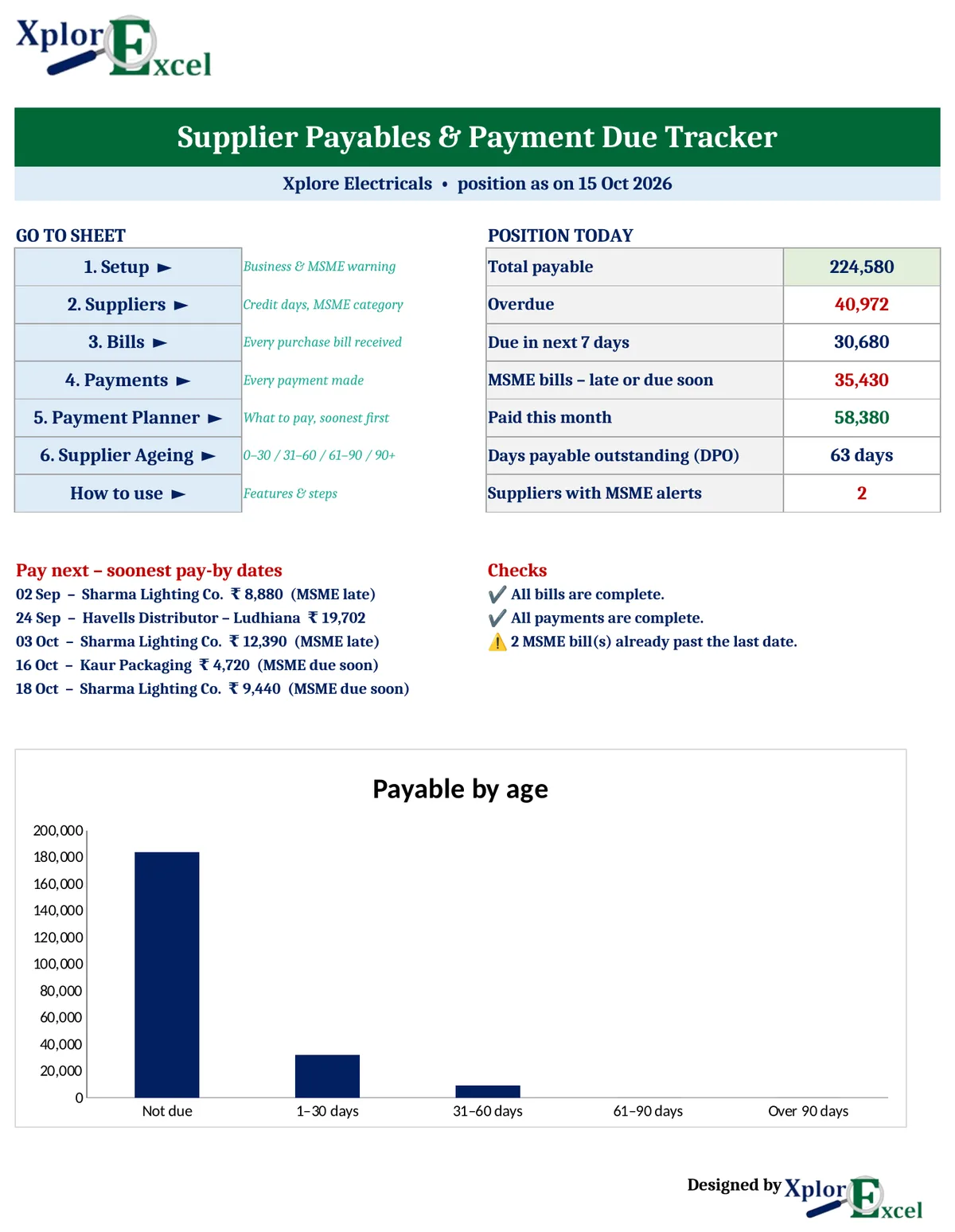
- The dashboard shows total payable, overdue, amounts due in 7 days, MSME bills at risk, payments this month and DPO.
Why track supplier payments at all?
Most small businesses watch money coming in closely and money going out loosely. Bills sit in a drawer or a WhatsApp chat until the supplier calls. That costs you in three ways:
- Cash surprises: four bills fall due in the same week and the bank balance is short.
- Supplier trust: late payers get worse rates, less credit and are served last when stock is short.
- Tax: late payment to a Micro or Small supplier can push that expense out of this year’s profit and loss for income tax.
A payables tracker fixes this with one list: what do I owe, to whom, and by when?
The MSME 45-day payment rule, in plain words
Under the MSME law, when you buy from a supplier registered as a Micro or Small enterprise (they will have an Udyam registration number):
| Situation | Pay within |
|---|---|
| Written agreement on credit days (purchase order, contract) | The agreed days, but maximum 45 days |
| No written agreement | 15 days |
| Supplier is Medium or not MSME | The rule does not apply. Use your normal credit terms |
What happens if you pay late:
- The supplier can claim interest at three times the RBI bank rate, compounded monthly.
- Since 2024, the unpaid amount can be disallowed as an expense in your income-tax computation for that year. It is allowed only in the year you actually pay.
The days are counted from the date you accept the goods or services. For most shops that is the bill date, which is what the template uses. Some suppliers registered under Udyam are traders, and the income-tax part is generally not applied to them. Because these details matter, confirm the position for your business with your CA. The template gives you the dates; your CA confirms which bills are covered.
What’s inside the template
| Sheet | What it does |
|---|---|
| Dashboard | Total payable, overdue, due in next 7 days, MSME bills at risk, paid this month, DPO, next 5 bills to pay, checks and an ageing chart |
| Setup | Business name, default credit days, the date to calculate on, and how many days’ warning you want before an MSME last date |
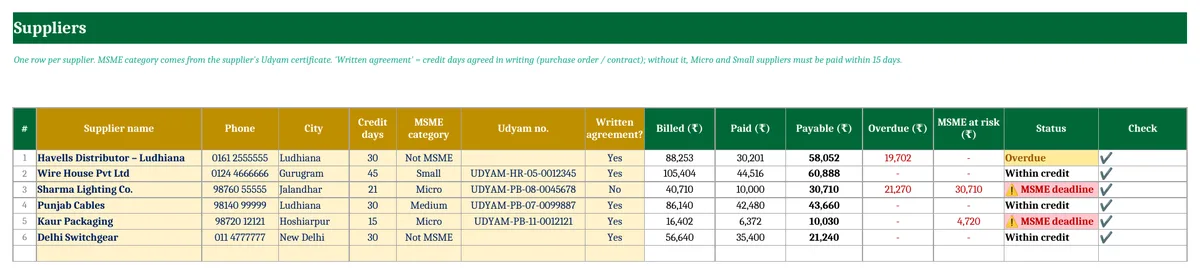
| Suppliers | Up to 100 suppliers with credit days, MSME category, Udyam number and written-agreement flag, plus each supplier’s billed, paid, payable and status |
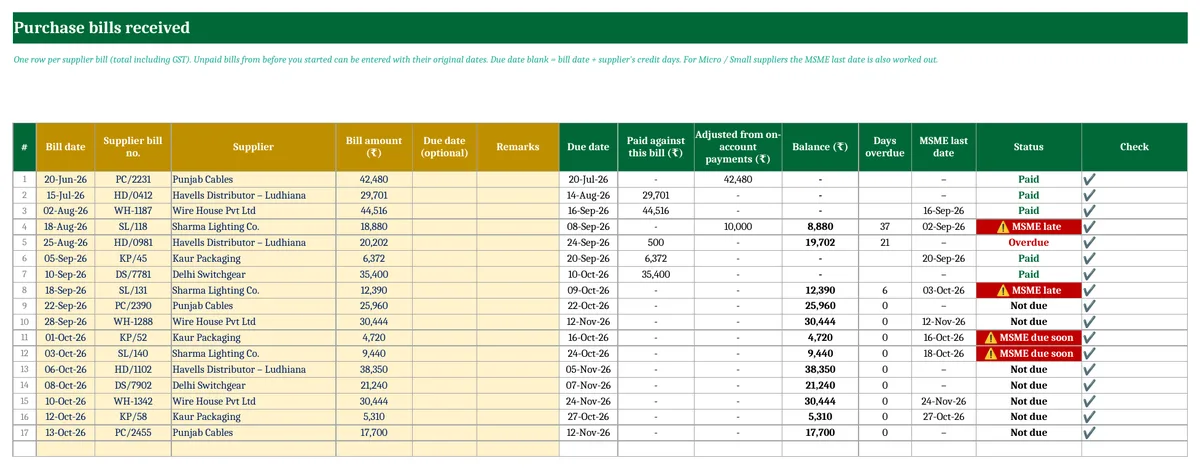
| Bills | Up to 500 purchase bills, with due date, balance, days overdue, MSME last date and status worked out |
| Payments | Up to 500 payments (bank, UPI, cheque, cash, card or debit note), against a bill or on account |
| Payment Planner | Every unpaid bill sorted by pay-by date, with days left and a running total |
| Supplier Ageing | Each supplier’s payable split into Not due, 1–30, 31–60, 61–90 and 90+ days, with oldest overdue bill and last payment |
How to use it (5 steps)
Step 1 – Setup
Enter your business name and the credit days most suppliers give you. Set the MSME warning, for example 5 days, so a bill turns red five days before its last date. Leave “position as on” blank to always use today’s date.
Step 2 – Add suppliers
One row per supplier. Take the MSME category and Udyam number from the supplier’s Udyam certificate; it’s worth asking every regular supplier for a copy. Mark “Written agreement” Yes only if the credit days are agreed in writing.
Step 3 – Enter purchase bills
Enter the bill date, the supplier’s bill number, the supplier and the bill total including GST. Old unpaid bills can be entered with their original dates. The due date comes from the supplier’s credit days unless you type your own. For Micro and Small suppliers the MSME last date is worked out as well.
Step 4 – Enter payments
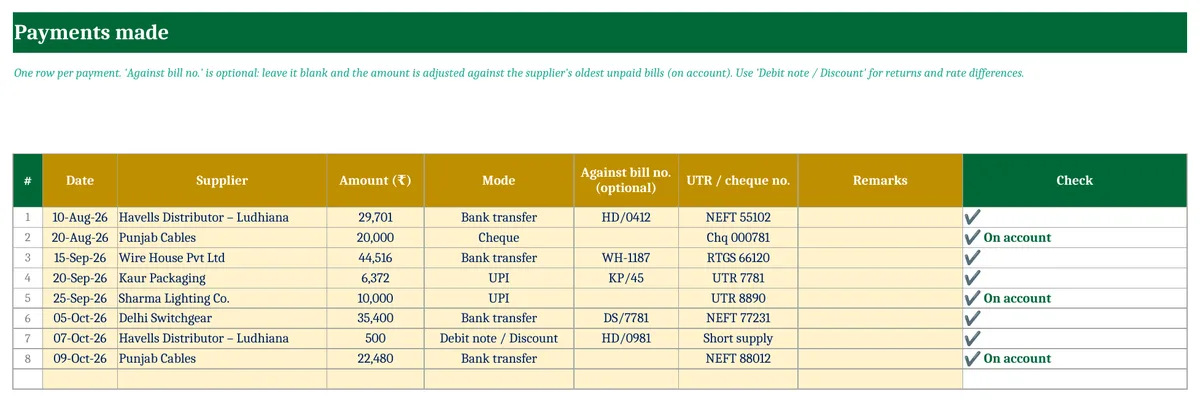
Enter every payment with its UTR or cheque number. Put the bill number in “Against bill no.” to clear that bill. Leave it blank and the payment is adjusted against the oldest unpaid bills of that supplier. Use “Debit note / Discount” for goods returned or rate differences.
Step 5 – Plan your payments every week
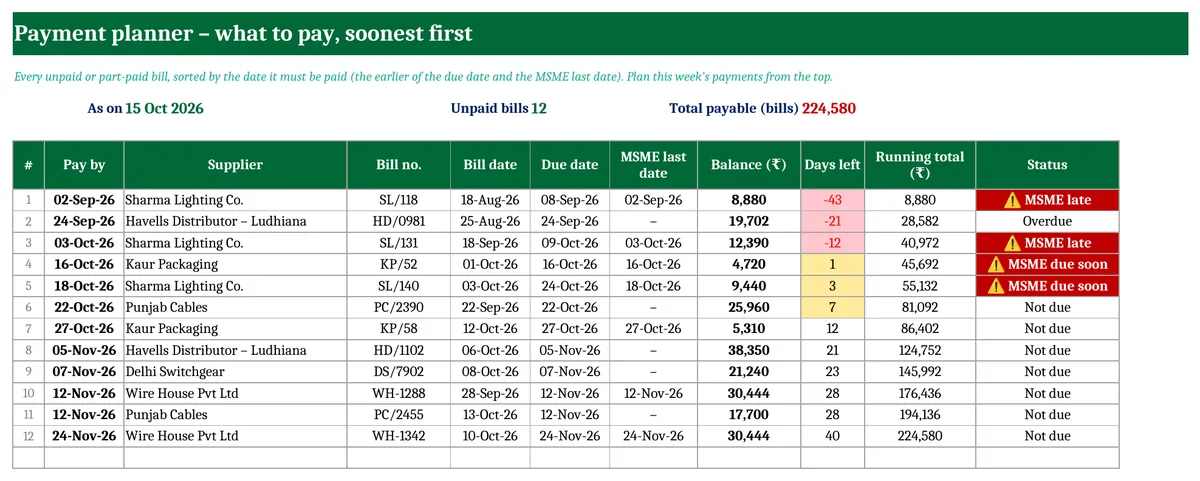
Open the Payment Planner. Bills are sorted by the date they must be paid, which is the earlier of the due date and the MSME last date. The running total shows how much cash you need to clear everything up to any row. Pay red rows first.
Supplier-wise ageing
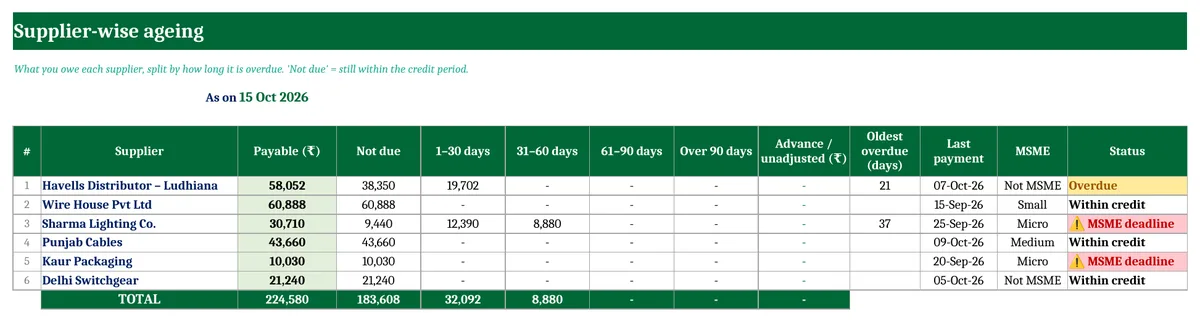
The ageing sheet shows how old your dues to each supplier are. A supplier with large 61–90 or 90+ day balances is one to call before they stop supplies. The MSME column shows at a glance which suppliers the 45-day rule covers.
What is DPO?
Days payable outstanding (DPO) tells you, on average, how many days you take to pay suppliers. The template calculates it as total payable ÷ (purchases of the last 90 days ÷ 90). A rising DPO means you are paying more slowly. That helps cash in the short term, but it hurts supplier trust and, with MSME suppliers, can cross the 45-day line. Compare it with your receivables ageing and DSO. If customers pay you in 60 days but you pay suppliers in 30, the gap has to be funded from your own cash.
Download the free Supplier Payables & Payment Due Tracker
It is free for life and has no macros. It works in Excel 2010 and later, Excel for Mac and Google Sheets. The download comes with sample data: delete the yellow cells on Suppliers, Bills and Payments and start with your own.

FAQs
Does the 45-day rule apply to every supplier?
No. It applies only to suppliers registered as Micro or Small enterprises. Medium enterprises and unregistered suppliers are not covered, and traders are generally treated differently for the income-tax part. Ask each supplier for their Udyam certificate and check with your CA.
Can I agree to 60 or 90 days of credit with an MSME supplier?
You can agree to it, but for the MSME rule the limit is still 45 days. The template takes the lower of your agreed days and 45 for the MSME last date.
What if I pay part of a bill?
Enter the payment against that bill number. The balance stays open and the status shows “Part paid” until it is cleared.
How do I record goods returned to a supplier?
Add a payment row with mode “Debit note / Discount” and the bill number. It reduces that bill’s balance.
Can I enter bills from before I started using the tracker?
Yes. Enter old unpaid bills with their original dates. If you paid part of one already, enter just that part as a payment, or enter only the unpaid balance as the bill amount.
Does it work in Google Sheets?
Yes. Upload the file to Google Drive and open it with Google Sheets. All the formulas work there.
More free business templates
- Customer Outstanding & Receivables Ageing Tracker
- GST Invoice Format in Excel
- Cash Book Template
- Inventory Management Template
- All Excel templates
