
Quick answer: A leave tracker in Excel is a workbook that records every leave an employee takes and shows how much leave they have left. For each leave type (casual, sick, earned and so on) it works out Balance = Opening balance + Leave credited − Leave taken. The free Xplorexcel leave tracker does this for up to 50 employees. It counts only working days, checks every entry for overlaps and leave beyond the balance, shows a monthly leave calendar, and prints a leave card for each employee.
Key takeaways
- Up to 6 leave types (CL, SL, EL, comp off, leave without pay and one more), each with its own yearly quota, yearly or monthly credit and carry-forward limit.
- Leave days count working days only. Weekly offs and holidays inside the leave dates are skipped automatically.
- Pro-rata leave for people who join mid-year, and half-day leave.
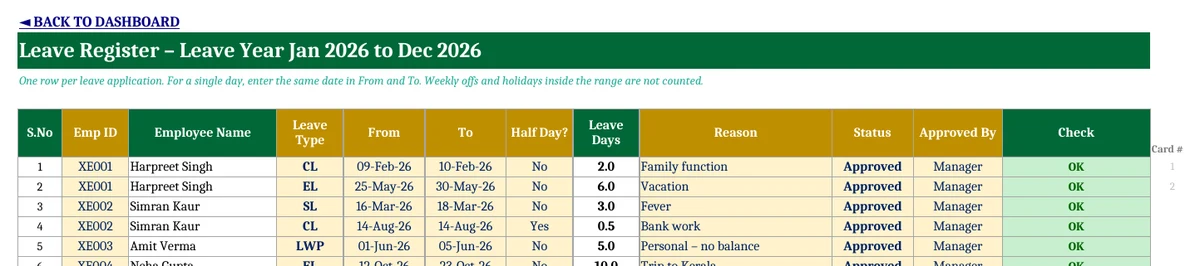
- Every entry is checked for overlapping leave, leave beyond the balance, wrong dates and dates outside the leave year.
- A colour-coded monthly leave calendar and a printable A4 leave card for each employee.
What is a leave tracker?
A leave tracker is a record of who took leave, when, of which type and for how many days, together with each person’s remaining balance. Small offices often keep this in a paper register or in scattered messages. The usual problems follow: nobody is sure of the balance, two people are off on the same day, and unpaid leave is missed when salary is calculated.
How leave balance is calculated
Leave balance = Opening balance (carried forward) + Leave credited this year − Leave taken
- Opening balance: unused leave brought forward from last year, up to the carry-forward limit you set.
- Leave credited: either the full yearly quota at the start of the year, or a monthly credit (for example 15 days a year = 1.25 days a month).
- Leave taken: approved leave days in the leave year, counting working days only.
Worked example
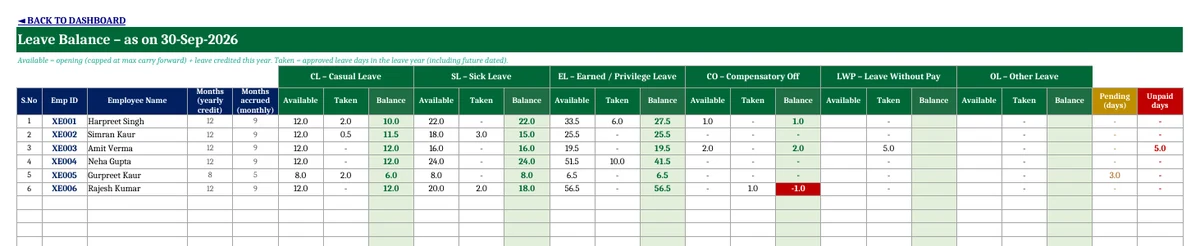
| Item (Earned Leave, as on 30 September 2026) | Days |
|---|---|
| Opening balance carried forward | 22 |
| Credited: 9 months × 1.25, rounded to the nearest half day | 11.5 |
| Available | 33.5 |
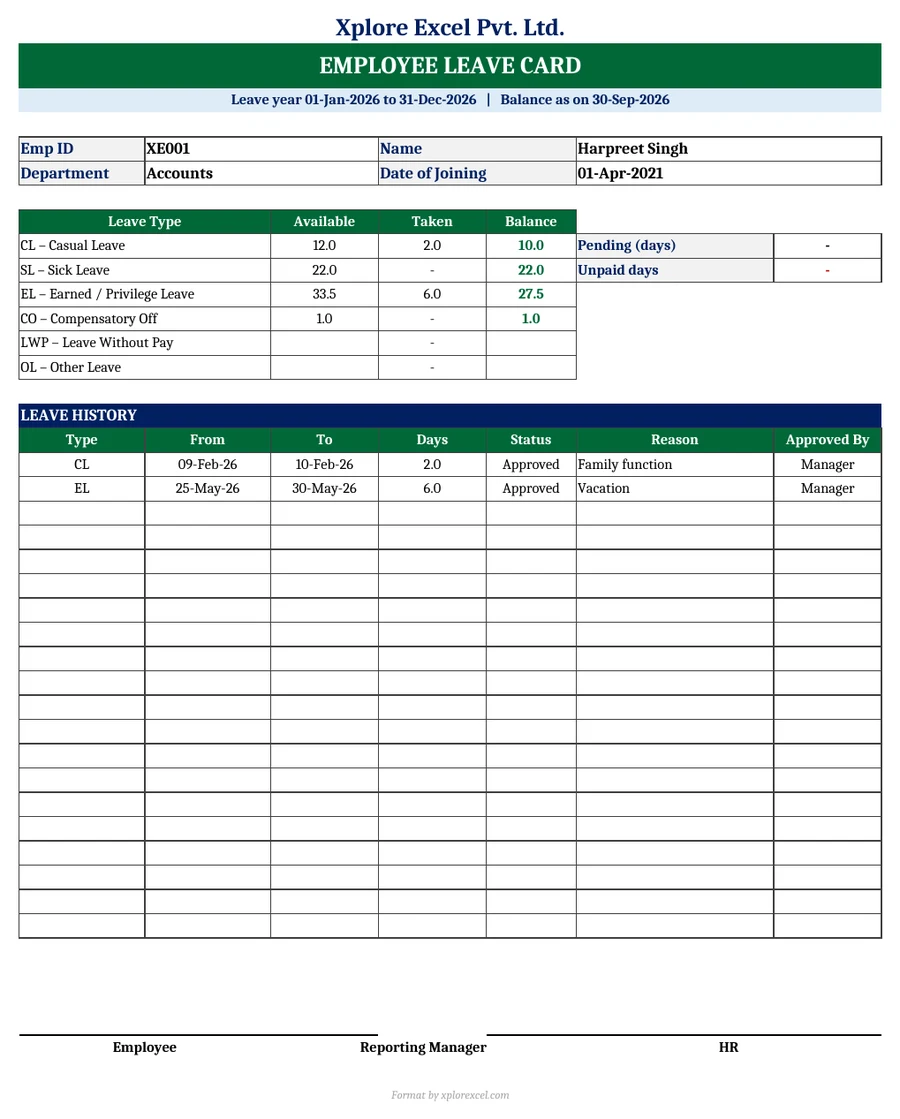
| Taken: 25 to 30 May (6 working days) | 6 |
| Balance | 27.5 |
How leave days are counted
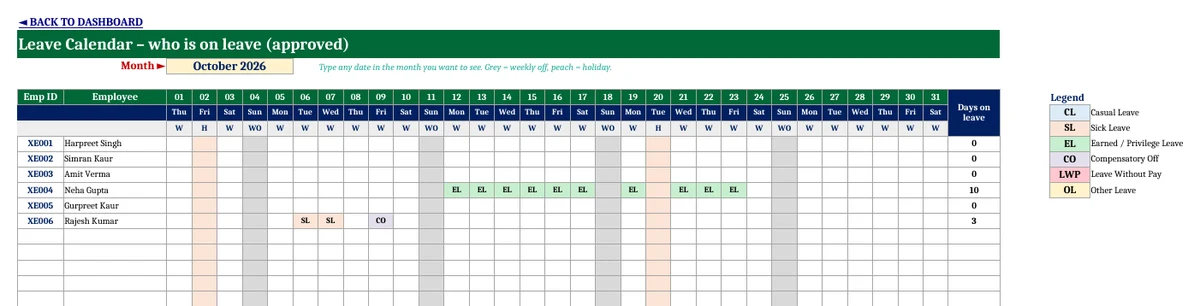
The template counts only the working days between the From and To dates. Your weekly off (Sunday, Saturday and Sunday, Friday, or none) and the dates on your holiday list are left out. For example, leave from 12 to 23 October 2026 with Sunday off and a holiday on 20 October is 10 leave days, not 12. A half-day leave counts as 0.5.
Some organisations do count holidays that fall inside a leave period (the “sandwich” rule). If yours does, remove those dates from the Holidays sheet or adjust the entry.
Checks on every leave entry
| The Check column says | What it means |
|---|---|
| Overlaps another leave | The employee already has leave on some of these dates |
| Exceeds balance | Approved leave of this type is more than the employee has available |
| Outside leave year | The dates fall outside the leave year on the Setup sheet |
| To before From / Half day = 1 date | The dates are the wrong way round, or a half day spans more than one date |
| No working day | The whole period is weekly offs or holidays |
Monthly leave calendar
Type any date in a month and the Leave Calendar shows every employee against every day, with approved leave marked by its code and colour. Weekly offs are grey and holidays are peach. It answers “who is off next week?” at a glance, which helps before you approve another request.
How to use the leave tracker in Excel (5 steps)
- Setup: Enter the company name, when the leave year starts (January or April), the weekly off and your leave types with their quotas.
- Holidays: Enter this year’s paid holidays.
- Employees: Add each employee’s ID, name, department and joining date, and the leave carried forward from last year.
- Leave Register: Add one row per leave with the employee, type, dates, reason and status. Fix anything the Check column flags.
- Balance, Calendar and Leave Card: Read the balances, see who is off this month, and print a card for any employee.
Common leave types in India
| Code | Leave type | Typical use |
|---|---|---|
| CL | Casual leave | Short, unplanned personal needs. Usually lapses at year-end |
| SL | Sick leave | Illness. A medical certificate is often needed for longer spells |
| EL / PL | Earned or privilege leave | Planned leave, earned for days worked. Usually carried forward up to a limit |
| CO | Compensatory off | A day off for working on a weekly off or holiday |
| LWP | Leave without pay | Leave when no paid balance is left. Deducted from salary |
The number of days for each type depends on your company’s policy and your state’s Shops and Establishments rules (or the Factories Act for factories). The quotas in the template are examples, so change them on the Setup sheet to match your own policy.
Tip: the unpaid (LWP) days from this tracker are the loss-of-pay days for payroll. Use them in our Attendance and Salary Sheet with Salary Slip.
Download the Leave Tracker in Excel (Free)
File: Employee Leave Tracker 1.0 · Format: .xlsx · Macros: none · Price: free.
Free download · one quick step
Unlock this free template
This one is a full working system, not a one-page format. It stays free. I only ask for a way to reach you, because:
- It has several linked sheets with a filled-in sample, so you see it working before you type your own entries.
- The formulas are locked so one wrong click can’t break your totals. If something still goes wrong, you’ll know where to ask.
- Tax and labour rules change. When GST, TDS or payroll rules change, I send the corrected file to the number or email you give here.
- No spam. A few messages a month at most, unsubscribe any time.
Made by Amanpreet Kaur Bharaj, XplorExcel, Hoshiarpur. You only need to do this once on this device.
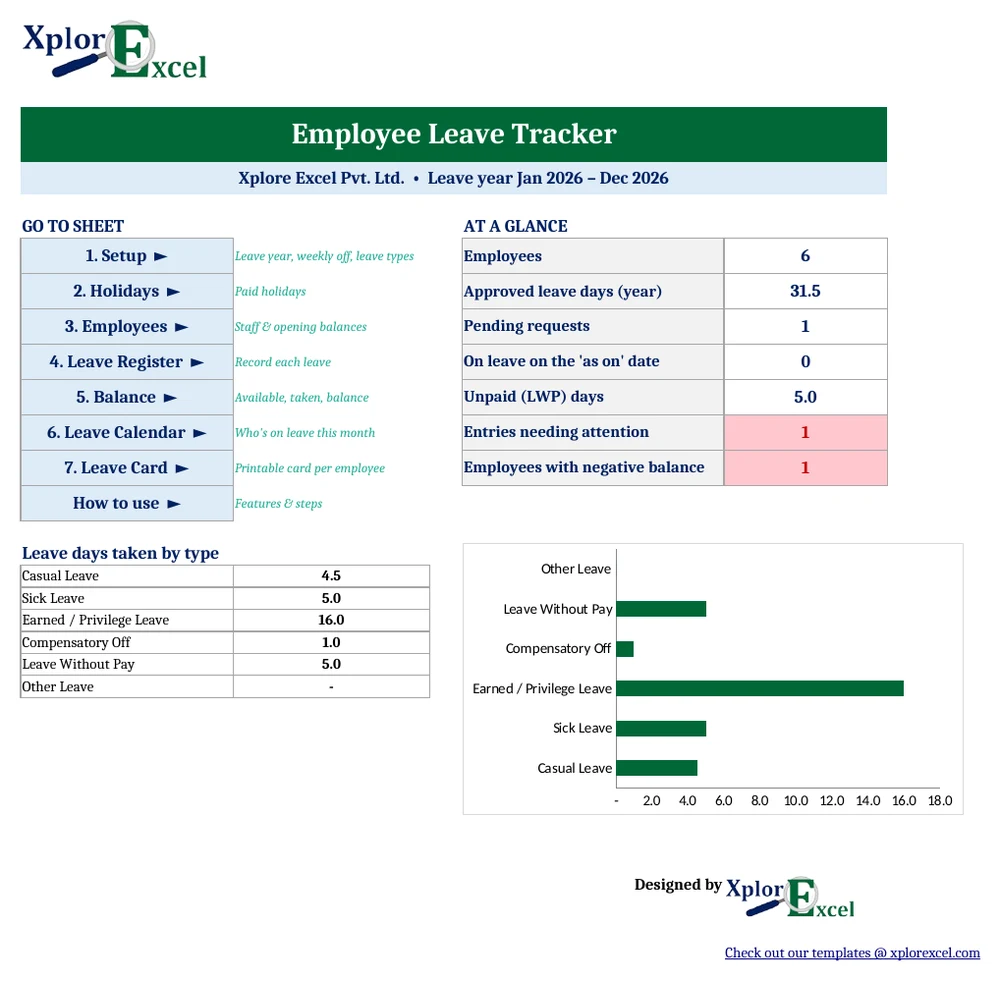
The sample data (six employees, leave year 2026) shows how it works. One sample entry is flagged “Exceeds balance” on purpose, so you can see the check in action. Replace the sample with your own staff.
Frequently asked questions
How do I create a leave tracker in Excel?
List your employees and leave types, record each leave with its dates, count the working days with NETWORKDAYS.INTL, and subtract the total from the opening balance plus the leave credited. This template has all of that built in, so you only enter the leave.
How is leave balance calculated?
Leave balance = opening balance carried forward + leave credited during the year − approved leave taken. It is worked out separately for each leave type.
Are weekends and holidays counted as leave?
In this template they are not. Weekly offs and listed holidays inside the leave dates are skipped. Some organisations count them under a “sandwich” rule, so follow your own policy.
How is earned leave credited monthly?
Divide the yearly quota by 12. For 15 days a year, 1.25 days are credited each month. Set the credit to “Monthly” on the Setup sheet and the template credits leave up to the “as on” date.
How is leave calculated for a new joiner?
On a pro-rata basis. Someone who joins in May in a January to December leave year gets 8 months of the yearly quota, so 12 days of casual leave becomes 8 days.
Can I use this leave tracker in Google Sheets?
Yes. Upload the .xlsx file to Google Drive and open it with Google Sheets. It has no macros.
More free HR and payroll templates from Xplorexcel
- Attendance and Salary Sheet with Salary Slip
- TA DA Bill Format in Excel
- Income Tax Calculator FY 2026-27
- Rent Receipt Generator with HRA Calculator
- All Excel templates
Disclaimer: Leave entitlements differ by company and by state law. The sample quotas are examples only. Last reviewed: October 2026.
